
Is Photomath Worth Using? Full Review of the Math Solver App
Finding the right math solver app can be challenging with so many options available today. Photomath has remained one of the most recognized math solver apps for years. Instead of requiring users to manually enter complex equations, it allows students to scan math problems with a smartphone camera and receive step-by-step explanations.
However, as AI-powered math tools become more popular, many students are now asking whether Photomath is still the best choice for solving homework problems.
In this Photomath review, we will analyze its features, how it works, pricing, limitations, and a realiable AI math solver to help you decide whether this math solver app is worth using in 2026.
What Is Photomath Math Solver App?
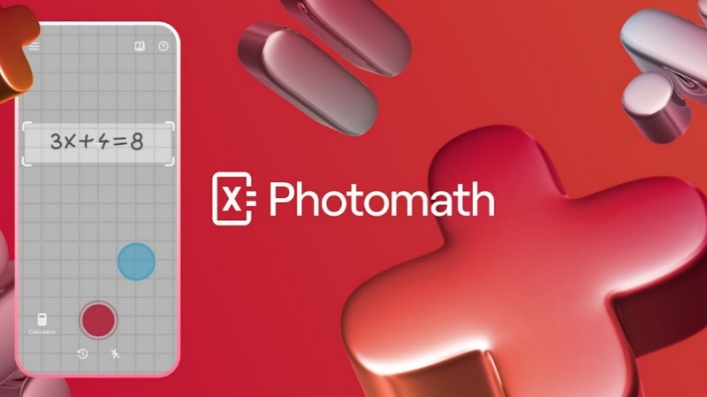
Photomath is a mobile math solver app designed to help students solve and understand math problems through camera-based recognition and step-by-step explanations. The app uses optical character recognition (OCR) technology to identify mathematical expressions from images and then provides a solution process instead of only showing the final answer.
The main idea behind Photomath is to make math problem-solving more accessible. Students can take a picture of a printed equation, textbook exercise, or handwritten problem, and the app analyzes the question before displaying possible solution steps.
The app is commonly used for:
-
Checking homework answers
-
Understanding unfamiliar math steps
-
Reviewing concepts before exams
-
Practicing problem-solving methods
While Photomath can be useful as a learning assistant, it is still primarily a math-solving tool. Users who need deeper discussions, personalized tutoring conversations, or broader study support may find AI-based learning tools more suitable.
Key Features
-
Camera Math Scanner: Scan printed or handwritten math problems and automatically recognize equations for solving.
-
Step-by-Step Solutions: Break down each problem into detailed solving steps instead of only providing the final answer.
-
Multiple Solution Methods: Provide different approaches for solving certain problems to help students compare methods.
-
Learning Assistance Features: Offer additional explanations, hints, and animated tutorials through Photomath Plus.
- Simple Scanning Experience: Quickly solve problems by taking a photo instead of manually entering equations.
- Clear Solution Breakdown: Helps students understand calculation steps and review mistakes.
- Suitable for Different Math Levels: Supports a wide range of school mathematics topics.
- Useful for Homework Review: Allows students to check their own solutions and compare solving methods.
- Limited Follow-Up Discussion: Does not provide open-ended conversations for asking additional questions about each step.
- Focused Mainly on Problem Solving: Offers fewer personalized learning interactions compared with AI tutor-style tools.
- Advanced Problems May Need Extra Explanation: Complex concepts may require additional guidance beyond the provided steps.
- Some Learning Features Require Plus: Deeper explanations and animated tutorials are included in the paid version.
How Does Photomath Work?
Photomath uses a camera-based scanning system to recognize math problems and provide solutions with step-by-step explanations. The whole process is designed to help students quickly move from a question image to a complete solution.
The basic workflow includes three steps:
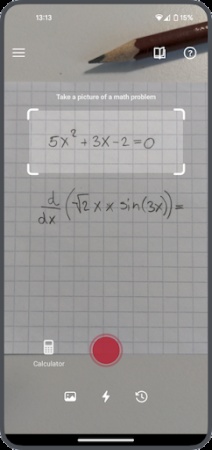
Scan the Math Problem: Take a photo of a printed or handwritten math question using the camera. Adjust the scanning frame to capture the complete problem and let Photomath recognize the equation.
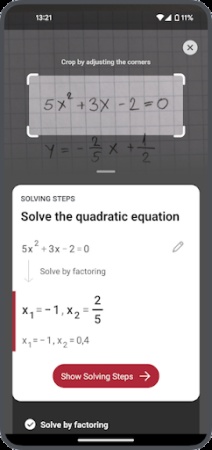
View the Answer: After scanning, Photomath immediately displays the solution for the detected problem, allowing users to quickly check the final result.
Review Solving Steps: Tap "Show Solving Steps" to see the detailed process behind the answer, including the calculations and methods used to solve the problem.
This simple workflow makes Photomath convenient for students who want quick homework assistance while still being able to review how each problem is solved.
The Best Alternative to Photomath Math Solver
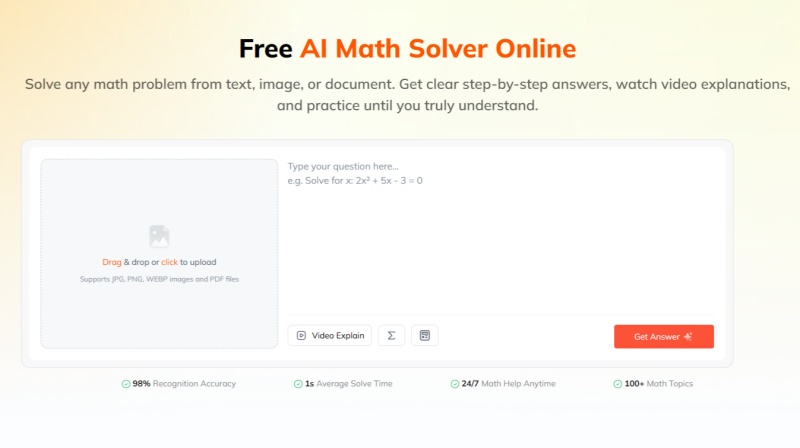
Photomath remains one of the most popular camera-based math solver apps, especially for students who want quick solutions with step-by-step explanations. However, as AI technology develops, many users are looking for alternatives that provide more interactive learning experiences.
For students who want more than solving individual problems, Tenorshare AI Math is an AI-powered alternative designed around a more interactive problem-solving experience. Unlike traditional math solver apps that mainly provide predefined solution steps, AI math solvers combine mathematical problem solving with conversational AI features.
| Feature | Photomath | Tenorshare AI Math |
|---|---|---|
| Input Methods | Camera-based scanning | Supports images, PDFs, and document-based math problems |
| Solution Explanation | Provides step-by-step solving processes | Provides step-by-step solutions with structured explanations |
| Learning Materials | Mainly focuses on solution steps | Includes video explanations |
| Practice Support | Not a primary feature | Generates similar exercises for additional practice |
For students who mainly need to check homework answers or review solving steps, Photomath remains a convenient option with its simple scanning experience.
However, students who want a more complete learning process may find Tenorshare AI Math Solver better suited to their needs. Instead of stopping after providing a solution, Tenorshare AI Math Solver extends the learning process by helping students understand concepts through step-by-step explanations, visual video lessons, and personalized practice questions.
This makes it a suitable alternative for students who want to use AI not only to find answers but also to strengthen their understanding of mathematics.
Is Photomath Free?
Photomath follows a freemium pricing model, offering a free version with core math-solving features and a paid subscription called Photomath Plus for additional learning tools. The free version allows users to scan math problems, receive answers, and access step-by-step explanations, while Plus adds features such as custom visual aids and additional learning support.
| Plan | Price | Main Features |
|---|---|---|
| Free | $0 | Scan math problems, view answers, and access basic step-by-step solutions |
| Photomath Plus Monthly | $9.99/month | Adds custom visual aids and additional “how” and “why” explanations |
| Photomath Plus Annual | $69.99/year | Includes Plus features with annual billing savings |
For students who mainly need help checking homework or reviewing solution steps, the free version of Photomath may already be sufficient. The paid plan is mainly designed for users who want additional explanations and visual learning support beyond the standard solving process.
Compared with Photomath, Tenorshare AI Math Solver follows a different pricing approach by combining math solving with broader AI learning features.
| Plan | Price | Main Features |
|---|---|---|
| Free | $0 | Limited daily questions, limited video explanations, practice tests, and graph features |
| Pro Yearly | $4.99/month ($59.88 billed annually) | Unlimited AI solutions, video lessons, practice tests, AI study guides, and latest AI models |
| Pro Monthly | $9.99/month | Same Pro features with monthly billing |
For users comparing the two tools, the main difference is not only the price but also the type of learning support included.
Photomath focuses on improving the traditional math-solving experience by adding more detailed explanations, visual aids, and learning tips through Photomath Plus. It is a good fit for students who already prefer a camera-based solver and want additional guidance when reviewing solutions.
Tenorshare AI Math Solver focuses on building a more complete AI-powered learning workflow. Beyond solving math problems, it helps students understand concepts through video explanations and reinforce knowledge through automatically generated practice tests. This makes it more suitable for students who want support throughout the learning process rather than only solving individual questions.
Final Verdict: Is Photomath Worth Using?
Photomath Math Solver APP remains a practical choice for students who need a simple way to scan math problems and review step-by-step solutions. Its biggest strengths are the convenient camera-based workflow and broad support for topics ranging from basic math to calculus.
However, Photomath is mainly designed around solving individual problems and explaining existing solutions. Students who want a more interactive learning experience, such as video lessons, concept explanations, and additional practice after solving a problem, may need a more comprehensive AI math tool like Tenorshare AI Math.

Tenorshare AI Math
- Solve math from text, images & PDFs at 98% accuracy
- Deliver step-by-step answers with detailed logic breakdown
- Access video explanations for deeper math concept understanding
- Generate matching practice tests to solidify knowledge

FAQs
-
Can Photomath Do Calculus?
Yes. Photomath supports calculus topics, along with other areas such as arithmetic, algebra, geometry, trigonometry, and statistics. However, the level of explanation may vary depending on the complexity of the calculus problem.
-
Is Photomath 100% Accurate?
No math solver can guarantee 100% accuracy in every situation. Photomath can handle many standard math problems and provides step-by-step solutions, but results may depend on factors such as image quality, problem format, and mathematical complexity. Clear input images and correctly recognized questions generally lead to better results.
-
Can Photomath Solve Word Problems?
Yes, Photomath supports certain word problems by analyzing the information provided and generating solution steps. However, word problems often require understanding the context and converting text into mathematical expressions, so more complex questions may require additional explanation.
-
Is Photomath Free to Use?
Yes. Photomath offers a free version that includes core features such as scanning math problems, viewing answers, and accessing basic solution steps. Photomath Plus is available for users who want additional features, including enhanced explanations and learning tools.
-
Does Photomath Work With Handwritten Problems?
Yes. Photomath can recognize both printed and handwritten math problems. However, recognition quality may depend on handwriting clarity, image quality, and the complexity of the equation.
You Might Also Like
- AskMath AI Math Solver Review 2026: A Complete Guide for Students
- EduBrain AI Math Solver Review: Is It a Reliable AI Homework Helper?
- EaseMate AI Math Solver Review: Features, Alternatives & How It Compares
- NoteGPT AI Math Solver Review 2026: Is It Accurate and Worth Using?
- Gauth AI Math Review 2026: Is It Worth Using for Homework Help?
- Mathos AI Math Solver Review 2026: Free Features, Pricing & Alternatives

Tenorshare AI Math: Solve any math problems with AI
Turn math questions into clear solutions, tutorial videos & targeted practice setsTenorshare AI Math: Instant Solutions
Steps, videos & practice for every problem
Tenorshare AI Math: Solve any math problems with AI