
Why ChatGPT Says This Content May Violate Our Usage Policies: Causes and Fixes
Many users feel confused when ChatGPT suddenly shows the warning "ChatGPT this content may violate our usage policies." Writers, students, marketers, and developers face this issue while working on normal tasks. The warning can stop responses, limit output, or block content completely. Because of this, users worry about bans, account safety, and content approval.
In this article, you will learn why does ChatGPT say this content may violate our usage policies , how to avoid it, and how to rewrite flagged content safely using a smart rewriting method.
Catalogs:
What Does "ChatGPT This Content May Violate Our Usage Policies" Mean?
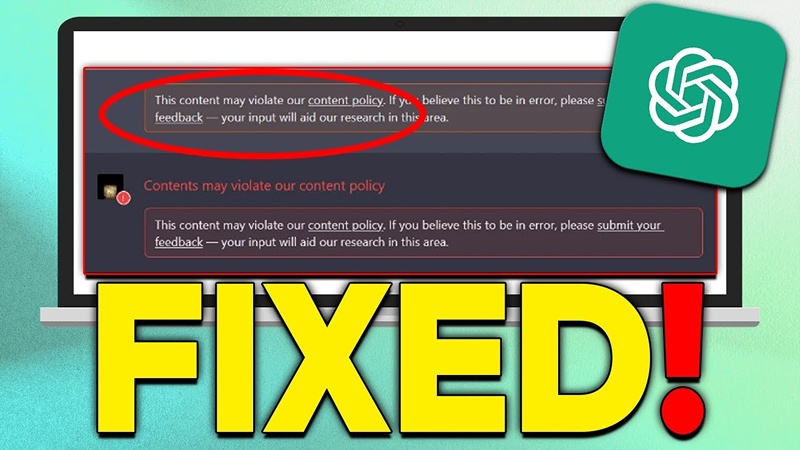
The warning ChatGPT this content may violate our usage policies means ChatGPT detected possible policy risk in your prompt or content. The system flags words, topics, or patterns that may break rules. This message does not always mean you did something wrong. In most cases, ChatGPT reacts to wording, not intent. The system works on automated checks, not human judgment.
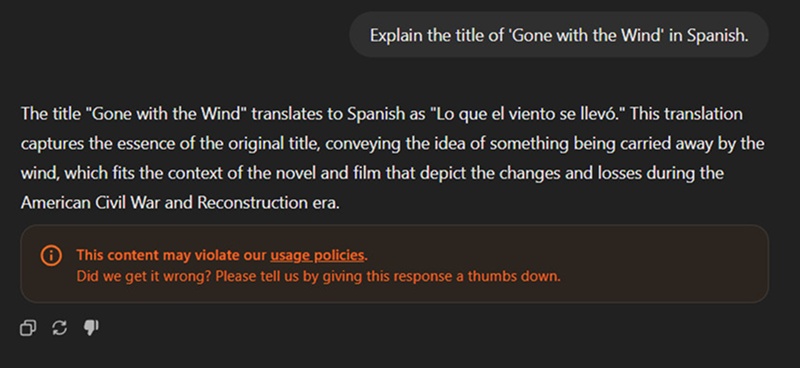
Warning vs Ban
Many users confuse this warning with a ban.
-
A warning means ChatGPT limits or stops a reply.
-
A ban means repeated serious violations.
So, ChatGPT this content may violate our usage policies ban does not apply in most cases. A single warning does not harm your account.
How ChatGPT Flags Content
ChatGPT scans:
-
Sensitive topics
-
Certain phrases
-
Repeated risky prompts
-
Policy-related wording
This explains ChatGPT this content may violate our usage policies meaning in simple terms.
Why Does ChatGPT Say This Content May Violate Our Usage Policies?
Many users ask why does ChatGPT say this content may violate our usage policies even for normal content. Below are the most common reasons.
1. Sensitive Topics
ChatGPT reacts quickly to topics like:
-
Hacking
-
Adult content
-
Illegal activity
-
Harmful instructions
Even educational use can trigger the warning.
2. Risky Wording Patterns
Certain words and sentence structures look unsafe to the system. Even if your intent stays clean, wording can trigger this content may violate our usage policies. ChatGPT message.
3. Repeated Prompts
If you ask similar questions many times, ChatGPT may assume misuse. This causes ChatGPT says this content may violate our usage policies to appear again and again.
4. Misunderstood Intent
ChatGPT does not fully understand context. It reacts to text patterns. This explains why does ChatGPT say this content may violate our usage policies for harmless tasks.
What Happens When ChatGPT Shows This Warning?
Many users worry about what happens when ChatGPT says this content may violate our usage policies. The result depends on the severity.

Partial Block
ChatGPT may:
-
Shorten the reply
-
Skip certain details
-
Rewrite content in a safe way
Full Refusal
In some cases, ChatGPT fully refuses to respond to a request and shows a policy warning instead. This usually happens due to wording or topic sensitivity and does not indicate account damage, suspension, or long-term restrictions.
Account Impact
A single warning does not affect your account. Only repeated serious misuse leads to action. So, what happens when ChatGPT says this content may violate our usage policies usually ends with limited output, not penalties.
Common Scenarios Where Users Face This Issue
The warning appears in many daily use cases.
1. Content Writing and Rewriting
Writers face ChatGPT this content may violate our usage policies when:
-
Rewriting articles
-
Improving tone
-
Adjusting sensitive topics
AI sometimes flags rewritten content even when it stays safe.
2. Academic and Research Prompts
Students often ask deep questions. ChatGPT may misread research intent and show ChatGPT says this content may violate our usage policies.
3. Marketing and Ad Copy
Marketers use strong wording. Certain phrases trigger this content may violate our usage policies. ChatGPT even in legal ads.
4. Technical or Policy Content
Developers and bloggers writing about rules, bans, or systems often face ChatGPT this content may violate our usage policies meaning warnings.
5. Daily Users and Freelancers
Frequent users face more flags due to repeated prompts. This explains why does ChatGPT say this content may violate our usage policies to active users.
How to Avoid This Warning Without Violating Policies
You can reduce warnings by using smart writing habits.
1. Rewrite Prompts Clearly
Clear prompts help ChatGPT understand intent. Avoid confusing or double-meaning sentences.
2. Use Neutral Language
Neutral wording lowers risk. This helps avoid ChatGPT this content may violate our usage policies alerts.
3. Avoid Risky Phrasing
Replace direct or harsh terms with softer explanations. This reduces ChatGPT says this content may violate our usage policies cases.
4. Structure Requests Properly
Use:
-
Bullet points
-
Clear goals
-
Simple instructions
This improves response safety.
5. Follow Ethical Use
Clean intent and clean wording matter. This answers what does it mean when ChatGPT says this content may violate our usage policies clearly.
Smart Way to Rewrite Flagged Content - Using Tenorshare AI Bypass
Tenorshare AI Bypass helps users fix content that ChatGPT flags with policy warnings. The tool rewrites AI-generated text into clear, natural, and human-like writing. Writers, students, teachers, and professionals use it when their content sounds too robotic or triggers AI checks.
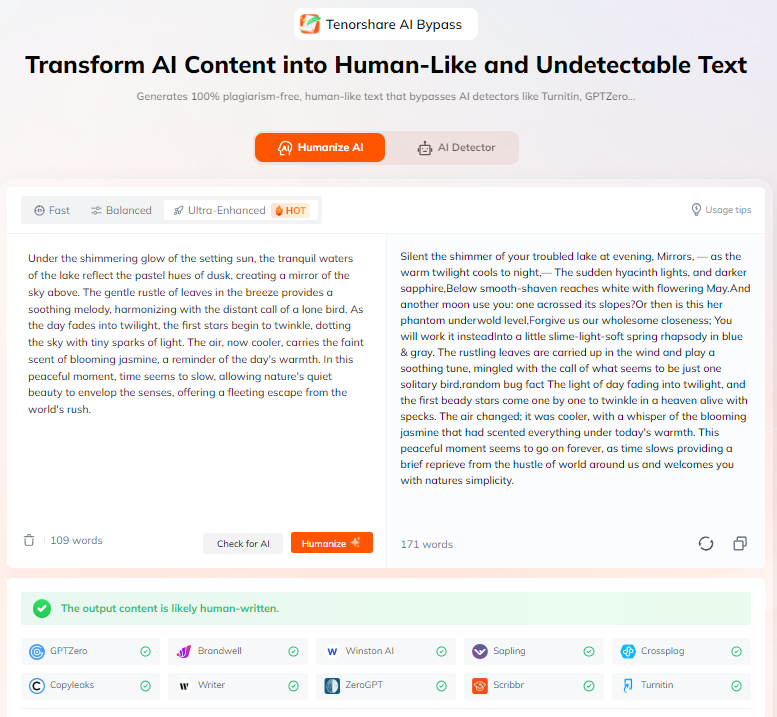
Instead of changing the message, Tenorshare AI Bypass improves wording and sentence flow. It helps content pass AI detection tools while keeping meaning intact. The tool works fast and supports many languages, which makes it useful for daily writing tasks. If ChatGPT blocks or limits your content, this tool offers a safe and clean way to rewrite it.
Conclusion
The warning ChatGPT this content may violate our usage policies appears due to wording, not bad intent. Most users face it while writing normal content. Understanding ChatGPT this content may violate our usage policies meaning removes fear and confusion. In most cases, nothing serious happens. The system only limits responses.
By writing clearly and avoiding risky phrasing, users can reduce warnings. Tools like Tenorshare AI Bypass offer a smart way to rewrite flagged content without breaking rules. Focus on clean language, honest intent, and policy-friendly content. This approach keeps your work safe, clear, and usable without stress.
FAQs
What does it mean when ChatGPT shows this warning?
It means ChatGPT detected wording or topics that may break rules. This explains what does it mean when ChatGPT says this content may violate our usage policies.
Is my account at risk if I see this message?
No. A single warning does not cause a ban. ChatGPT this content may violate our usage policies ban happens only after repeated serious misuse.
Can this warning appear by mistake?
Yes. ChatGPT often flags safe content. This answers why does ChatGPT say this content may violate our usage policies incorrectly.
How can I rewrite content to avoid this issue?
Use simple language, neutral tone, and clear structure. Tools like Tenorshare AI Bypass also help.
Is Tenorshare AI Bypass helpful for flagged content?
Yes. It helps users searching for how to bypass ChatGPT this content may violate our usage policies safely and ethically.
Tenorshare AI Bypass
- Create 100% undetectable human-like content
- Bypass all AI detector tools like GPTZero, ZeroGPT, Copyleaks, etc.
- Original content, free of plagiarism and grammatical errors
- One-click AI bypass with a clean and easy-to-use interface

You Might Also Like
- 18+ ChatGPT Free Fire Photo Editing Prompts: Create Epic Game-Inspired Images in Minutes
- List of Words Overused by AI: 140+ Common ChatGPT Phrases to Avoid
- 10+ ChatGPT Bikers AI Photo Editing Prompts: Create Epic Rider Shots
- 18+ Best Prompts for ChatGPT Halloween to Create Spooky & Fun Photos
- 7 Hot ChatGPT Image Enhancer Prompts for Free Photo Quality Boosts
- ChatGPT Photo Style Disney: Best Disney Character Prompts to Try

Tenorshare AI Bypass: 100% Bypass AI Detection
Turn AI text into undetectable, human-like content.AI Humanizer, 100% Undetectable
Humanize AI text instantly.
Tenorshare AI Bypass: 100% Bypass AI Detection