
How to Solve Unable to Index File ChatGPT Errors Fast
Many users face the unable to index file ChatGPT issue while uploading documents. This problem appears when ChatGPT cannot read or process a file after upload. Students use ChatGPT for study notes, writers upload drafts for editing, and professionals analyze reports. These errors stop ChatGPT from reading content and giving responses. This article explains why does ChatGPT say unable to index file, what the error means, and how to fix it step by step.
Catalogs:
What "Unable to Index File ChatGPT" Means
The unable to index file ChatGPT error means ChatGPT cannot scan, read, or store the content of your uploaded file. Indexing allows ChatGPT to understand file text and respond to questions. When indexing fails, ChatGPT cannot continue. Users often see this error during file uploads on the web version or the unable to index file ChatGPT app. Some users also report ChatGPT file upload not working when uploading PDFs, DOCX, or TXT files.

This issue can appear in different situations:
-
Uploading a large PDF
-
Uploading scanned or image-based files
-
Uploading files with unusual formatting
-
Uploading AI-generated content
-
Using unstable internet connections
Many users ask, what does it mean when ChatGPT says unable to index file. It simply means ChatGPT cannot read your file properly. In some cases, OpenAI unable to index file ChatGPT errors occur due to system limits or temporary server load. In other cases, the problem exists inside the file itself.
Common Causes of Unable to Index File ChatGPT Error
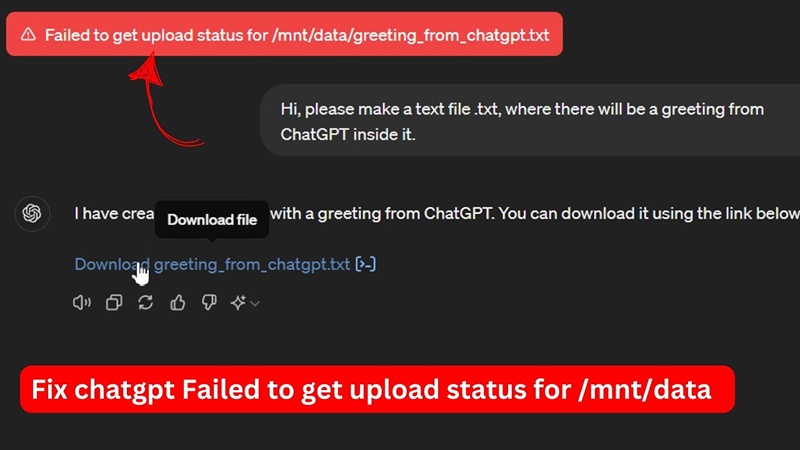
Several technical and user-side issues can trigger the unable to index file ChatGPT error. Understanding these common causes helps users fix file upload problems faster and avoid repeat errors.
-
1. Incompatible File Types
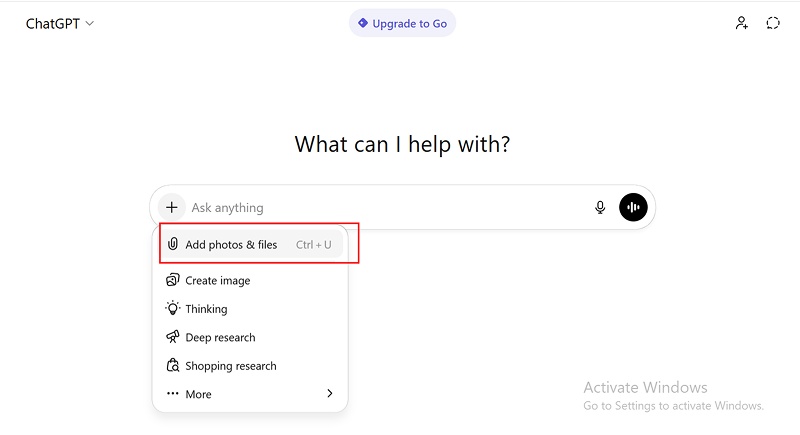
ChatGPT supports common formats like PDF, DOCX, and TXT. When users upload unsupported or corrupted formats, the ChatGPT file upload failed unable to index file error appears. Some PDFs contain images instead of real text, which blocks indexing.
-
2. Large File Size
Large files often trigger file upload failed unable to index file ChatGPT errors. When files exceed system limits, ChatGPT fails to process them. Splitting files into smaller parts often fixes this issue.
-
3. Corrupted or Protected Files
Password-protected or damaged files cause the unable to index file ChatGPT error. ChatGPT cannot read locked or broken documents.
-
4. AI Detection Restrictions
Some files contain strong AI patterns. This triggers safety checks and causes OpenAI unable to index file ChatGPT problems. AI-heavy content may fail indexing due to system restrictions.
-
5. Internet or Browser Issues
Slow or unstable connections cause ChatGPT file upload not working problems. Browser cache issues or outdated browsers also block file uploads.
- 6. App or Account Limitations
Outdated app versions lead to unable to index file ChatGPT app errors. Free accounts also face upload limits that trigger indexing failures.
Step-by-Step Troubleshooting Guide
Follow these steps to fix the unable to index file ChatGPT issue quickly and restore smooth file uploads.
Check File Type and Size
ChatGPT supports common formats like PDF, DOCX, and TXT. When you upload unsupported or very large files, indexing often fails. Compress large PDFs or split files into smaller parts. This step helps prevent ChatGPT file upload failed unable to index file errors.
Remove Password Protection
ChatGPT cannot read password-protected or restricted documents. Before uploading, remove all security locks from your file. Protected files commonly trigger file upload failed unable to index file ChatGPT messages and stop ChatGPT from reading the content properly.
Clear Browser Cache or Restart App
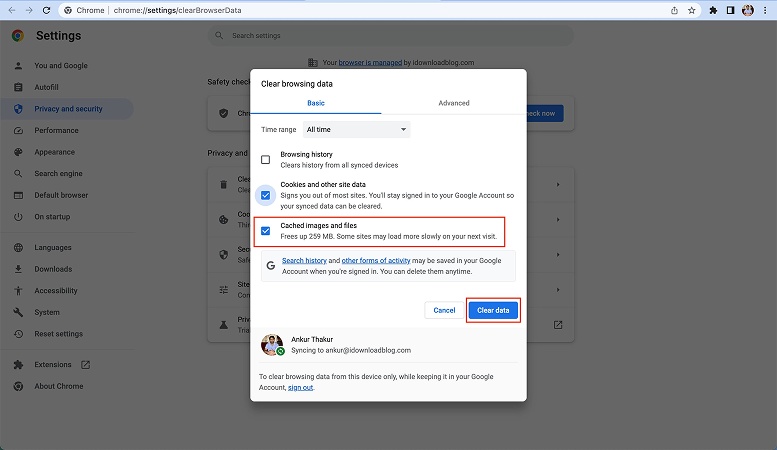
Old cache files and cookies often cause ChatGPT file upload not working problems. Clear browser data and reload the page. If you use the mobile app, restart it to fix unable to index file ChatGPT app errors and refresh the session.
Switch Browser or Device
Some browser settings block uploads without warning. Try using Chrome, Edge, or Firefox to upload your file again. If the issue continues, switch to another device. This method often resolves OpenAI unable to index file ChatGPT issues quickly.

Update ChatGPT App
Outdated app versions can cause system errors during file uploads. Always install the latest ChatGPT app update from the official store. Updated versions reduce bugs and lower the risk of facing an unable to index file ChatGPT error again.

Re-upload the File
Sometimes the upload process fails due to a temporary glitch. Rename the file, refresh the page, and upload it again. This simple action often fixes why does ChatGPT say unable to index file problems without extra steps.
Tenorshare AI Bypass: Smart Solution for Detection Issues
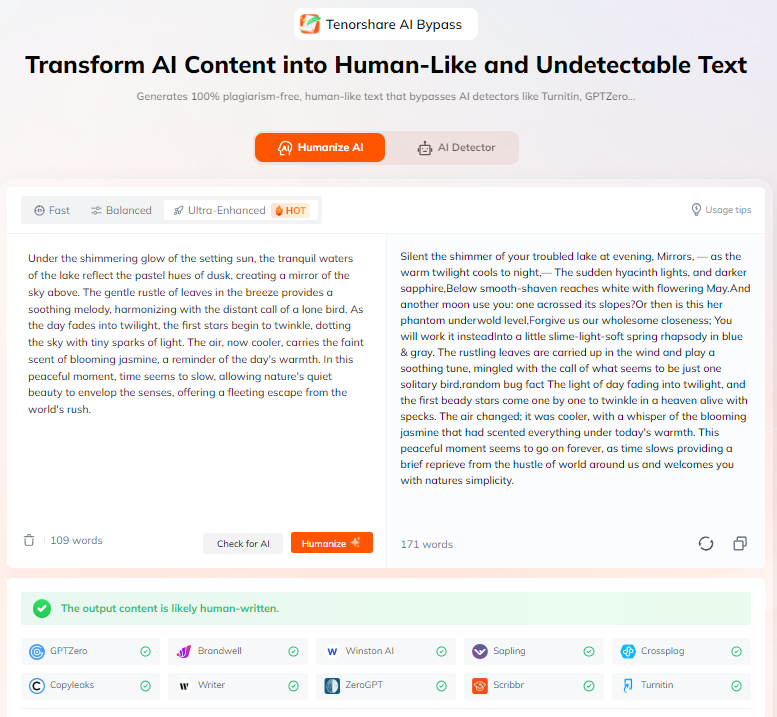
Tenorshare AI Bypass is a practical tool made to turn AI-written text into clear, natural, human-like content. Many users face the unable to index file ChatGPT issue because AI detection blocks file reading. This tool helps remove those blocks by rewriting content in a way that feels human and easy to read.
Writers, students, teachers, and professionals use it to keep their work safe from AI detectors and avoid upload errors. It also helps when ChatGPT file upload fails due to detection limits. With simple copy-and-paste steps, users can prepare files that upload smoothly and work without interruptions.
Conclusion
The unable to index file ChatGPT problem appears due to file format issues, size limits, AI detection, or system errors. Many users face ChatGPT file upload failed unable to index file during daily tasks. Simple steps like checking file size, clearing cache, and updating apps fix most issues.
When basic fixes fail, tools like Tenorshare AI Bypass help users avoid indexing and AI detection problems. This tool improves upload success and saves time for students, writers, and professionals. If you want smooth file uploads and fewer unable to index file ChatGPT error messages, try smart file handling and AI-friendly tools.
FAQs
Why does ChatGPT say unable to index file?
ChatGPT says this when it cannot read or process your file. Common reasons include file size, format, AI detection, or corrupted data. This leads to why does ChatGPT say unable to index file messages.
Is this a ChatGPT server issue or my file issue?
Both are possible. Temporary server load causes OpenAI unable to index file ChatGPT errors. File issues cause file upload failed unable to index file ChatGPT problems more often.
How can I prevent file upload errors in ChatGPT?
Use supported formats, smaller file sizes, stable internet, and updated apps. These steps reduce ChatGPT file upload not working problems.
Can Tenorshare AI Bypass help fix this error?
Yes. Tenorshare AI Bypass helps reduce AI detection issues that cause unable to index file ChatGPT error during uploads.
Does this error happen on both ChatGPT app and web?
Yes. Users report unable to index file ChatGPT app and web errors. Fixes apply to both versions.

Tenorshare AI Bypass
- Create 100% undetectable human-like content
- Bypass all AI detector tools like GPTZero, ZeroGPT, Copyleaks, etc.
- Original content, free of plagiarism and grammatical errors
- One-click AI bypass with a clean and easy-to-use interface

You Might Also Like
- Can’t Download Files from ChatGPT? Help You Solve Here
- 18+ ChatGPT Free Fire Photo Editing Prompts: Create Epic Game-Inspired Images in Minutes
- List of Words Overused by AI: 140+ Common ChatGPT Phrases to Avoid
- 10+ ChatGPT Bikers AI Photo Editing Prompts: Create Epic Rider Shots
- 18+ Best Prompts for ChatGPT Halloween to Create Spooky & Fun Photos
- 7 Hot ChatGPT Image Enhancer Prompts for Free Photo Quality Boosts

Tenorshare AI Bypass: 100% Bypass AI Detection
Turn AI text into undetectable, human-like content.AI Humanizer, 100% Undetectable
Humanize AI text instantly.
Tenorshare AI Bypass: 100% Bypass AI Detection