
Julius AI Math Solver Review: How Does It Compare in 2026?
AI math solvers can now do more than calculate an answer. Many tools can read math problems from images, explain the solution step by step, and respond to follow-up questions. Julius AI Math Solver is one such option, but it differs from traditional math apps in one important way: Julius is not exclusively a math-solving platform.
Julius describes its broader product as an AI assistant for statistical analysis, data science, computation, and other productivity tasks. Its math solver is part of this wider AI workspace rather than a completely separate math application.
This Julius AI Math Solver review examines its main features, free access, and overall suitability for students. We will also compare it with Tenorshare AI Math , ChatGPT, and Photomath to help you identify which type of tool better matches your learning needs.
What Is Julius AI Math Solver?
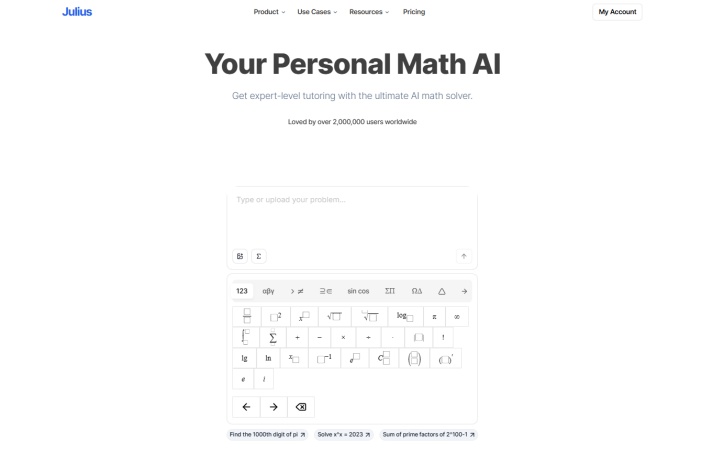
Julius AI Math Solver is a browser-based AI tool that processes math questions through a chat interface. The official math pages list equation solving, word problems, graphing, photo input, and written solution steps. Julius also has separate pages for geometry and calculus, although these tools appear to lead to the same general chat-based platform rather than separate specialist calculators.
This means Julius works more like a general AI assistant that can answer math questions than a conventional math solver built around fixed calculators, verified solution methods, or a structured course workflow.
Key Features of Julius AI Math Solver
-
Built-in Math Keyboard: Julius provides an on-screen math input panel with fractions, powers, roots, logarithms, and other common notation.
-
Step-by-Step Solutions: It can break a math problem into separate solution steps instead of returning only the final answer.
-
Graphing and Data Analysis: Julius can create graphs, visualize datasets, and perform statistical or computational analysis.
- Flexible input: It accepts text, images, screenshots, PDFs, and several document formats.
- Allows follow-up questions: Users can continue the conversation instead of receiving only a fixed answer.
- Supports data-related tasks: Julius may be useful when a problem involves statistics, spreadsheets, or charts.
- Covers several math areas: Its official pages include algebra, geometry, calculus, and word problems.
- Not focused exclusively on math: The interface and subscription are shared with Julius's wider data-analysis platform.
- Limited learning features: It does not clearly provide dedicated video lessons, automatic practice tests, or a structured review process after each solution.
- Answer quality may vary: AI-generated steps can be incomplete, overly brief, or based on a misread symbol.
- Free usage is restricted: The platform limits free use, and its newer credit system makes exact consumption dependent on the model and task complexity.
How Does Julius AI Work?
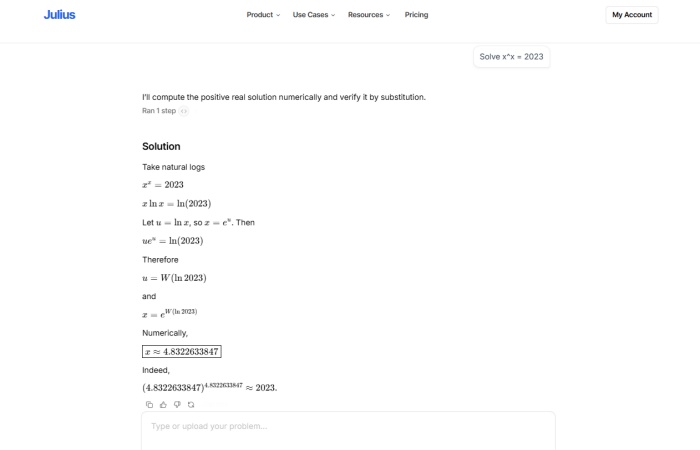
Unlike traditional math solvers that rely on dedicated calculators or predefined solution engines, Julius AI works through a conversational AI system. The math solver is integrated into the Julius chat interface, where users submit a problem and the AI model generates a response based on the given instructions.
When solving math problems, Julius first interprets the user's input. It then processes the request through its AI models and generates a response depending on the task. This working method makes Julius different from traditional math-focused tools. Products such as Photomath are designed primarily around scanning and solving math problems, while Julius is built as a broader AI workspace that can handle mathematics alongside data analysis, documents, visualizations, and other tasks.
Best Free Alternatives to Julius AI Math Solver
Julius is more suitable for users who want math support within a general AI or data-analysis workspace. Students who need a focused math-learning process, broader tutoring, or a mobile scanner may prefer another product.
| Tool | Main Focus | Multiple Inputs | Follow-Up Chat | Learning Support |
|---|---|---|---|---|
| Julius AI | General AI assistant | Text, images, files, spreadsheets | Yes | AI-generated explanations and problem discussions |
| Tenorshare AI Math | Dedicated AI math solver | Text, photos, documents | Yes | Step-by-step solutions, video explanations, and practice tests |
| ChatGPT | General-purpose AI model | Text, images, files | Yes | Depends on prompts and selected features |
| Photomath | Mobile math solution tool | Camera scans, text input | Limited | Structured solution steps and method explanations |
These tools are selected because they represent different categories of AI-powered math assistance. Julius AI represents a general AI workspace with math capabilities, ChatGPT represents a general-purpose AI model, Photomath represents a traditional math-solving app focused on scanning and solutions, while Tenorshare AI Math represents a dedicated AI math learning tool. Comparing these products helps users understand how different approaches to AI math assistance fit different needs.
Julius AI vs. Tenorshare AI Math
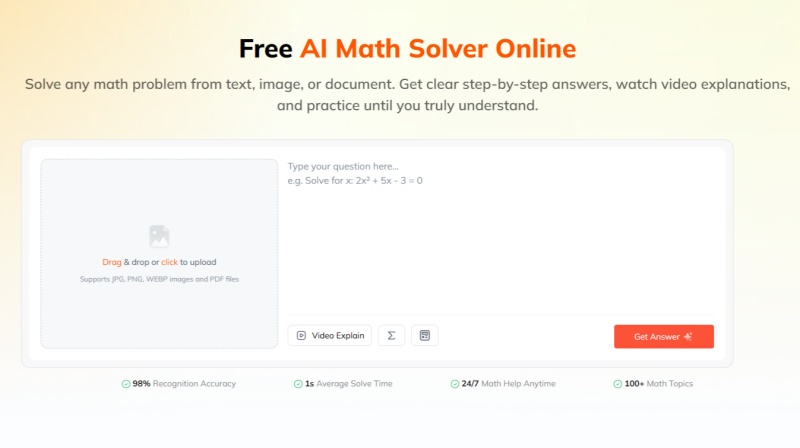
Julius AI and Tenorshare AI Math target different types of users. Julius AI is a broader AI workspace that supports mathematical tasks alongside data analysis, graphing, and other computational tasks.
Tenorshare AI Math is more focused on math problem-solving and learning scenarios. It is designed as an AI homework helper for students, teachers, and parents who need help understanding math problems, reviewing solution steps, and practising similar questions. Its workflow goes beyond generating an answer by combining solution explanations, learning resources, and practice features.
Key features of Tenorshare AI Math include:
-
Solve Math Problems from Text, Images & PDFs: Upload questions from different formats and get AI-assisted solutions without manually rewriting complex formulas.
-
Step-by-Step Solution Breakdown: Understand how each problem is solved through structured explanations and detailed reasoning steps.
-
Video Explanations for Better Understanding: Turn solutions into visual learning content to help users understand the underlying concepts.
-
Personalized Practice Tests: Generate similar exercises after solving a problem to reinforce understanding and test knowledge.
Overall, the choice depends on the user's primary goal. Julius AI may be a better fit for users who need a flexible AI assistant that can handle mathematics together with data analysis, documents, or other tasks. Tenorshare AI Math is more suitable for students, parents, and teachers looking for a dedicated math homework helper that focuses on solving problems, understanding concepts, and practising related skills.
Julius AI vs. ChatGPT
Both tools use conversational AI and support follow-up questions. Julius places more emphasis on data analysis, spreadsheets, graphs, and computation.
ChatGPT covers a wider range of subjects and includes Study Mode, which can guide users with questions, staged explanations, uploaded course materials, and practice activities. OpenAI also states that Study Mode may make mistakes and should not replace teachers or course materials.
Julius may be more relevant for data-heavy assignments. ChatGPT is more suitable when users want general tutoring across math and other subjects.
Julius AI vs. Photomath
Photomath is a mobile-first math application. Users scan a problem with a phone or tablet and review the provided steps. The official site describes it as a math camera solver, and the product is currently designed for smartphones and tablets rather than desktop use.
Julius is browser-based and offers a more open-ended chat experience. It also handles files, datasets, and graphing tasks beyond standard homework questions.
Photomath is the simpler option for scanning printed math problems. Julius is more flexible when the question is part of a larger document or data task.
Is Julius AI Free?
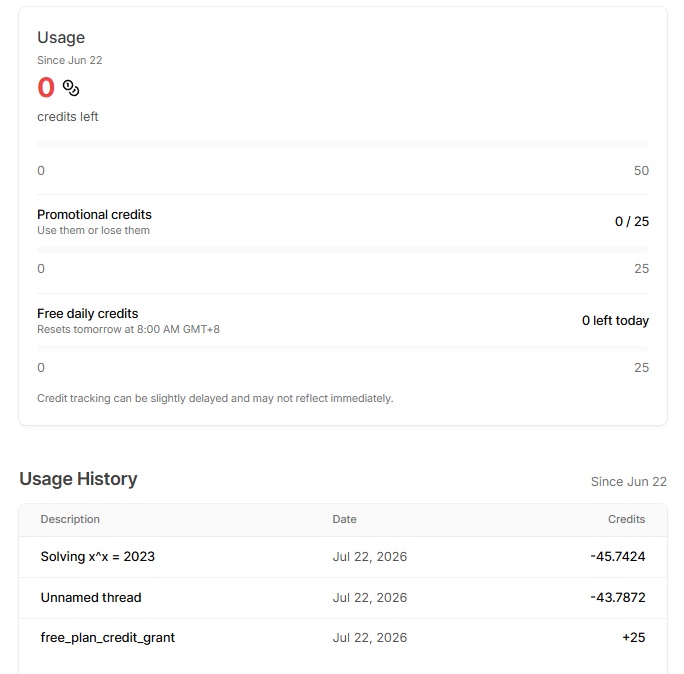
Julius AI offers a free plan, but free usage is limited by credits rather than unlimited access. New users can receive free daily credits and promotional credits, which are consumed when using AI models or completing tasks. In the usage panel, Julius shows the remaining credits, daily credit refresh, promotional credits, and detailed usage history to help users track consumption.
The amount of credits used depends on the complexity of the task. Simple questions may consume fewer credits, while more demanding tasks, such as advanced reasoning, complex calculations, or data analysis, may use more. Julius has moved from a message-based limitation system to a credit-based model, making usage depend on the computational requirements of each request.

For users who only occasionally solve math problems, the free plan may be enough for testing Julius AI. However, frequent users may need a paid subscription to access higher usage limits and more advanced features.
Final Verdict: Is Julius AI Math Solver Worth Using?
Julius AI Math Solver is a reasonable option for occasional math questions, particularly when the task also involves spreadsheets, statistics, graphs, or uploaded documents.
Its main limitation is product focus. Julius is a broad AI and data-analysis platform rather than a dedicated math-learning tool. It can generate answers and explanations, but it offers fewer clearly defined learning features after the solution is produced. Students mainly looking for structured math support, instructional content, or follow-up practice may find a dedicated AI math solver more suitable.
Overall, Julius is useful as a general AI assistant with math capabilities, but it should not be considered a complete replacement for a specialist calculator, verified learning resource, or teacher.

Tenorshare AI Math
- Solve math from text, images & PDFs at 98% accuracy
- Deliver step-by-step answers with detailed logic breakdown
- Access video explanations for deeper math concept understanding
- Generate matching practice tests to solidify knowledge

FAQs
-
Is Julius AI Better Than ChatGPT?
Not in every situation. Julius is more oriented toward data analysis, spreadsheets, and computation. ChatGPT offers broader subject support and a dedicated Study Mode for guided learning. The better choice depends on whether the task is primarily data analysis or general tutoring.
-
Is Julius AI Safe?
Julius states that data is encrypted in transit and at rest, is not used to train models, and is stored and processed in the United States. It also states that authorized personnel may access data in exceptional cases such as troubleshooting.
-
Is Julius AI Good for Math?
Julius can process common equations, word problems, graphs, geometry, and calculus questions. However, its answers are AI-generated and may require correction or additional prompting. It is better used for assistance than as the only source for an important solution.
-
Can Julius AI Solve Calculus Problems?
Julius advertises support for derivatives, limits, integrals, differential equations, sequences, and optimization problems. The accuracy and detail of the response may vary, especially for advanced or notation-heavy questions.
-
Can Julius AI Solve Math Problems From Images?
Yes. Users can upload an image or paste a screenshot into the chat. Before relying on the answer, they should check that Julius has correctly recognized every symbol and diagram label.
You Might Also Like
- AskMath AI Math Solver Review 2026: A Complete Guide for Students
- EduBrain AI Math Solver Review: Is It a Reliable AI Homework Helper?
- EaseMate AI Math Solver Review: Features, Alternatives & How It Compares
- NoteGPT AI Math Solver Review 2026: Is It Accurate and Worth Using?
- Gauth AI Math Review 2026: Is It Worth Using for Homework Help?
- Is ThetaWise AI Worth It in 2026? Honest Review, Features & Pricing

Tenorshare AI Math: Solve any math problems with AI
Turn math questions into clear solutions, tutorial videos & targeted practice setsTenorshare AI Math: Instant Solutions
Steps, videos & practice for every problem
Tenorshare AI Math: Solve any math problems with AI