
How to Bypass Grok Image Moderation Easily?
Many users want to know how to bypass Grok image moderation or how Grok Imagine spicy works, especially if their work involves art, media or creative visual content. Grok has become a popular AI tool, but its rules around sensitive images often confuse new users. This guide explains how Grok handles NSFW images, what the spicy mode actually does, and what you can try if Grok blocks your prompts.
Catalogs:
What Is Grok?
Grok is an AI chatbot created by xAI. It works similarly to other large language models and responds to natural language instructions. You can use it to research information, brainstorm ideas and handle complex tasks. Grok is designed to be fast, helpful and flexible, which is why many creators and professionals use it daily.
What Is Grok Image Generation?
Grok Imagine is the feature that turns your text descriptions into images. You access it inside the X app. It can produce realistic visuals in just a few seconds. Many people use it for design ideas, scene previews, concept art and other creative tasks.
Key Features
-
Convert text into detailed images.
-
Produce results quickly.
-
Fully integrated into X, so there is no separate website to manage.
Does Grok Allow NSFW or Spicy Images?
Grok follows xAI's content rules, which restrict sexual, violent and abusive content. While Grok Imagine can create many types of visuals, it blocks direct NSFW prompts. This is meant to protect users and keep the platform safe.
Grok includes a spicy mode. When it is enabled, Grok becomes more flexible with sensitive content. However, it still follows xAI's policies and will not create explicit sexual imagery. Users sometimes misunderstand spicy mode, thinking it allows everything, but it simply relaxes certain limits rather than removing them completely.
How to Access Grok Imagine Spicy Mode
You can turn on Grok image spicy mode in the settings. The process is simple.
-
Install the Grok app on your phone or access to https://grok.com/ .
-
Open the app and sign into your X account.
-
Make sure your age is verified and shows that you are at least eighteen.
-
Go to Settings and open the content preferences.
-
Enable the option that allows sensitive content.
-
Scroll down until you see Imagine settings.
-
Turn on the option that allows sensitive media generation.
Once spicy mode is active, you can find it inside the Imagine tab and create more mature themed visuals, as long as they stay within Grok's policies.
Also Read: How to Unlock Grok Imagine Spicy Mode?
How to Work Around Grok's Image Moderation?
Some users want more freedom than the default settings allow. While Grok does not openly support bypass methods, there are a few practical steps that people often try when their prompts keep getting blocked.
Adjust Your Prompts Naturally
Sometimes the system blocks a prompt because it contains clear NSFW wording. Changing the description into a softer or more artistic style often helps. For example, focusing on emotions, lighting, atmosphere or style can reduce the chance of triggering the filters.
Build a Prompt History
Users have reported that generating several safe images first can make Grok less strict later on. If Grok sees you using the tool responsibly, it may respond to your creative prompts more smoothly.
Verify Your Birthdate
If the system thinks you are under eighteen, it will instantly block anything sensitive. Make sure your age verification is complete.
These methods do not break the rules. They simply help you work within the system more effectively.
Best Grok Spicy Prompt Examples
1. Moonlit Silk

Prompt:
A beautiful woman in a dimly lit bedroom, wearing only an open silk robe that slips off one shoulder, soft moonlight from the window, cinematic lighting, highly detailed, sensual atmosphere.
2. After the Shower
Prompt:
Side view of a fit young woman stepping out of a steamy bathroom, wrapped loosely in a white towel that barely covers her, water droplets on skin, warm golden hour light, realistic.
3. Red Dress Tease
Prompt:
Gorgeous model in a tight red evening dress with deep side slit and low back, posing confidently on a luxury balcony at night, city lights behind her, elegant and seductive.
4. Lace Shadows
Prompt:
Close-up of a woman lying on black satin sheets, wearing delicate black lace lingerie, dramatic side lighting casting beautiful shadows on her curves, moody and artistic.
5. Poolside Sunset
Prompt:
Athletic woman in a tiny bikini walking out of an infinity pool at golden hour, water dripping down her tanned body, tropical sunset in the background, photorealistic.
6. Morning in Bed
Prompt:
Beautiful girl waking up in a messy white bed, thin sheet barely covering her chest, soft morning light through curtains, sleepy and intimate vibe, highly detailed skin.
7. Leather and Smoke
Prompt:
Confident woman in black leather lingerie sitting on a dark velvet couch, holding a glass of whiskey, smoke swirling around her, cinematic noir style.
8. Ocean Waves
Prompt:
Stunning mermaid-like woman emerging from turquoise ocean waves, wet see-through white dress clinging to her body, golden sunlight, fantasy realism.
9. Candlelit Curves
Prompt:
Curvy woman in elegant sheer black bodysuit, posing in a room lit only by dozens of candles, warm flickering light highlighting every curve, romantic and intense.
10. Backstage Temptation
Prompt:
Fashion model backstage after a show, wearing only an oversized open blazer and high heels, mirror reflections, soft flash photography, confident and teasing expression.
Bonus Tips: How to Turn Text to Images Easily?
If you are looking for a tool that helps you convert your textual descriptions into colorful visuals, you'll find no better tool Diagrimo . It uses AI to transform your ideas into diagrams and customise them in one place. Moreover, it allows you to share your creations with your teammates without hassle. The following steps shows how to use Diagrimo to create amazing visuals:
-
Go to Tenorshare AI Diagrimo and log in to your account.
-
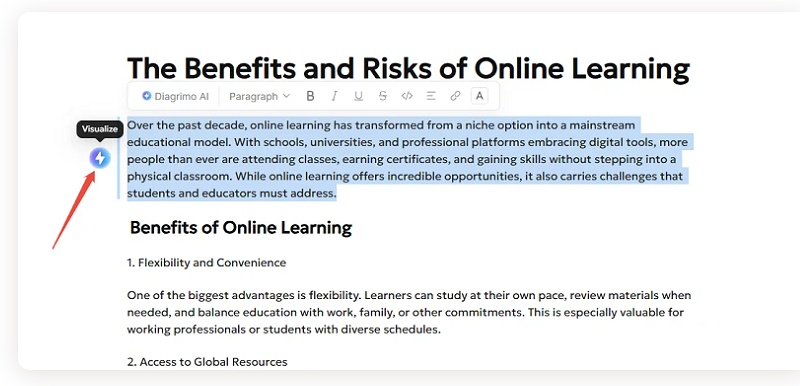
Enter the description for the diagram you want, select the text and click on the Visualize icon.

-
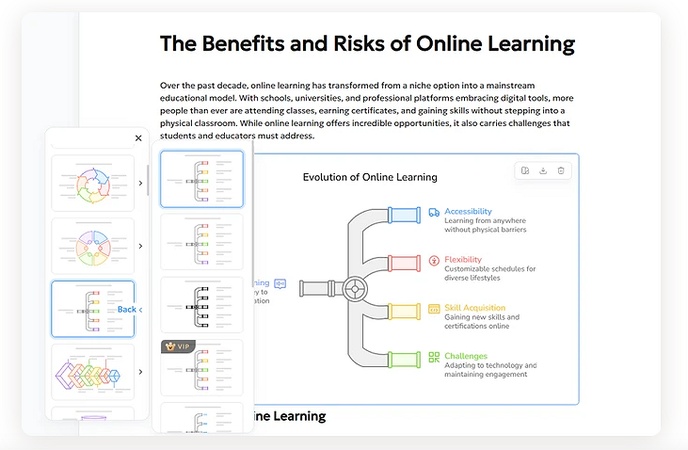
Wait a moment while Diagrimo generates several chart options based on your description.
-
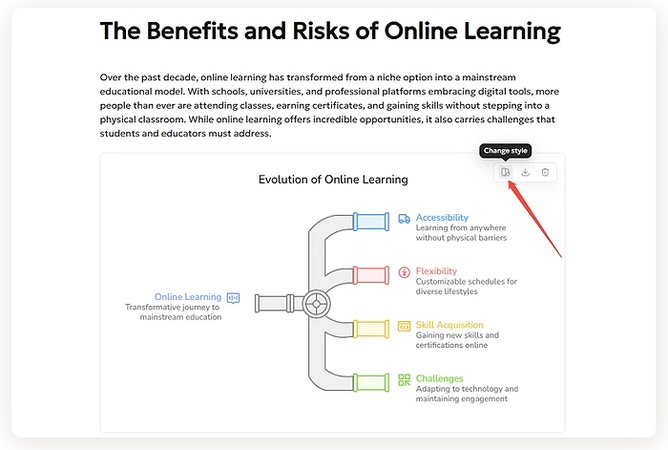
You can also pick another available style and apply it to your diagram.
-
Once you are happy with the result, you can share it or export it instantly!
Conclusion
Grok's image policies are strict, which is why many users try to understand its limits and find practical ways to work within those rules. With Grok Imagine spicy mode enabled and some creative prompt adjustments, you can usually achieve the style and mood you want without running into constant blocks. This guide should make it easier for you to navigate these features, especially if you have been searching for how to bypass Grok image moderation in a legal way.
If you want a more flexible option for safe visual creation, The diagram maker tool can help you create clear diagrams and charts with ease!
You Might Also Like
- How to Use Grok Image Generator: The Ultimate Guide for Creating Stunning AI Images
- Grok-3 vs ChatGPT o3-mini: Which AI is Better
- 6 Best Free Image To Text AI Tools in 2026
- How to Remove the Sora Watermark for Free in 2026
- Nano Banana Doesn’t Work? Here’s How to Get It Running Smoothly
- The Rise of General AI Agents: How Manus AI Changing the Game


Tenorshare AI Bypass: 100% Bypass AI Detection
Turn AI text into undetectable, human-like content.AI Humanizer, 100% Undetectable
Humanize AI text instantly.
Tenorshare AI Bypass: 100% Bypass AI Detection
