
CameraMath Review 2026: Is This AI Math Solver Worth It?
Getting stuck on a math problem is frustrating---especially when the question is full of fractions, symbols, or handwritten notes that are difficult to type into a search bar. A camera math solver promises a faster option: take a photo, get an answer, and see the steps behind it. CameraMath is one of these tools.
This review examines how CameraMath works, what its free version includes, what real users say, and when an alternative may better match a student's needs.
What Is CameraMath?
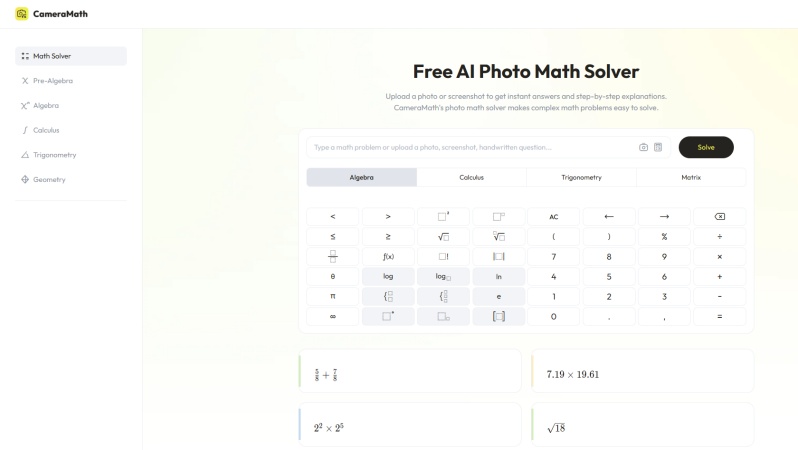
CameraMath is an AI-powered math solver that accepts typed questions, photos, screenshots, and handwritten math problems. Its web version focuses on solving math problems online, while its linked mobile app, UpStudy -- Camera Math Solver, expands into broader homework support across subjects.
The platform is built around a simple idea: reduce the time spent entering equations manually and show a solution process rather than only a final result. It supports common school-level topics, including arithmetic, algebra, geometry, trigonometry, calculus, statistics, probability, and matrices.
Key Features
-
Text input: Type an equation or expression directly instead of uploading an image.
-
Photo math solver: Upload a clear photo, screenshot, or handwritten math problem for recognition and solving.
-
Topic calculators: Access calculators for fractions, equations, derivatives, integrals, limits, trigonometry, geometry, and more.
-
Step-by-step solutions: View intermediate steps for supported problems, including simplifying expressions and solving equations.
- Easy-to-access web solver for common math questions.
- Supports multiple subjects, from basic arithmetic to calculus.
- Accepts photos, screenshots, handwritten questions, and typed input.
- Step-by-step explanations can help users check their working.
- Image recognition may struggle with unclear handwriting, poor lighting, or crowded worksheets.
- Step-by-step explanations can be too brief for more complex problems.
- Does not support follow-up questions or conversational clarification in the web solver.
- Offers limited extra learning features beyond solving and calculator tools.
CameraMath Calculator Reviews from Real Users
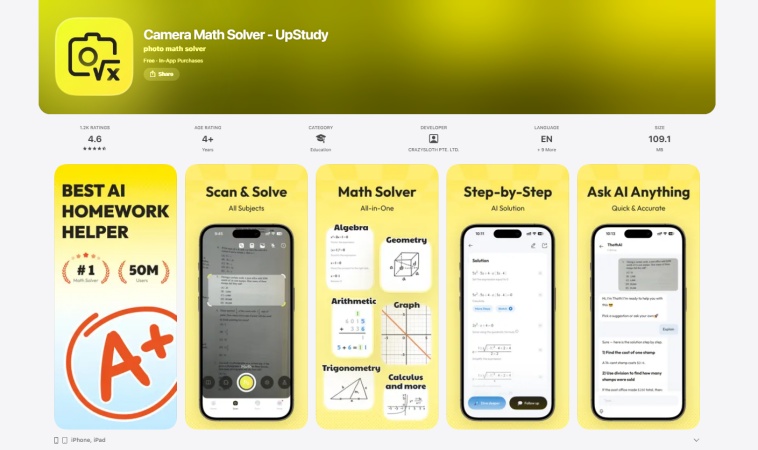
CameraMath and UpStudy have separate ratings and review samples on Google Play and the Apple App Store . Ratings can change over time, so they are best treated as general signals rather than a guarantee of every user's experience.
What users commonly like
-
Taking a photo instead of typing a long equation.
-
Getting a quick answer for routine homework questions.
-
Seeing a step-by-step explanation for supported problems.
Common concerns
-
Free download does not mean every feature is free.
-
Some users report that answers or methods do not always match their textbook.
-
Subscription, trial, and renewal terms should be checked before paying.
Third-party perspectives
-
The Educational App Store's CameraMath review rated the app positively and found it effective for clear, well-lit photo-based questions.
-
The CameraMath Trustpilot profile has a much smaller review sample and includes concerns about billing and answer quality.
Takeaway: CameraMath is useful for solving and checking standard math problems, with features that can make routine calculations and homework review more convenient. However, its effectiveness may vary with problem complexity or image quality, and users should verify important answers rather than rely on it blindly. Before starting a trial or subscription, users should also review the current payment terms and cancellation conditions.
Is CameraMath Free?
CameraMath's online AI Photo Math Solver is free to try. Users can type in a math problem or upload a photo, screenshot, or handwritten question to get an answer.
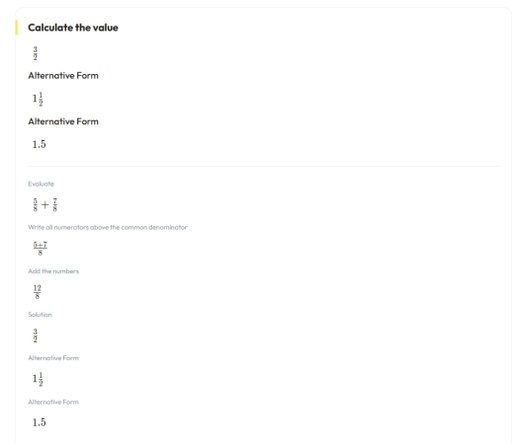
The free web version works best for simple calculations and standard equations. Its step-by-step explanations are often brief, so it is more useful for checking answers than for learning a complex method in depth. It also does not offer follow-up chat or many extra learning tools.
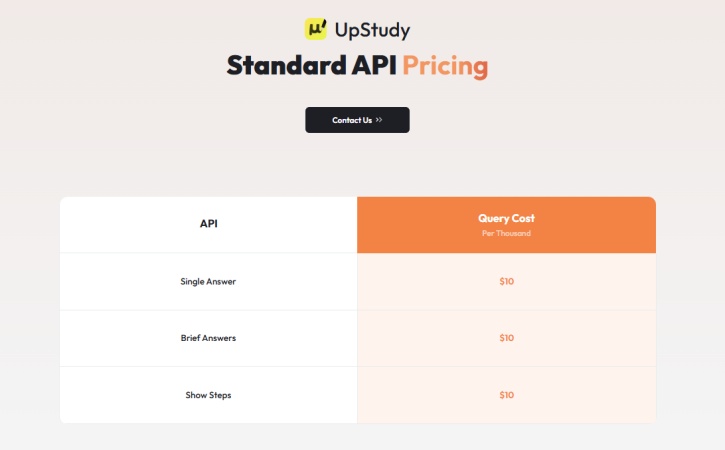
CameraMath also offers paid API access for developers. According to the official API pricing page , the following API functions cost $10 per 1,000 queries:
-
Single Answer
-
Brief Answers
-
Show Steps
The UpStudy mobile app is free to download on Google Play and the App Store , but it includes in-app purchases. Premium features may include unlimited scan-and-solve, practice tools, and tutor-related support. Subscription prices can vary by location and platform.
Overall, CameraMath offers a free starting point for basic math solving, while higher-volume API use and additional mobile features may require payment.
The Best Alternative to CameraMath Solver
If you usually do homework or study on a computer, a web-based math solver can be more convenient than downloading and switching between mobile apps. CameraMath offers a free online solver, but its web experience is mainly designed for basic problem solving. Its step-by-step explanations can be brief, and it provides limited follow-up or extra learning features.
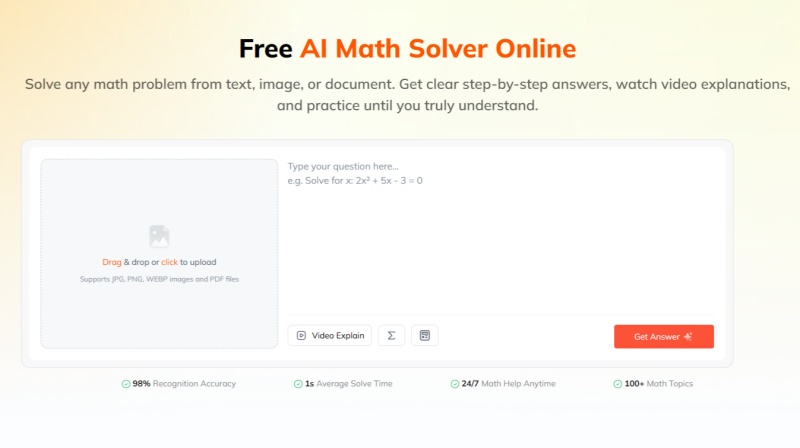
In this case, Tenorshare AI Math is a practical web-based alternative to consider. It works directly in a browser, so users can enter a question, upload an image, or submit a PDF without installing an app.
Tenorshare AI Math is designed for students who want more than a final answer. Its free math-solving tools include:
-
Detailed step-by-step explanations for supported math problems.
-
Text, image, and PDF input options.
-
Follow-up questions for additional clarification.
-
AI-generated video explanations for difficult concepts.
-
Similar practice questions to help reinforce the method.
-
A built-in calculator for quick calculations.
CameraMath may be enough for users who only need a quick answer to a simple equation. For students who study mainly on a computer and want a more detailed web-based learning workflow, Tenorshare AI Math offers a broader set of tools without requiring an app download.
Final Verdict: Is CameraMath AI Worth It in 2026?
CameraMath remains a practical option for users who want an accessible AI math solver and a free way to test basic online problem solving. Its web-based tool can handle many common equations and provides step-by-step explanations for supported questions. The UpStudy app also offers a wider range of mobile study features for users who want more than a browser-based solver.
Its value depends on the user's goal. For occasional math checks, the free web experience may be enough. For frequent homework use, users should compare the app's current premium features, pricing, and renewal terms with their actual study needs.
For users looking for a more structured study workflow with explanations, video support, and generated practice questions, Tenorshare AI Math is another option worth exploring.

Tenorshare AI Math
- Solve math from text, images & PDFs at 98% accuracy
- Deliver step-by-step answers with detailed logic breakdown
- Access video explanations for deeper math concept understanding
- Generate matching practice tests to solidify knowledge

FAQs
-
Is there a CameraMath app?
Yes. CameraMath's mobile experience is currently listed in major app stores as UpStudy -- Camera Math Solver. The app is available for iPhone, iPad, and Android devices, though features may vary by platform and subscription plan.
-
Does CameraMath work without an account?
The CameraMath website can be used for many basic math-solving tasks without creating an account. Some features, saved activity, mobile tools, or premium services may require an account or subscription.
-
Does CameraMath show step-by-step solutions?
For supported problems, CameraMath can show intermediate steps rather than only the final answer. The level of detail may vary depending on the question type and how clearly the expression is recognized.
-
Can CameraMath solve handwritten math problems?
CameraMath can accept handwritten math questions through a photo or image upload. Results are usually better when handwriting is dark, clear, and well spaced, with the full problem visible in good lighting.
-
Is CameraMath safe for students?
CameraMath can be used safely as a homework and study-support tool when students verify answers and follow their school's academic-integrity rules. Parents and students should also review the privacy policy, account settings, subscription terms, and permissions before using the mobile app.
You Might Also Like
- Math.now Review 2026: Can It Solve Math Problems Accurately?
- AllMath Review 2026: We Tested Its AI Math Solver Accuracy
- MathBot Review 2026: Is MathBot Legit, Free, and Worth It?
- QuickMath Review 2026: Is This Math Solver Worth It?
- Goth AI Review 2026: Is This AI Math Solver Worth Using?
- DeltaMath Solver Review 2026: Is This AI Math Solver Good?

Tenorshare AI Math: Solve any math problems with AI
Turn math questions into clear solutions, tutorial videos & targeted practice setsTenorshare AI Math: Instant Solutions
Steps, videos & practice for every problem
Tenorshare AI Math: Solve any math problems with AI