
QuickMath Review 2026: Is This Math Solver Worth It?
QuickMath has been helping students solve math problems online for more than two decades. Unlike newer AI-powered homework tools, it focuses mainly on direct mathematical calculations.
But with AI math solvers now able to scan homework, explain concepts, answer follow-up questions, and generate practice exercises, is QuickMath still worth using in 2026 ?
This QuickMath review looks at its features, how the QuickMath solver works, whether it is free and accurate, and where it stands compared with newer AI math tools.
What Is QuickMath?
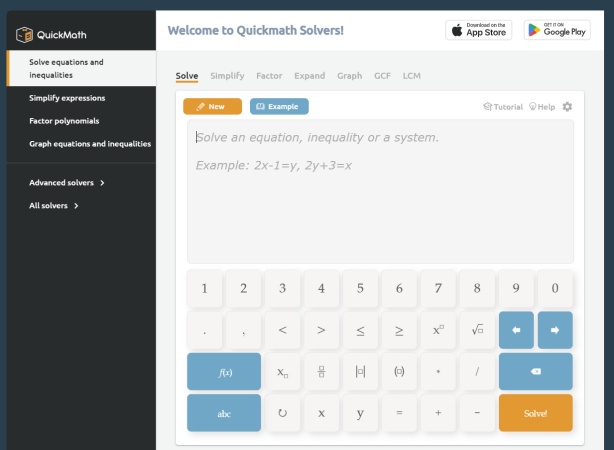
QuickMath is an online step-by-step math solver designed mainly for high school and college-level mathematics. The website first became active in 1999 and originally used the Mathematica computer algebra system as its symbolic calculation engine. QuickMath was later acquired by Softmath in 2013, which added technology for generating step-by-step solutions and contextual explanations.
Today, QuickMath can solve common problems involving algebra, equations, inequalities, calculus, matrices, fractions, graphs, percentages, and scientific notation. Its interface is closer to a traditional math calculator than a conversational AI assistant: you select a mathematical operation, enter the problem, and submit it for calculation.
Key Features
QuickMath provides several useful tools for common school and college math problems:
-
Equation solving: Solve individual equations, inequalities, and systems of equations.
-
Algebra: Simplify, expand, and factor expressions.
-
Calculus: Calculate derivatives as well as definite and indefinite integrals.
-
Fractions: Reduce fractions, combine fractions, and work with partial fractions.
-
Graphing: Plot equations and inequalities.
-
Matrices: Perform common matrix calculations.
- Free online math solver
- No registration required for the web version
- Clear step-by-step solutions
- Strong support for algebra and equations
- Simple interface for users who already know what calculation they need
- Input is more structured than conversational AI tools
- Some mathematical notation must be entered in a specific format
- Less flexible for questions provided as worksheets, documents, or complex natural-language prompts
- Limited learning tools beyond explanations and solution steps
- No built-in video lessons or personalized practice workflow
- Results should still be checked for important assignments
How Does the QuickMath Solver Work?
Using the QuickMath solver is straightforward.
QuickMath works by letting users select a specific type of mathematical operation, input a properly formatted expression, and then processing it through its calculation engine to generate a result in the browser. It is designed for structured math input rather than conversational or image-based problem solving.
To use it in practice:
-
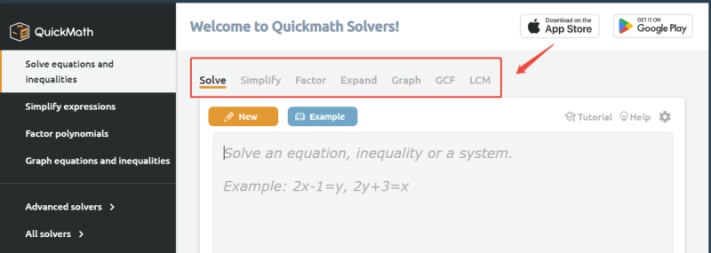
Choose the operation you need, such as Solve, Simplify, Factor, Expand, Graph, GCF, or LCM.

-
Enter your equation or expression using the on-screen math keyboard or supported notation.
-
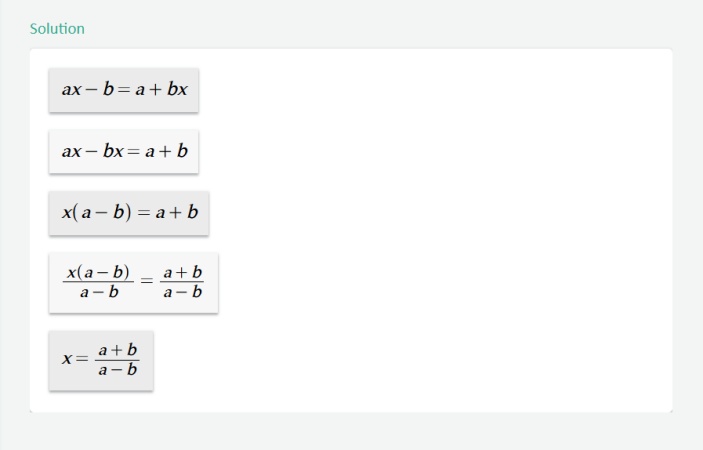
Submit the problem and wait for QuickMath to return the result and, when available, step-by-step working.
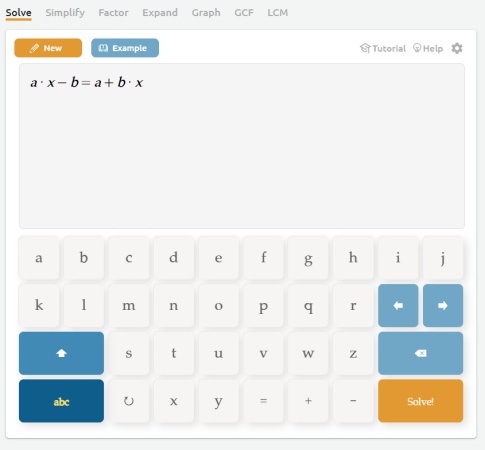
Because QuickMath relies on specific input formatting rules , users may need to adjust how they type expressions to match its expected syntax. This can require some initial familiarity, especially for more complex notation.
Overall, QuickMath is best suited for users who already have clearly written mathematical problems and want a direct computational result. It is less convenient for those who prefer uploading images, working from PDFs, or using natural-language problem descriptions, where a more flexible AI math solver may be preferable.
Is QuickMath Free?
QuickMath currently offers its web-based math solver for free. According to its official website, users can access step-by-step solutions without creating an account, subscription, or paid plan. SourceForge also lists QuickMath as having a free version.
However, price alone does not determine how much value a math solver provides. QuickMath mainly focuses on structured mathematical calculations such as algebra, equations, calculus, matrices, and graphing. Its free access is useful if those are the features you need, but it does not include many of the broader learning tools now found in AI math solvers, such as image and PDF input, interactive follow-up explanations, video-based learning, or generated practice questions.
In other words, QuickMath has a low cost of entry, but its value depends on whether its relatively focused feature set matches how you want to study math.
It is also important to distinguish quickmath.com from similarly named mobile apps or services, as their pricing and usage limits may be different .
Is the QuickMath Solver Accurate?
QuickMath can be useful for many standard math problems, but no online solver should be assumed to be correct in every case.
According to QuickMath , its equation solver tries to return exact solutions when possible. When an exact symbolic result cannot be produced, it may return a numerical approximation. The documentation also acknowledges that certain equations can have limitations---for example, some trigonometric equations may contain infinitely many solutions, in which case QuickMath may warn that not every solution was found.
Importantly, QuickMath's own disclaimer does not guarantee the accuracy or reliability of every result produced through the service.
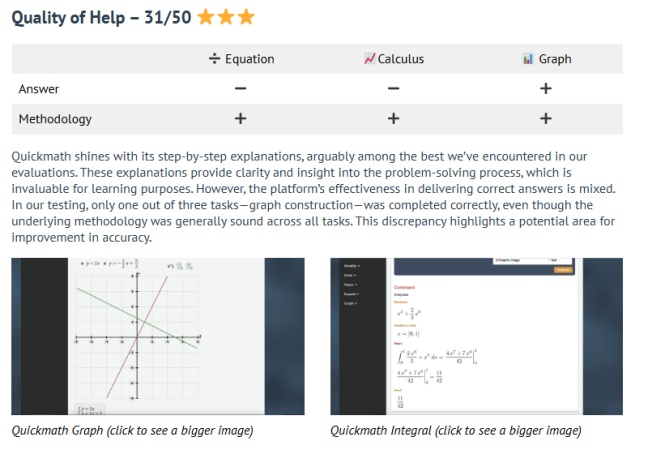
Independent testing also suggests that answer quality can vary. AcademicHelp's QuickMath review praised the platform's step-by-step methodology but reported mixed final-answer performance in its small three-task test, with its graphing task performing better than the tested equation and calculus tasks. Because this was a limited test rather than a comprehensive benchmark, it should not be treated as a universal accuracy rate.
The practical takeaway is simple:
QuickMath is useful for solving and checking math, but students should verify important answers---especially for complex equations, calculus, or graded work.
Its step-by-step output can actually help here. Instead of checking only the final answer, you can review the transformations and calculation process to see whether the logic makes sense.
Need More Than QuickMath? Try an AI Math Solver
QuickMath works well when your main goal is to enter a mathematical problem and get a solution. Newer AI math solvers take the idea further by focusing on what happens before and after the calculation.
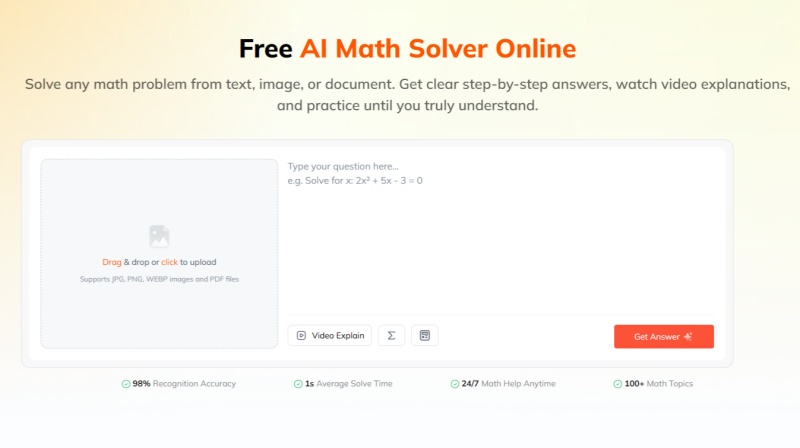
For example, Tenorshare AI Math supports questions entered as text as well as math problems uploaded from JPG, PNG, WEBP images and PDF documents. It then provides step-by-step answers and adds learning tools such as video explanations, follow-up questions, and generated practice exercises.
This creates a different workflow:
| Feature | QuickMath | Tenorshare AI Math |
|---|---|---|
| Solve equations | Yes | Yes |
| Step-by-step solutions | Yes | Yes |
| Text input | Yes | Yes |
| Image problem input | Not a core web workflow | Yes |
| PDF problem input | Not a core web workflow | Yes |
| Video explanations | No | Yes |
| Follow-up questions | Not a core feature | Yes |
| Similar practice questions | No | Yes |
| Graphing tools | Yes | Not its main focus |
| Best suited for | Direct mathematical calculations | Solving, understanding, and practicing |
QuickMath therefore still has an advantage when you want a simple, dedicated calculator-style solver, particularly for algebraic manipulation, equation solving, calculus, or graphs.
Tenorshare AI Math may be more suitable when the problem starts in a photo or document, or when your goal is not simply to obtain an answer but to continue learning afterward. Its current workflow connects problem scanning, step-by-step solving, video explanations, and related practice exercises in one tool.
Neither approach is automatically better for every student. The better choice depends on whether you need a focused mathematical calculator or a broader AI-supported learning workflow.
Final Verdict: Is QuickMath Worth It?
QuickMath still serves a specific purpose in 2026, but its value depends on what you need from a math solver. It works well for structured problems, offering direct input and step-by-step solutions without a subscription.
However, it is mainly limited to structured math input. Users who rely on photos, PDFs, follow-up explanations, or extra practice may find it less flexible than newer AI math tools. QuickMath also does not guarantee full accuracy for every result, so answers should be verified when used for important work.
Overall, QuickMath is best seen as a focused calculation and step-by-step solver, while broader learning workflows are better supported by AI math solvers like Tenorshare AI Math , which also include image/PDF input, explanations, and practice features.

Tenorshare AI Math
- Solve math from text, images & PDFs at 98% accuracy
- Deliver step-by-step answers with detailed logic breakdown
- Access video explanations for deeper math concept understanding
- Generate matching practice tests to solidify knowledge

FAQs
-
Is QuickMath Safe and Legit?
QuickMath is a long-running math website that has been online since 1999 and was later acquired by Softmath in 2013. It is generally considered legitimate, but like any online tool, users should still be mindful of privacy when entering sensitive information. No account is required for basic use.
-
Does QuickMath Show Steps?
Yes. QuickMath provides step-by-step solutions for many supported problems, showing the solving process instead of only the final answer, which is one of its main advantages over a basic calculator.
-
What Types of Math Problems Can QuickMath Solve?
QuickMath mainly covers standard school and college math such as algebra, equations, inequalities, calculus, fractions, matrices, graphs, percentages, and scientific notation, with a stronger focus on structured algebra and calculus problems rather than broad tutoring.
-
Is QuickMath an AI Math Solver?
Not in the modern AI sense. It is based on a computer algebra system designed for structured calculations and step-by-step solutions, rather than a conversational AI that understands natural language, images, or follow-up questions.
-
What Is the Best App for Fast Calculations?
It depends on the task. QuickMath works well for structured math like algebra and calculus because it gives direct solutions with steps, while simple arithmetic is usually faster with a standard calculator, and more complex homework workflows may benefit from AI math tools.
-
What Is the Best App for Learning Math?
A good learning tool should explain the process, not just give answers. QuickMath helps with reviewing solution steps for topics like algebra and calculus, while Tenorshare AI Math offers a more guided experience with step-by-step explanations, follow-up questions, and practice problems, which is more suitable for deeper learning.
You Might Also Like
- AI Math Solver That Can Read Graphs: 5 Best Tools Reviewed
- Chegg Math Solver Review 2026: Does Chegg Help With Math?
- Desmos Alternatives Review: 4 Best Graphing Calculators Compared in 2026
- MathPapa Review 2026: Is MathPapa Algebra Calculator Worth It?
- Is Mathway Worth It in 2026? Full Review of Features, Accuracy & Pricing
- Symbolab Calculator Review 2026: Is It Accurate, Free, and Worth It?

Tenorshare AI Math: Solve any math problems with AI
Turn math questions into clear solutions, tutorial videos & targeted practice setsTenorshare AI Math: Instant Solutions
Steps, videos & practice for every problem
Tenorshare AI Math: Solve any math problems with AI