
FilterNote Review 2026: Does It Really Bypass AI Detectors?
AI-generated writing is now common in essays, blogs, emails, and marketing content, but AI detection has made the editing process more complicated. A text can sound fluent and still be flagged as AI-written. For users who rely on AI-assisted writing, the challenge is not only making text sound natural, but also understanding whether a humanizer actually removes AI detection.
In this FilterNote review, we test FilterNote against six Top AI detectors. We look at whether its rewritten output passes AI detection, how its pricing works, and whether there is a better AI humanizer alternative.
Catalogs:
What Is FilterNote AI?
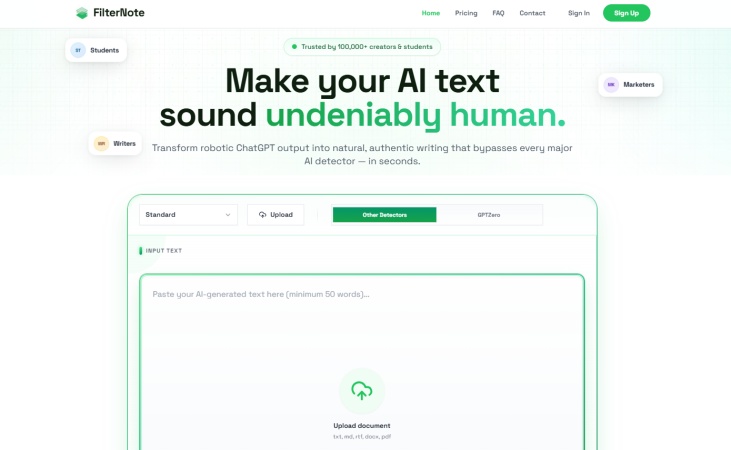
FilterNote AI is an AI text humanizer that rewrites AI-generated content to make it sound more natural and less machine-written. Instead of positioning itself as a general writing assistant, FilterNote focuses on one clear use case: helping users humanize AI text and reduce AI detection risk.
Key Features
FilterNote's main feature is AI text humanization. Based on FilterNote's own website and third-party product information, its key features include:
-
Rewrites AI-generated text into a more natural style
-
Adjusts sentence structure, tone, and wording
-
Helps reduce robotic or repetitive phrasing
-
Allows users to paste text directly into the tool
-
Supports file upload for longer documents
Pros & Cons
Pros
-
Simple & straightforward design: Easy for users to grasp core function: paste AI text, humanize content and reduce robotic tone.
-
Targeted at AI detection patterns: Aims to eliminate AI characteristic signals that detectors pick up.
-
Supports file upload workflow: Allows processing content via files, suitable for long-form texts like essays, reports and articles.
Cons
-
No built-in AI detector: Users cannot check detection results directly on the platform.
-
Lack of transparent pricing
-
Unreliable full bypass guarantee: Pass rates vary greatly based on original text, writing style, detector type and detection strictness, with no 100% pass guarantee for all platforms.
Real Test: Can FilterNote Humanize AI Text?
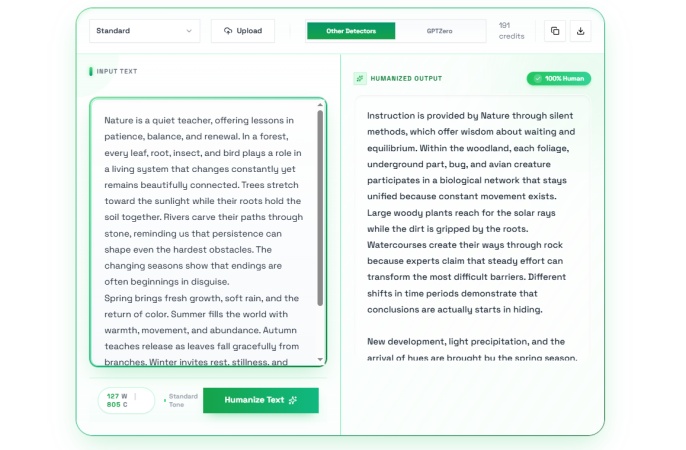
We followed a standard testing process to evaluate whether FilterNote can humanize AI text in a measurable way. First, we generated a 150-word text sample with ChatGPT as the original AI-written content. Then, we pasted the original text into FilterNote and used its humanizing feature without making any extra manual edits.
Next, we submitted the rewritten content to six AI detectors: GPTZero, Copyleaks, ZeroGPT, Originality.ai, Sapling, and QuillBot. We recorded the AI Score from each tool. The judging rule was simple: if all detected AI scores stayed below 10%, FilterNote's humanization performance would be considered reliable in this test. The same original text was used throughout the process to keep the test fair.
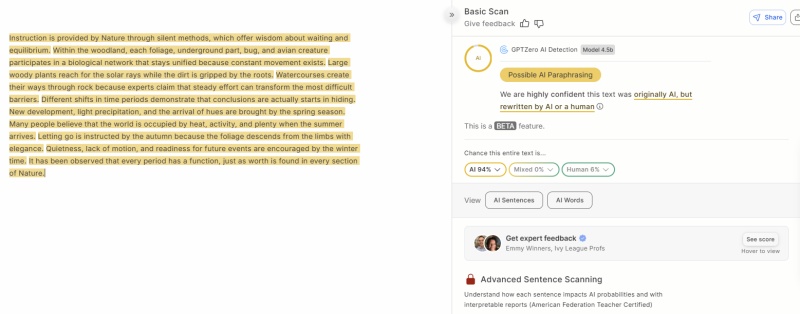
FilterNote VS GPTZero
Test Result: 94% AI Score
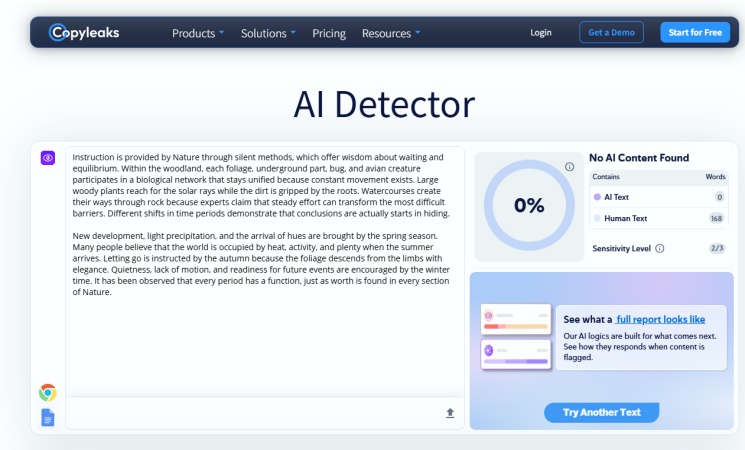
FilterNote VS Copyleaks
Test Result: 0% AI Score
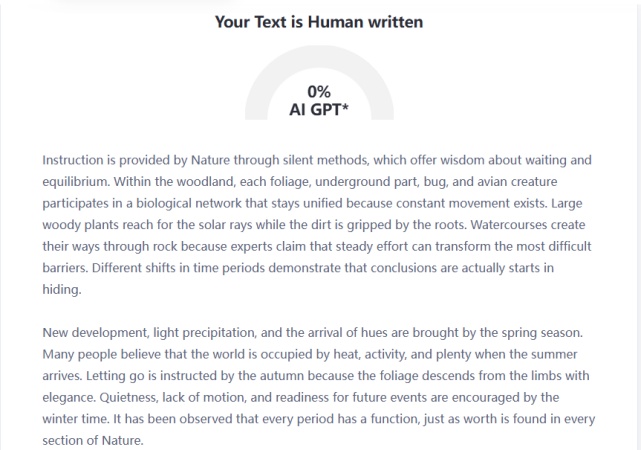
FilterNote VS ZeroGPT
Test Result: 0% AI Score
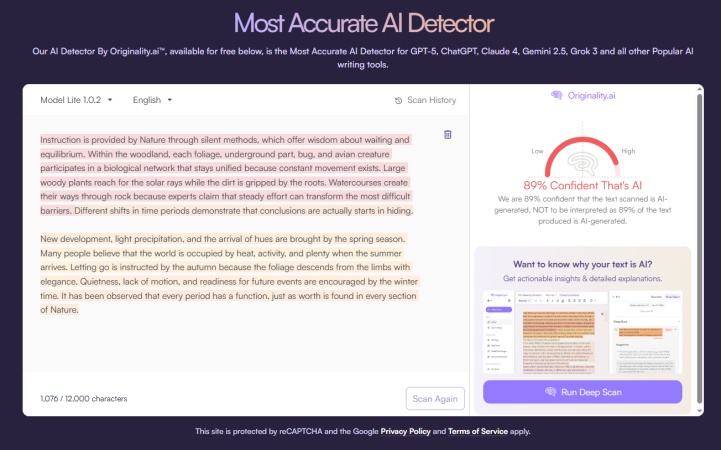
FilterNote VS Originality.ai
Test Result: 89% AI Score
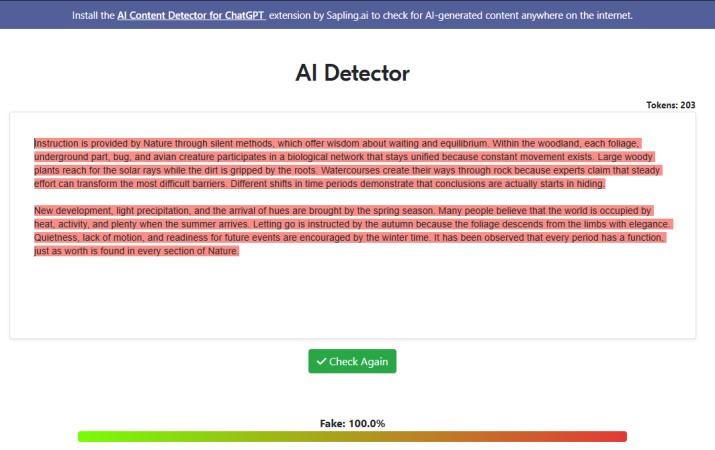
FilterNote VS Sapling
Test Result: 100% AI Score
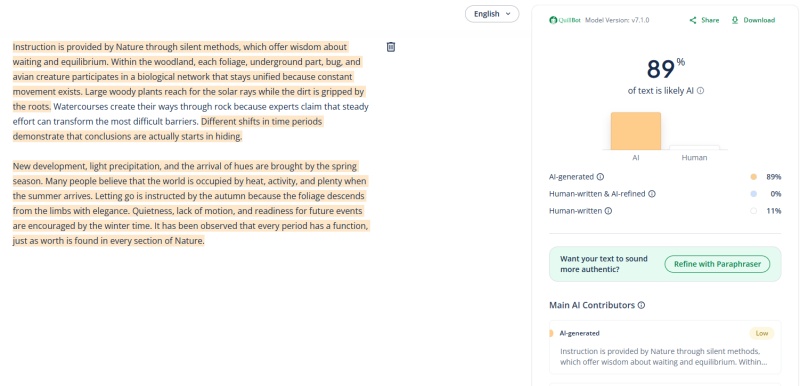
FilterNote VS QuillBot
Test Result: 89% AI Score
FilterNote Test Result: Does It Pass AI Detectors?
After running the FilterNote output through six AI detectors, the results were mixed. FilterNote passed Copyleaks and ZeroGPT with a 0% AI score, but it failed GPTZero, Originality.ai, Sapling, and QuillBot with high AI scores.
Based on our judging rule, FilterNote would only be considered reliable if all AI scores stayed below 10%. In this test, it passed 2 out of 6 detectors and failed 4 out of 6. This means FilterNote may reduce AI detection scores in certain cases, but users should not assume that its rewritten output will reliably bypass all AI detectors.
| AI Detector | AI Score After FilterNote | Result |
|---|---|---|
| GPTZero | 94% | ❌️Fail |
| Copyleaks | 0% | ✔️Pass |
| ZeroGPT | 0% | ✔️Pass |
| Originality.ai | 89% | ❌️Fail |
| Sapling | 100% | ❌️Fail |
| QuillBot | 89% | ❌️Fail |
This result suggests that FilterNote's humanization performance is inconsistent across different AI detectors. It performed well in Copyleaks and ZeroGPT, but it was still strongly flagged by GPTZero, Originality.ai, Sapling, and QuillBot. For users who need reliable AI detection results, it is better to test the output with more than one detector instead of relying on FilterNote alone.
Is FilterNote Free?
FilterNote offers a free trial with limited credits, so users can test the tool before choosing a paid plan.
For continued use, FilterNote provides three yearly pricing plans: Basic, Pro, and Ultra. Each plan includes a monthly word allowance, a per-request word limit, and different levels of processing speed, humanization engine, and support.
| Plan | Price (Annual Billing) | Words Limit | Requests Limit | Main Features |
|---|---|---|---|---|
| Basic | US$2.99/mo | 5,000 words/mo | Up to 600 words/request | Basic Humanization Engine |
| Pro | US$9.99/mo | 20,000 words/mo | Up to 2,000 words/request | Faster processing, Advanced Humanization Engine |
| Ultra | US$19.99/mo | 45,000 words/mo | Up to 3,000 words/request | Priority processing, Advanced Humanization Engine, API access, team support |
The Basic plan is the cheapest option, but its 5,000-word monthly limit and 600-word per-request limit may feel restrictive for long essays, reports, or blog posts. The Pro plan offers a more practical balance, while the Ultra plan is designed for heavier use, especially for teams or users who need API access and higher processing limits.
Overall, FilterNote is free to try, but regular use requires a paid plan. For occasional short rewrites, the free trial or Basic plan may be enough. For users who need to humanize longer AI-generated content regularly, the Pro plan appears to be the more practical option, while Ultra is mainly useful for high-volume or team workflows.
The Best Alternative to FilterNote
FilterNote is useful if your main goal is to humanize AI text. However, it has one important limitation: it does not include a built-in AI detector . That means users need to rewrite their text in FilterNote, then open GPTZero, Copyleaks, Originality.ai, or another detector separately to check the result. This workflow can be slow, especially if the first rewrite still gets flagged.
A stronger alternative like Tenorshare AI Bypass offers a more complete workflow by combining AI humanization with AI detection feedback. Instead of switching between separate tools, users can humanize AI-generated text and check the AI score in one place.
| Feature | FilterNote | Tenorshare AI Bypass |
|---|---|---|
| AI text humanization | Yes | Yes |
| Built-in AI detector | No | Yes |
| Detector-focused rewriting | Yes | Yes |
| Best for | Basic AI humanizing | Humanizing + checking AI score |
| Words limit | Always has a monthly word limit | Unlimited words & requests available |
For users who only need occasional AI text rewriting, FilterNote may be enough. But for users who care about both the rewritten text and the detection result, Tenorshare AI Bypass provides a more complete workflow. It reduces the need to move content between multiple tools and makes it easier to review whether the humanized output still appears AI-generated.
Conclusion
This FilterNote review finds that FilterNote is a straightforward AI humanizer designed to rewrite AI-generated text into a more natural, human-like style. Even so, our testing reveals it cannot reliably bypass all mainstream AI detectors. All in all, FilterNote works well for quick, occasional AI text humanization tasks. However, if you want an all-in-one workflow that combines text humanization and AI score detection, Tenorshare AI Bypass is the more practical choice.

Tenorshare AI Bypass
- Create 100% undetectable human-like content
- Bypass all AI detector tools like GPTZero, ZeroGPT, Copyleaks, etc.
- Original content, free of plagiarism and grammatical errors
- One-click AI bypass with a clean and easy-to-use interface

FAQs
Does FilterNote Have an AI Detector?
FilterNote is mainly built for AI text humanization and rewriting. However, the platform does not come with a built-in AI detector. There is no official detection feature on its interface for you to check AI originality scores directly. After rewriting content with FilterNote, users still need to copy the output and test it manually on third-party AI detection tools separately.
What Do Users Say about FilterNote on Reddit?
There does not appear to be much reliable Reddit discussion specifically about FilterNote. While Reddit has many discussions about AI humanizers in general, FilterNote has less visible community feedback than some better-known tools. Because of that, users should test the tool themselves before paying.
Can FilterNote Bypass AI Detectors?
FilterNote claims it can bypass major AI detectors, including GPTZero, Copyleaks, Originality.ai, ZeroGPT, Sapling, Writer, and QuillBot. However, no AI humanizer can guarantee a 100% pass rate across every detector and every text type.
Can I Use FilterNote AI for Academic Work?
You can use FilterNote to improve readability and make AI-assisted writing sound more natural, but you should follow your school's AI policy. It should not be used to misrepresent AI-generated work as fully original human writing if that violates academic rules.
Is There a Word Limit on FilterNote?
FilterNote appears to use a credit-based system, and free usage is limited. The public pricing section does not clearly show complete plan details in the crawled page content, so users should check the live pricing page or account dashboard before relying on it for long documents.
You Might Also Like
- Huewrite Review 2026: Can It Really Bypass the Top 10 AI Detectors?
- PaperBleach.ai Review 2026: Is It Good, Free & Worth It?
- Tenorshare AI Detector Review: How Well Does It Detect AI Text?
- Is Clever AI Humanizer Good: Honest Review & Real Test 2026
- Sidekicker AI Review: Does it Really Beat AI Detectors?
- Writeless AI Review 2026: Is It Worth Trying?

Tenorshare AI Bypass: 100% Bypass AI Detection
Turn AI text into undetectable, human-like content.AI Humanizer, 100% Undetectable
Humanize AI text instantly.
Tenorshare AI Bypass: 100% Bypass AI Detection