
Can Claude Humanize Text? Best Prompts & Easy Methods
Can Claude humanize text?
Yes. Claude is a powerful AI tool that can help make AI-generated content sound more natural and human-like. With the right prompt, you can use Claude to rewrite text, refine tone, improve readability, and create a smoother writing style. However, achieving consistent results often requires testing different prompts, adapting them to various content types, and building a reusable Claude humanizer skill or workflow. This process can be time-consuming.
In this guide, you'll learn what Claude can and cannot do, how to use it for human-like writing, what a Claude humanize skill should include, and when Tenorshare AI Bypass may be a faster, more convenient alternative.
Catalogs:
Does Claude AI Humanize Text?

Claude can be an effective tool for humanizing AI-generated content, but the quality of the results largely depends on how you use it. With the right prompts, workflows, or skills, Claude can significantly improve the naturalness of a text, yet it still has limitations that users should understand before relying on it as a complete AI humanizer solution.
What Claude Can Do for Human-Like Writing
Claude is useful when your AI-generated text has the right meaning but sounds too robotic. It can help you turn stiff or generic writing into something more natural.
Claude can help with:
-
Rewriting formal AI text into a more conversational style
-
Reducing repetitive sentence patterns
-
Making paragraphs flow more smoothly
-
Replacing generic phrases with clearer wording
-
Adjusting tone for blogs, emails, essays, or social media posts
-
Making content easier for real readers to understand
-
Adding a more natural rhythm to the writing
Claude is also useful for matching a specific tone. You can ask it to make the text sound more casual, more personal, more professional, more direct, or more emotional. This makes Claude a strong writing assistant for people who want better human-like writing without rewriting everything from scratch.
What Claude Cannot Fully Fix in AI-Generated Text
Although Claude can humanize AI text, it has limits. If the original content is too generic, Claude may only make it sound smoother without making it truly original or personal.
Claude may not fully fix:
-
Lack of real experience
-
Repetitive ideas
-
Overly polished structure
-
Generic claims without examples
-
Sentences that sound safe or predictable
-
Content that has no personal opinion or specific detail
-
AI-like transitions such as "in today's digital world" or "it is important to note"
This is why a Claude humanizer prompt is helpful , but not always enough . A prompt can tell Claude what to change, but it cannot create real experience that is not there. If you want your writing to sound genuinely human, you should add your own examples, opinions, stories, data, or brand voice.
Another problem is that Claude may still produce text that sounds "too clean." Human writing is often a little more varied. It may include shorter sentences, stronger opinions, specific details, and a more natural rhythm. Claude can imitate this style, but you may still need to review the final output manually.
So, can Claude AI humanize text? Yes. But can Claude fully remove every AI-like trace by itself? Not always.
How to Use Claude for Human-Like Writing
To get better results from Claude, you should not simply type "humanize this text." That kind of prompt is too vague. Claude needs context, tone, audience, purpose, and clear rewriting rules.
A good Claude AI humanizer prompt should tell Claude:
-
Who the audience is
-
What tone you want
-
What kind of AI-like writing to avoid
-
Whether to keep the meaning unchanged
-
Whether to simplify the text
-
Whether to add personality or natural rhythm
-
Whether to keep the same format
The more specific your instruction is, the more useful Claude's rewritten text will be.
Claude AI Humanizer Prompts You Can Copy
Here are several Claude AI humanizer prompts you can copy and use directly.

Prompt 1: General Claude AI Humanizer Prompt
Rewrite the following AI-generated text to sound more natural, human-written, and easy to read. Keep the original meaning, but remove robotic phrases, repetitive sentence patterns, and overly formal wording. Use a clear, conversational tone. Vary sentence length and make the writing flow like it was written by a real person. Do not add false facts or change the main message. Text: [Paste your text here]
Prompt 2: Claude Prompt to Humanize SEO Content
Humanize the following SEO content while keeping the target keyword natural. Make the writing sound helpful, clear, and written for real readers instead of search engines. Avoid keyword stuffing, generic AI phrases, and repetitive transitions. Keep the content accurate and easy to scan. Use a natural blog writing style. Target keyword: [Insert keyword]. Text: [Paste your text here]
Prompt 3: Claude Humanizer Prompt for Emails
Rewrite this email to sound natural, professional, and human. Keep it polite and clear, but make it less stiff and less AI-generated. Use simple language, natural transitions, and a warm tone. Keep the original purpose of the email. Email: [Paste your email here]
Prompt 4: Claude Prompt for Human-Like Writing
Please rewrite this text as if it were written by a real person with experience in the topic. Keep the meaning the same, but make the tone more natural, direct, and engaging. Add smoother flow, stronger word choices, and more varied sentence structure. Avoid sounding overly polished, generic, or robotic. Text: [Paste your text here]
Prompt 5: Claude AI Humanizer Prompt for Casual Writing
Make this text sound more casual and natural. Keep the main idea, but rewrite it with simpler words, shorter sentences, and a more human rhythm. Remove any phrases that sound like AI-generated content. Make it feel like something a real person would write online. Text: [Paste your text here]
These prompts work better than a simple "humanize this" command because they tell Claude exactly what to improve. You can also adjust the prompt based on your content type. For example, SEO content needs clarity and structure, while an email needs warmth and directness.
Claude Humanizer Skills You Can Build
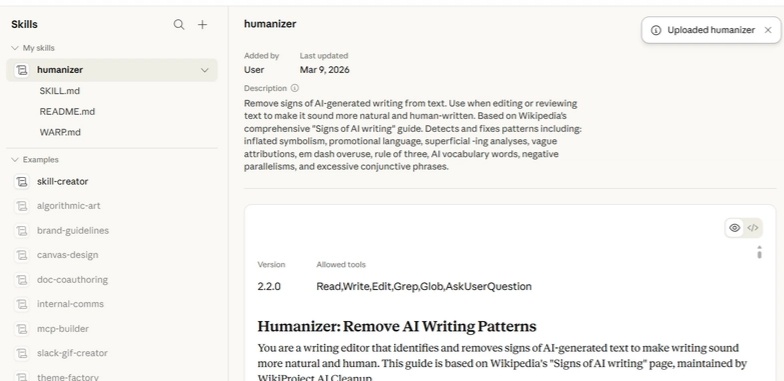
A Claude humanizer skill is different from a simple prompt. A prompt is a one-time instruction. A skill is more like a reusable workflow that helps Claude handle the same type of task again and again.
If you often use Claude to humanize AI text, you can build a Claude humanizer skill that includes your preferred rewriting rules, tone guidelines, examples, and final editing checklist.
A good humanizer skill for Claude should include:
| Skill Component | What to Include |
|---|---|
| Clear Rewriting Goal | Tell Claude to make the text more natural, conversational, and reader-friendly while preserving the original meaning. |
| AI-Like Phrase Checklist | Ask Claude to remove common AI phrases such as “In today’s fast-paced world,” “It is important to note,” “Delve into,” and similar expressions. |
| Sentence Variation Rules | Encourage a mix of short, medium, and long sentences instead of repeating the same structure. |
| Tone and Audience Rules | Define the target audience and desired tone, such as conversational for blogs or professional for business emails. |
| Brand Voice Examples | Provide sample content so Claude can better match your preferred writing style. |
| Before-and-After Review Steps | Have Claude explain key changes and verify that the original meaning remains intact. |
| Final Human Editing Reminder | Remind users to add personal insights, examples, or specific details to make the content more authentic. |
If you are wondering what the best humanizer skill for Claude should include, the answer is simple: it should not just say "make this sound human." It should guide Claude through a complete rewriting process.
When Claude Prompts Are Not Enough: Try Tenorshare AI Bypass
Claude prompts can help, but they are not always the fastest or most reliable option. If you have a lot of AI-generated text to rewrite, or if you do not want to keep testing different prompts, an AI humanizer tool may save more time.
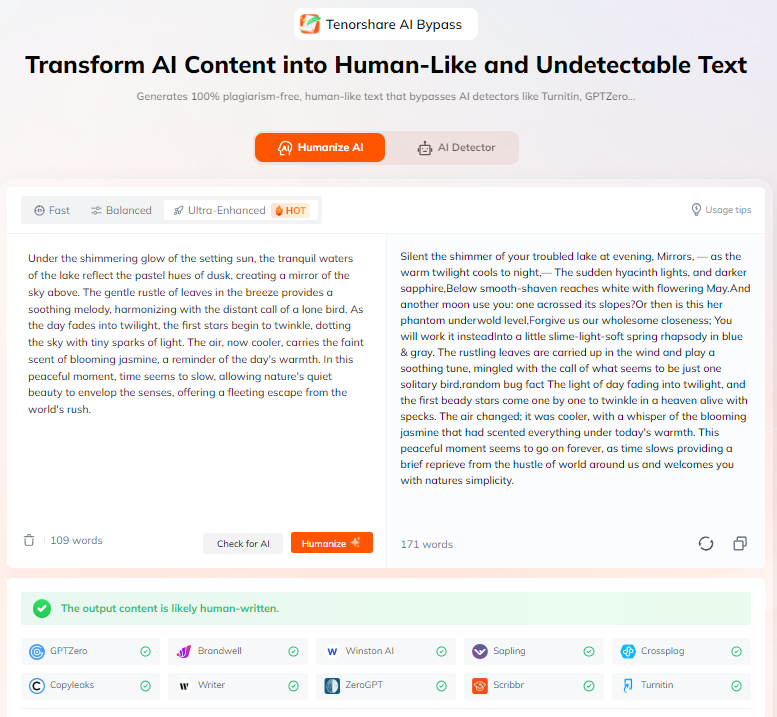
Tenorshare AI Bypass is designed to turn AI-generated text into more natural, human-like writing. It offers stable and reliable humanization with 7 different rewriting tones to match various content formats . With one-click humanization, you can quickly transform AI-generated content. The platform also includes a built-in AI detector, allowing you to check whether the rewritten text is likely to pass AI detection without switching between different tools or platforms.
This can be useful when:
-
Your content feels repetitive, robotic, or lacks a natural human writing style
-
You need to humanize long-form AI writing quickly without manually refining multiple drafts
-
You want a one-step workflow instead of switching between AI generators, prompt libraries, and editing tools
-
You do not want to spend time collecting and testing prompts for different content types, tones, and writing scenarios
-
You want to see whether the humanized text is likely to perform better against AI detection tools without running separate checks
A Claude prompt to humanize text is helpful when you want more control over style and direction. But Tenorshare AI Bypass is a better choice when you want a faster and more direct way to humanize Claude text or other AI-generated content.
Conclusion
So, can Claude humanize text ? Yes, Claude can help make AI-generated content sound more natural, readable, and human-like. It can improve sentence flow, simplify wording, adjust tone, and remove some robotic phrases.
However, if you want to use Claude to humanize text effectively, you often need to spend a significant amount of time and effort collecting suitable prompts and building a reusable workflow.
If you want a faster option, Tenorshare AI Bypass gives you an easier way to humanize Claude text without testing prompt after prompt.

Tenorshare AI Bypass
- Create 100% undetectable human-like content
- Bypass all AI detector tools like GPTZero, ZeroGPT, Copyleaks, etc.
- Original content, free of plagiarism and grammatical errors
- One-click AI bypass with a clean and easy-to-use interface

FAQs
Can Claude write undetectable AI?
Claude can make text sound more natural, but detection results vary depending on the AI detector, topic, and writing style. For better results, review the output manually and add your own insights or examples.
Can Claude AI Humanize Text?
Yes. Claude can rewrite AI-generated text to improve readability, vary sentence structure, and create a more natural tone. The quality of the result largely depends on the prompt you use.
What Is the Best Claude Humanizer Prompt?
A good Claude humanizer prompt should ask Claude to keep the original meaning while removing robotic wording, varying sentence length, and using a more natural tone.
What Is the Best Humanizer Skill for Claude?
The best Claude humanizer skill is a reusable workflow that includes rewriting instructions, tone guidelines, AI-style phrases to avoid, and a final review step. This helps produce more consistent results across different types of content.
Is There a Claude AI Humanizer?
Claude does not have a dedicated feature called "Claude AI Humanizer." However, you can use Claude as a humanizer through prompts or custom skills. If you prefer a simpler solution, tools like Tenorshare AI Bypass are designed specifically for AI text humanization.
How to Add Humanizer to Claude?
You can add a humanizer workflow to Claude by using a reusable prompt or creating a custom Claude humanize skill with your preferred rewriting rules and tone guidelines. For a faster option, you can also use a dedicated AI humanizer tool such as Tenorshare AI Bypass.
You Might Also Like
- Can AI Detectors Be Wrong? Causes, False Positives & How to Reduce Risk
- Can Grok Content Be Detected: Full Test & Results
- Does Canvas Have AI Detection? What It Tracks and What It Cannot Do
- How to Humanize AI Content Manually: Practical Tips & Reliable Tools
- How to Humanize AI Content on Grammarly?
- How to Humanize AI for Research Paper: A Practical Step-by-Step Guide

Tenorshare AI Bypass: 100% Bypass AI Detection
Turn AI text into undetectable, human-like content.AI Humanizer, 100% Undetectable
Humanize AI text instantly.
Tenorshare AI Bypass: 100% Bypass AI Detection