
How to Humanize AI Content on Grammarly?
Grammarly is one of the world's most popular AI English writing assistants, best known for its industry-leading grammar and proofreading features. But did you know it also offers an AI text humanization service?
In this guide, we'll walk you through exactly how to humanize AI content on Grammarly step-by-step, and also share reliable alternatives like Tenorshare AI Bypass and solutions for your needs.
Can Grammarly Humanize AI Text?
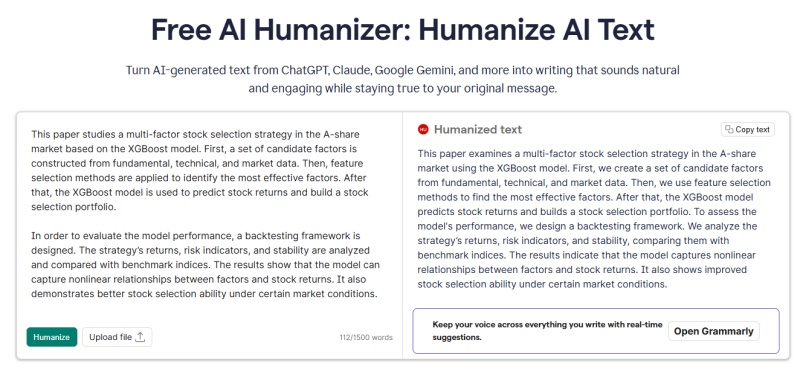
Grammarly includes a Humanizer feature that can adjust AI-generated text to make it read more smoothly. It mainly focuses on correcting grammar and refining phrasing, so its impact on deeper humanization may be limited.
How to Humanize AI Content on Grammarly (Step-by-Step)
Now let's walk through exactly how to humanize AI text in Grammarly.
Step 1. Open the Humanizer in Docs
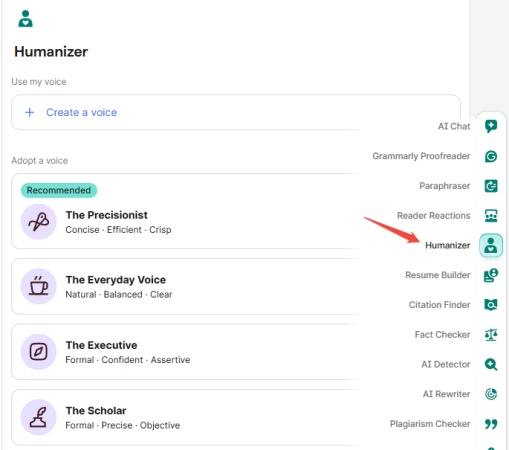
In Grammarly's interface, open your document or paste the text you want to adjust. Then look for the Humanizer option. It is often found among writing enhancement tools within the editor.
Step 2. Choose or Create a Voice
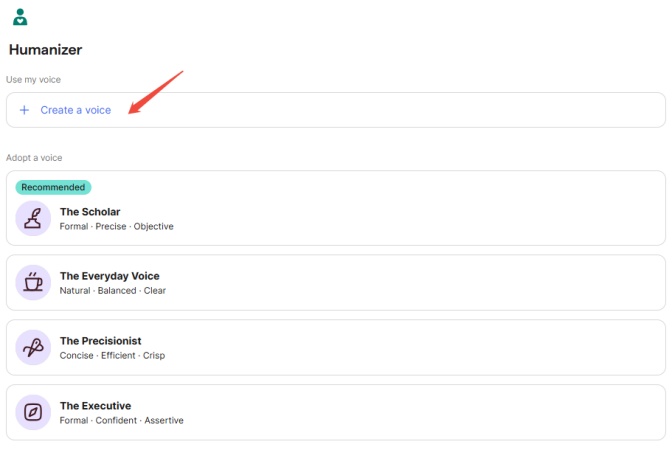
Grammarly's Humanizer allows you to pick from preset stylistic voices or create a custom one. When creating a custom voice, you typically provide a sample of writing to serve as a style reference. The tool can then apply that voice pattern to future edits.
Step 3. Review Suggestions
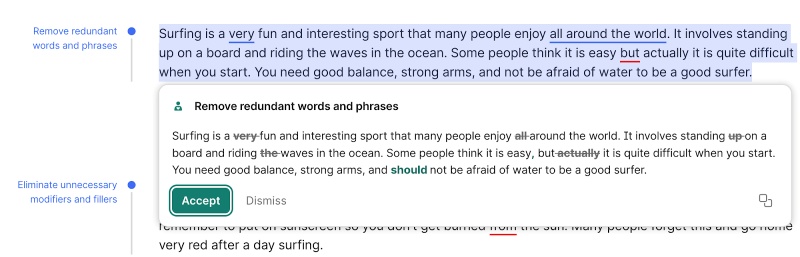
After processing, the Humanizer displays suggestions. These prompt you to revise specific areas of text.
For example, altering phrases that seem stiff or formal. Reviewing each change thoughtfully helps ensure the output still reflects your original intent while improving naturalness.
Is Grammarly Enough for AI Humanization?
While Grammarly offers a convenient way to polish AI-generated text, it is important to understand its real-world limitations before relying on it for critical writing tasks.
From usage restrictions to effectiveness in bypassing detection, we'll break down what this tool can and cannot do, and share practical alternatives when it falls short.
Is Grammarly Humanizer Free?
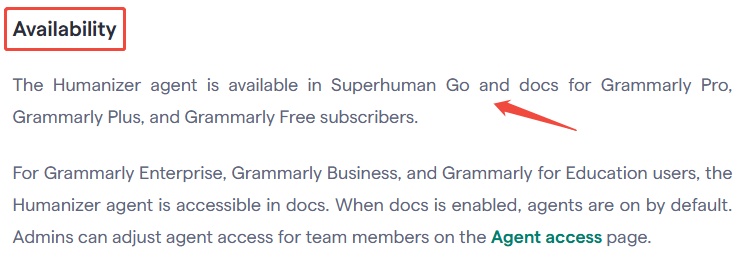
According to the official description, this feature is available for Superhuman Go and Docs for Grammarly Pro and Grammarly Plus. While Grammarly does offer free access to try the feature, our hands-on testing shows that each user is limited to just 3 free uses per day .
Does Grammarly Humanizer Have Any Limits?
Based on both product information and user feedback from independent sources, there are several practical limits worth considering when evaluating Grammarly Humanizer:
1. Light polish only, not full rewriting
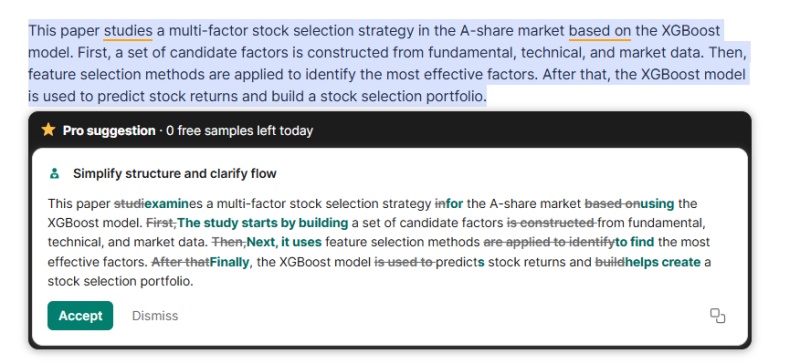
As shown in the example, Grammarly Humanizer only makes incremental phrasing adjustments. It does not restructure sentences or reimagine the original text's flow. The revised version retains the same sentence structure and logical order, acting more as a surface-level polish than a deep humanization rewrite.
2. Free tier has strict daily limits
As noted earlier, registered users without a paid subscription are limited to just 3 rewrite attempts per day. Full, frequent access to the Humanizer feature requires upgrading to a paid Grammarly Pro or Plus plan.
3. Mixed Results on AI Detection
Some independent reviews suggest that while the feature can lower AI-detector scores modestly, it does not reliably make text undetectable. In some tests, even after humanizing, advanced AI detectors still flag content as having AI origins.
Out of Free Humanizer Uses?
If you've used up the daily free attempts available in Grammarly's Humanizer, you have a few practical options. You can wait for the usage limit to reset, upgrade to a paid plan, or try an alternative humanizer to continue working without interruption.
Some users choose to combine multiple tools to make better use of free quotas. One option is Tenorshare AI Bypass , which is positioned as a complementary tool for AI text humanization.
-
Built-in AI Detection Feedback: shows how the text performs against common detection tools right after rewriting.
-
Consistent bypass results: delivers reliable outcomes across major AI detectors.
-
More Continuous Free Usage: offers a free entry point with broader access to its core humanization feature.
-
Multiple humanization modes and tone options: allow users to choose the appropriate rewriting method based on the text type.
-
Workflow Efficiency: allows users to adjust, check, and refine text within a single interface.
Conclusion
When exploring how to humanize AI content on Grammarly , it's clear that the tool provides a convenient way to refine grammar while making light adjustments to AI-generated text in one place. However, for longer or more complex content, its capabilities may be limited, so combining it with other reliable AI humanization tools like Tenorshare AI Bypass can help achieve more consistent and flexible results.

Tenorshare AI Bypass
- Create 100% undetectable human-like content
- Bypass all AI detector tools like GPTZero, ZeroGPT, Copyleaks, etc.
- Original content, free of plagiarism and grammatical errors
- One-click AI bypass with a clean and easy-to-use interface

FAQs
Can Grammarly detect AI-generated content?
Yes. Grammarly includes an AI detection feature that assesses text to indicate likely AI involvement, though its accuracy can vary depending on the context and detector used.
Can Grammarly Rewrite AI Text?
Grammarly offers rewriting and paraphrasing suggestions as part of its broader editing tools. While these can adjust AI-generated text, they are generally focused on clarity and tone rather than full stylistic transformation.
How to reduce AI detection in Grammarly
To reduce AI detection flags, many users combine automated tools with manual edits like adjusting sentence structure, varying vocabulary, and refining tone, in addition to relying on features like the Humanizer.
You Might Also Like

Tenorshare AI Bypass: 100% Bypass AI Detection
Turn AI text into undetectable, human-like content.AI Humanizer, 100% Undetectable
Humanize AI text instantly.
Tenorshare AI Bypass: 100% Bypass AI Detection