
How to Prove I Didn't Use AI: From Emergency Response to Daily Habits
As AI writing becomes more integrated into academic and professional spaces, verifying the authenticity of human-created work has become a key concern for students, writers, and educators alike.
If you've ever wondered how to prove you didn't use AI , this guide covers everything you need: urgent defense steps for sudden accusations, long-term daily habits to protect your work, and a reliable AI bypasser to minimize false positives.
I Didn't Use AI But It Says I Did -- What to Do First
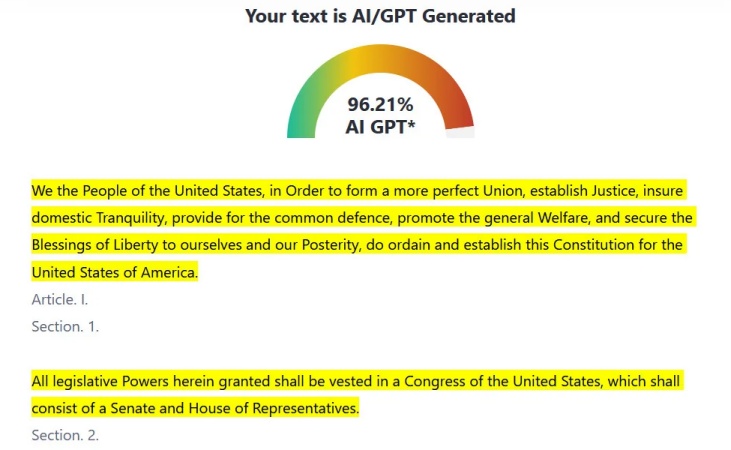
When an AI detector or teacher labels your work as AI-written, your first reaction might be frustration or panic -- but staying organized is key .
First, understand exactly why your work was flagged . Ask for details. Was it a score from a tool like GPTZero or Turnitin? Did a teacher notice specific sentence patterns? Do not delete or modify your files yet. All original writing records could become critical evidence.
Second, stay calm and avoid emotional or defensive messages . A hasty, angry response can make the situation worse.
Third, begin gathering evidence immediately . Collect recent drafts, edit history, research notes, and timestamps. These small details will help you build a clear, believable case that you created the work manually.
Is It Possible to Be Falsely Accused of AI
False accusations of AI use are not rare -- they happen regularly to students, writers, and employees, even when no AI was involved.
Evidence From Research and Real-World Reports
Many studies and media investigations show that AI detection tools are not fully reliable and false accusations are common.
-
An investigation by The Guardian in 2024 reported that confirmed AI cheating cases rose sharply in the 2023–24 academic year. As more institutions adopted AI checkers, false accusation cases also increased significantly.
-
Research in CRNEUR found that popular AI detection tools have high false-positive rates, especially on formal essays and non-native English writing.
-
A study in PLOS One found that AI detection tools sometimes assign high AI likelihood scores to texts that were originally human-authored but revised using AI for grammar.
No AI detection tool is perfect. Learning how to prove your work is original has become a necessary skill for students and writers.
Also read: Can AI Detectors Be Wrong? Research, Errors & Responsible Use
Evidence From Reddit Cases
On Reddit, there are real discussions and reports showing falsely accused of AI happening. Here are a few examples and insights.
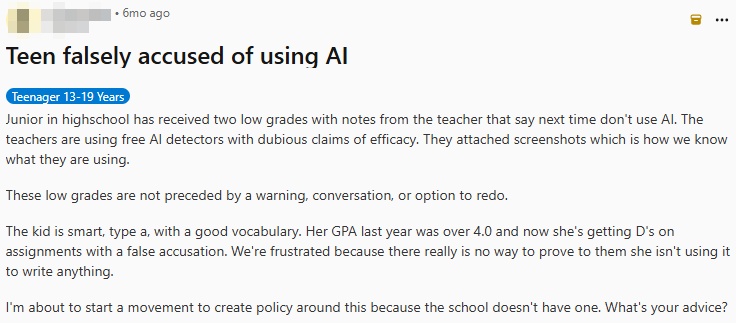
One post shares a high school junior's story. The student received failing grades after teachers used AI detectors to flag her work. The school had no formal policy for such accusations, leaving no clear way to appeal or prove her innocence.
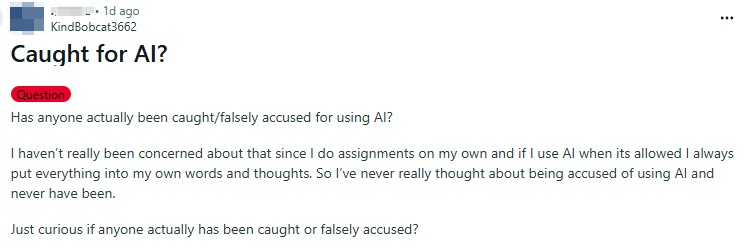
A popular question thread asks if students have ever been falsely accused of AI use. It reflects widespread concern among honest writers, who worry about unfair penalties even when they complete all work independently.
How to Prove You Didn't Use AI in Your Daily Work
Building consistent daily habits is the most reliable way to prevent false AI accusations and create strong proof of your original work. These ongoing practices create a natural, traceable writing process that AI simply cannot replicate.
Use Version History
Nearly every modern writing tool records version history, which shows when you edited, added, or removed content. AI-generated text is usually created in one smooth batch, while human writing shows gradual changes. Showing a clear timeline of edits proves you developed your work over time, not generated it all at once.
Keep Drafts to Track Writing Process
Save multiple drafts: outlines, rough notes, first versions, revised copies, and final work. Each draft shows how your ideas evolved. Teachers and examiners often accept a full chain of drafts as strong evidence that the writing is authentically human.
Document Your Research Process
Keep track of where you found information: links to articles, PDF notes, highlighted textbooks, or handwritten research jottings. When you can connect your writing to specific sources and show your thinking process, it becomes much easier to prove you didn't use AI.
Reduce False Positives Before Submission
Reducing the risk of false positives before submission is just as important as keeping proof of your writing process. Even fully human-written content can be flagged due to overly uniform phrasing or AI-like patterns.
Before submitting your work, review and refine your writing to make it more natural and less predictable. This helps lower the chances of being incorrectly flagged by AI detection tools.
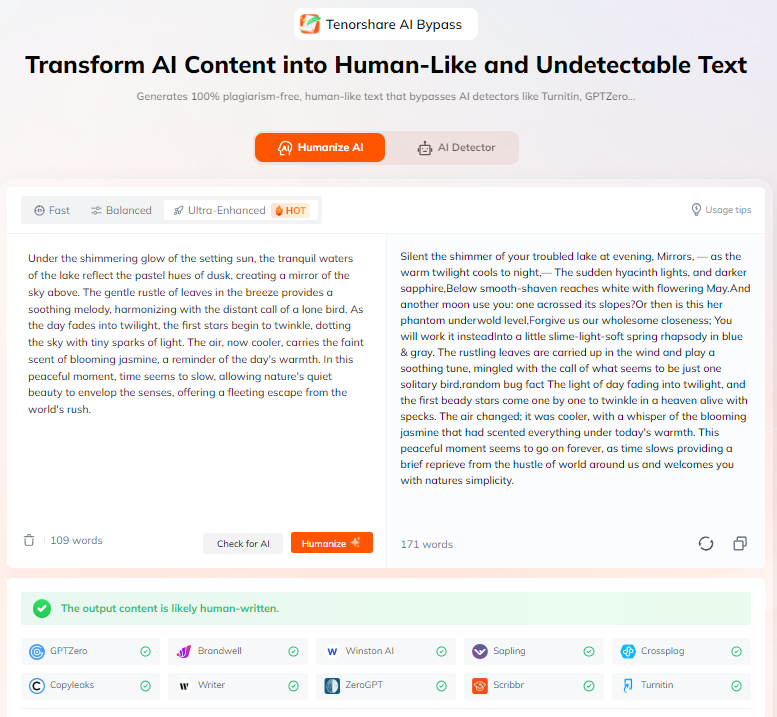
Tenorshare AI Bypass is an effective solution for this purpose.
-
Human-like rewriting: Refines overly polished or AI-like text into more natural, human-style writing.
-
Bypasses detectors: Avoids flags from GPTZero, Copyleaks, and other top AI detectors.
-
Multiple tone options: Supports different rewriting styles, such as academic, to match various writing scenarios.
-
Historical tracking: Keeps and manages all past AI detection results.
-
Multi-language support: Provides reliable detection for global users.
How to Prove You Didn't Use AI on an Essay
Essays are among the most commonly flagged types of work. Below are tool-specific ways to prove your writing is human.
How to Prove I Didn't Use AI on Word
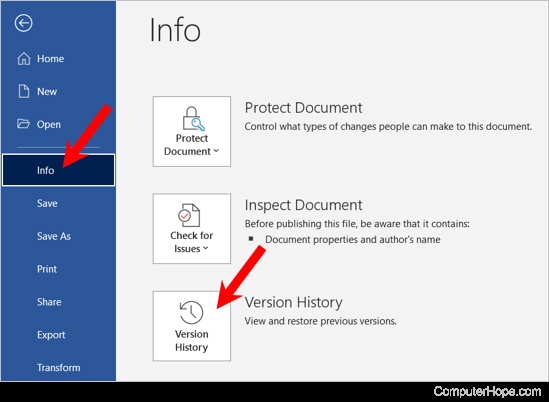
In Microsoft Word, you can:
-
Open the document and go to File > Info > Version History to show edit timelines.
-
Show track changes, comments, and manual revisions.
-
Share older saved versions on your computer or cloud storage to prove gradual development.
-
These features create a clear paper trail that supports your claim of original, human writing.
How to Prove I Didn't Use AI on Google Docs
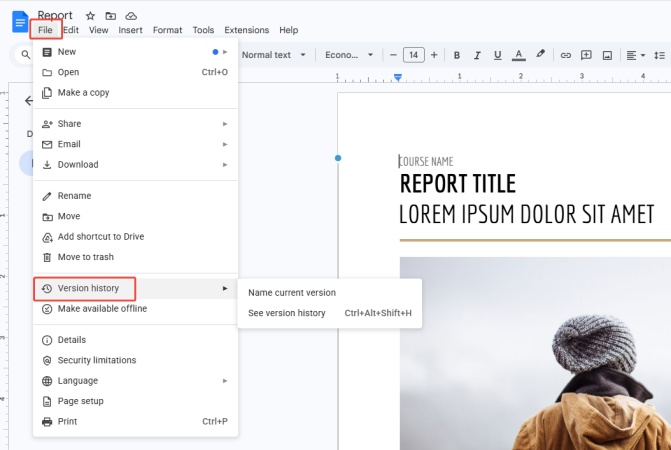
Google Docs makes it easy to prove your process:
-
Go to File > Version history > See version history to view every edit with timestamps.
-
Show comment threads, suggestion mode changes, and collaborative edits if applicable.
-
Share the full version history directly with your teacher or reviewer.
-
The detailed, time-stamped edit log is one of the strongest proofs available.
Conclusion
Proving you didn't use AI works on two levels: quick responses when accusations happen, and daily habits that build long-term proof of your writing process.
By combining immediate defense steps with long-term daily practices, you can master how to prove I didn't use AI in any situation, and safeguard your academic and professional integrity effectively.

Tenorshare AI Bypass
- Create 100% undetectable human-like content
- Bypass all AI detector tools like GPTZero, ZeroGPT, Copyleaks, etc.
- Original content, free of plagiarism and grammatical errors
- One-click AI bypass with a clean and easy-to-use interface

FAQs
My Teacher Thinks I Used AI but I Didn't -- What to Do
Show your full writing process: drafts, version history, research notes, and edit timelines. Explain your work step by step in a polite meeting or email, and remain calm and cooperative.
How to Prove You Didn't Use AI on an Assignment
Collect all physical or digital evidence of your work: outlines, rough drafts, research links, handwritten notes, and tool version history. Present these materials to show gradual, human development.
How to Prove You Didn't Use AI on ChatGPT
You can show that no ChatGPT account linked to you generated the content. You can also share your full writing process to prove the text was created manually. Since ChatGPT produces consistent, one-generation text, your layered writing process will contrast clearly with AI output.
You Might Also Like
- Why Do AI Detectors Flag My Writing | Reasons & Solutions
- Can AI Detectors Be Wrong? Causes, False Positives & How to Reduce Risk
- How to Humanize AI Content Manually: Practical Tips & Reliable Tools
- How to Humanize AI for Research Paper: A Practical Step-by-Step Guide
- Why AI Humanizers Don't Work: 8 Hidden Reasons & 2 Fixes
- Tenorshare AI Detector Review: How Well Does It Detect AI Text?

Tenorshare AI Bypass: 100% Bypass AI Detection
Turn AI text into undetectable, human-like content.AI Humanizer, 100% Undetectable
Humanize AI text instantly.
Tenorshare AI Bypass: 100% Bypass AI Detection