
Is Claude AI Down Today? Live Status, Causes, and Fixes
Claude AI has grown rapidly in popularity as a reliable AI tool for writers, students, educators, and professionals. Many users depend on Claude AI daily for creating content, research assistance, and drafting ideas. However, nothing frustrates users more than discovering that Claude AI is down. If Claude AI is not working today, it can cause delays in content creation and disrupt workflow.
This article explains everything you need to know when is Claude AI down : live status checks, common causes, step-by-step fixes, and what to do if the problem continues. We will also introduce a smart solution, Tenorshare AI Bypass, to maintain productivity even when Claude AI goes offline.
Catalogs:
Is Claude AI Down Today or Just You?
When Claude AI is down, users often panic. However, not all issues are global. Sometimes, the problem is on the user's side.

Here are some ways to differentiate:
-
Global outage : Many users report Claude AI is down, social media updates confirm the issue, and official status pages show downtime.
-
User-side problem : Only you face blank responses, app loading errors, or login issues, while others use Claude AI normally.
Common signs that Claude AI is down today include:
-
App or website not loading
-
Blank responses or failed prompts
-
Login errors or session timeouts
Before assuming Claude AI is down, check if the problem is widespread. Ask colleagues, visit online forums, or check the official Claude AI status page.
How to Check Claude AI Server Status in Real Time
If you suspect Claude AI is down, verify the server status before panicking. Here's how:
Official Status Page
Claude AI provides a server status page showing uptime, maintenance updates, and ongoing issues. Visit this page to confirm if Claude AI is down today.
Social Media & Community Reports
Twitter, Reddit, and Discord often report outages faster than official channels. Searching "Claude AI down" or "Claude.ai down again" can show real-time user experiences.
Third-Party Uptime Monitors
Websites like DownDetector track downtime reports from multiple users. They give a clear idea if Claude AI is experiencing a global outage. Always check multiple sources. Sometimes your local network or browser may cause Claude AI not working today, even if the server is fine.
Common Reasons Why Claude AI Is Not Working
There are several reasons Claude AI may stop working. Understanding these helps in quick troubleshooting.

Server Outages or Maintenance
Claude AI servers sometimes undergo maintenance. During this time, users may face downtime or limited functionality. These outages are usually temporary.
Rate Limit Errors
If you receive a "rate exceeded" message, Claude AI is limiting requests. This occurs when many requests come from the same account or IP.
High Traffic or Peak Usage
When traffic spikes, Claude AI may respond slowly or not at all. Servers may prioritize certain users, causing some sessions to fail.
Browser or Cache Issues
Old cache files can cause Claude AI not working today. Clearing the browser cache or using a fresh browser session often solves this problem.
Account or Network Restrictions
Some network firewalls or account restrictions block access to Claude AI. Checking your network settings can fix these problems.
How to Fix Claude AI Not Working Issues
Here are step-by-step solutions when Claude AI is down or not responding:
-
Refresh and Retry : Simple but effective. Refresh the page or reopen the app to restore connection.
-
Log Out and Log In Again : Re-login can fix session errors and resolve account-related issues.
-
Clear Browser Cache : Remove old cookies and cache to prevent loading errors.
-
Try Incognito or Another Browser : Incognito mode disables extensions that may block Claude AI.
-
Check Internet/VPN Issues : Slow or restricted connections can cause Claude AI not working today. Switch networks or disable VPN temporarily.
-
Wait and Retry During Peak Hours : If the issue is traffic-related, try using Claude AI during off-peak times.


What to Do When Claude AI Is Down for Work or Studies
Claude AI downtime affects many users:
-
Writers face delays in generating drafts or brainstorming content.
-
Students struggle to complete assignments or research.
-
Educators rely on Claude AI for lesson plans and teaching resources.
-
Professionals experience interruptions in content creation and workflow.
Incomplete AI-generated drafts can slow down work. In such cases, having a backup plan ensures productivity. A tool like Tenorshare AI Bypass can help continue work without relying on Claude AI.
Tenorshare AI Bypass - Smart Support for AI Content
Tenorshare AI Bypass is a reliable companion for writers, students, educators, and professionals. This all-in-one tool converts AI-generated text into natural, human-like content that bypasses most AI detection systems. With advanced AI training on millions of human-written datasets, it replicates human writing patterns accurately.
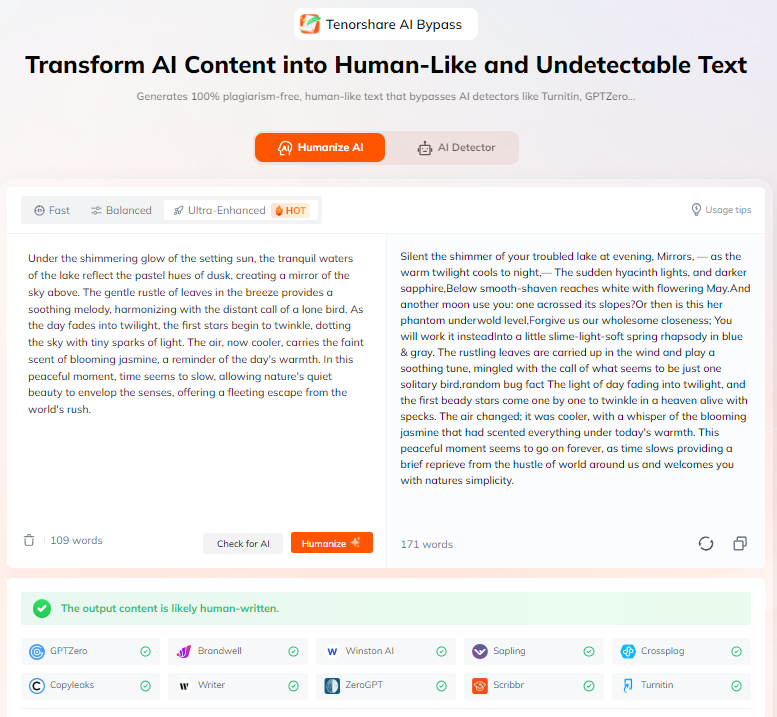
Users can quickly refine drafts, improve content readability, and maintain workflow without delays. Supporting over 50 languages, Tenorshare AI Bypass ensures your work looks genuine and fluent, even when other AI tools fail or produce detectable text.
Conclusion
Claude AI downtime is usually temporary and often caused by server maintenance, high traffic, or rate limit errors. Users should always check the server status before panicking. For those who rely on AI for writing, studying, or professional work, having a backup plan is essential.
Tenorshare AI Bypass ensures you can refine content, maintain workflow, and convert AI drafts into human-like content even when is Claude AI down. Next time Claude AI is not working today, stay calm, check the server status, and use tools like Tenorshare AI Bypass to continue your work smoothly.
FAQs
Is Claude AI down right now?
You can check official status pages, social media, and third-party uptime monitors to see if Claude AI is down today.
How often does Claude AI go down?
Downtime is rare and usually brief. Most outages occur during maintenance or peak traffic.
What does "rate exceeded" mean in Claude AI?
It means your account sent too many requests in a short time. Waiting or reducing requests usually fixes this.
Is Claude AI downtime temporary?
Yes, most downtime is temporary and resolved within minutes to a few hours.
Can I still work on AI content when Claude AI is down?
Yes, using tools like Tenorshare AI Bypass allows you to refine AI drafts and maintain workflow even when Claude AI is not working today.

Tenorshare AI Bypass
- Create 100% undetectable human-like content
- Bypass all AI detector tools like GPTZero, ZeroGPT, Copyleaks, etc.
- Original content, free of plagiarism and grammatical errors
- One-click AI bypass with a clean and easy-to-use interface

You Might Also Like
- How to Prevent Plagiarism with ChatGPT: Full Guide 2026
- How to Remove Plagiarism from Code Easily: A Complete Guide
- How to Humanize AI Text Free for Unlimited Words?
- Can Turnitin Detect Humanize AI: Full Test in 2026
- How to Humanize AI Text in Malay Online Free 2026
- How to Bypass Winston AI Detector (Free & Effective Ways in 2026)

Tenorshare AI Bypass: 100% Bypass AI Detection
Turn AI text into undetectable, human-like content.AI Humanizer, 100% Undetectable
Humanize AI text instantly.
Tenorshare AI Bypass: 100% Bypass AI Detection