
How to Remove ChatGPT Watermark: Clean Invisible Watermark Easily
Have you ever copied text from ChatGPT and found hidden formatting or invisible characters in Word, Google Docs, or a code editor? These subtle traces may act like a ChatGPT watermark, making AI-generated text easier to detect.
Some newer ChatGPT models may include invisible Unicode characters, such as U+202F, which look like normal spaces but can be identified by certain tools.
So, how to remove ChatGPT watermark from your text? In this guide, we'll explain what causes these hidden markers and show you easy ways to clean them automatically with Tenorshare AI Bypass or manually with Unicode tools.
Does ChatGPT Leave a Watermark?
Yes, newer ChatGPT models may include subtle traces in their text. These are often invisible Unicode characters, such as the Narrow No-Break Space (U+202F). They look like regular spaces but act as hidden markers.
This kind of ChatGPT invisible watermark has been spotted by users when copying content into Microsoft Word or code editors. While OpenAI claims they are not intentional, their repeated appearance raises concerns.
These ChatGPT Unicode markers do not affect readability but can be detected with the right tools. That's why many users now search for ways to remove or bypass them completely.
How to Remove ChatGPT Watermark?
There are two main ways to remove watermark markers from ChatGPT content. One is automatic and fast, the other offers full manual control.
Method 1: Use Tenorshare AI Bypass (One Click)
The easiest and most effective solution is to use Tenorshare AI Bypass. It is designed to clean and rewrite AI-generated text, removing hidden formatting and making it undetectable.
As a powerful ChatGPT watermark remover, it:
-
Rewrites your content into human-like language
-
Breaks invisible characters such as U+202F
-
Avoids detection from tools like GPTZero and Turnitin
-
Supports multiple modes to balance speed and accuracy
How to remove ChatGPT watermark using Tenorshare AI Bypass:
-
Go to Tenorshare AI Bypass and paste your ChatGPT-generated text into the input box to begin cleaning hidden ChatGPT watermark.

-
Select a rewriting mode based on how natural or undetectable you want the final content to be.
-
Click Humanize to instantly generate clean text without ChatGPT invisible watermarks or formatting traces.


If you're looking for how to remove ChatGPT watermark with minimal effort, this is the recommended method. It requires no installation and works entirely online.
| Pros | Cons |
|---|---|
| One-click to remove ChatGPT watermark | Free version may have limits |
| Removes invisible characters automatically | / |
| No technical knowledge required | / |
| Supports rewriting to human-like text | / |
Method 2: Remove Unicode Characters with SoSciSurvey (Manually)
If you prefer a hands-on approach, you can detect and delete hidden characters manually.
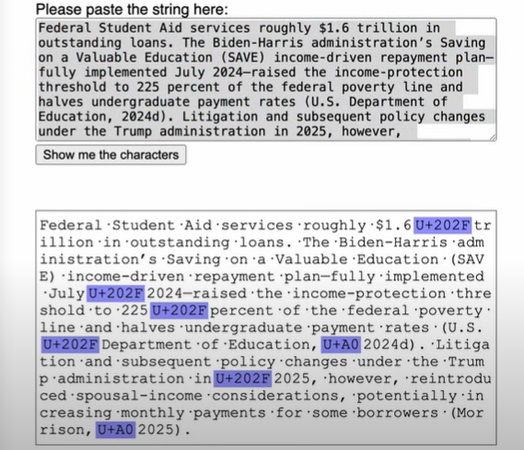
- Copy your ChatGPT text into SoSciSurvey Unicode Analyzer.
-
Look for invisible Unicode characters like U+202F.
-
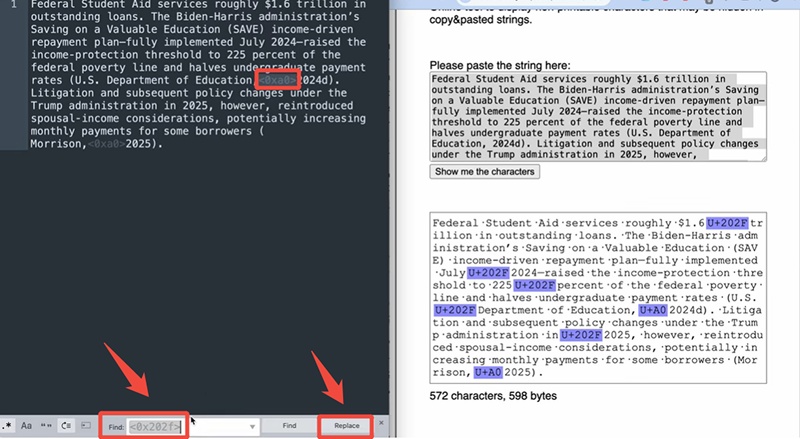
Open the text in Sublime Text or VS Code .
-
Use Find and Replace to clean them.
- Save the updated, watermark-free version.
This method is slower but gives you full control over what you edit.
| Pros | Cons |
|---|---|
| Full control over each change | Time-consuming and requires attention to detail |
| No reliance on third-party tools | Requires basic knowledge of text editors |
| Ideal for checking exact Unicode characters | Higher chance of missing hidden markers |
Also Read: How to Make ChatGPT Undetectable Free? 8 Proven Methods
Why You Need to Remove Watermark?
Many users rely on ChatGPT for writing, especially students and content creators. But few realize that invisible markers in the text could expose the use of AI tools. As AI detectors improve, even subtle ChatGPT invisible watermarks may trigger plagiarism alerts.
For students, this can mean failed assignments. For bloggers or marketers, it can damage credibility or SEO performance. Removing these hidden elements helps ensure your content stays clean, natural, and undetectable.
That is why using a reliable ChatGPT watermark remover matters. Whether you choose an automatic tool or a manual Unicode-cleaning method, removing hidden watermark traces can make your AI-generated text safer, cleaner, and easier to use.
Conclusion
ChatGPT outputs may contain invisible Unicode characters that act like hidden watermarks. These markers are harmless but can be detected by certain tools, which may raise concerns.
If you want to know how to remove ChatGPT watermark from your text, using a trusted ChatGPT watermark remover is the easiest option. Tenorshare AI Bypass offers a fast, one-click way to clean, rewrite, and remove hidden watermark traces. If needed, you can also use Unicode tools to remove invisible characters manually.

Tenorshare AI Bypass
- Create 100% undetectable human-like content
- Bypass all AI detector tools like GPTZero, ZeroGPT, Copyleaks, etc.
- Original content, free of plagiarism and grammatical errors
- One-click AI bypass with a clean and easy-to-use interface

FAQs
Does ChatGPT have an invisible watermark?
ChatGPT does not add a visible watermark to its text. However, some users have reported invisible Unicode characters, such as U+202F, in ChatGPT-generated content. These characters may look like normal spaces but can sometimes be detected by text editors or Unicode analyzers. Similar invisible watermark concerns may also appear in other AI tools, such as Gemini and Grok.
Is using AI to remove watermark illegal?
Removing hidden formatting or invisible Unicode characters from your own text is generally not illegal. However, you should not use any tool to violate school rules, workplace policies, copyright laws, or platform guidelines. If you use AI-generated content, make sure it follows the rules of the place where you submit or publish it.
How to remove ChatGPT watermark on Mac?
On Mac, you can paste your ChatGPT text into a plain text editor, such as TextEdit in plain text mode, to remove some hidden formatting. For invisible Unicode characters, you can also use an online Unicode analyzer or a code editor like Sublime Text or VS Code to find and replace special spaces.
How to remove ChatGPT watermark in Google Docs?
To remove ChatGPT watermark in Google Docs, first paste the text using Paste without formatting. Then check for unusual spacing or hidden characters. You can also copy the text into a Unicode analyzer, remove characters like U+202F, and paste the cleaned version back into Google Docs.
How to remove ChatGPT watermark with Notepad?
Open Notepad and paste your ChatGPT-generated text into it. Since Notepad uses plain text, it can remove many hidden formatting styles. After that, copy the text back to your document. For invisible Unicode markers, you may still need a Unicode detection tool to check and clean them fully.
How to remove ChatGPT watermark with Sublime Text?
Paste your ChatGPT text into Sublime Text, then use the Find and Replace feature to search for invisible Unicode characters such as U+202F. Once found, replace them with normal spaces. This method gives you more control when cleaning hidden ChatGPT watermark traces manually.
How to see ChatGPT watermark in Word?
To see possible ChatGPT watermark traces in Word, turn on hidden formatting marks by clicking the paragraph symbol. You can also copy the text into a Unicode analyzer to check whether it contains invisible characters like U+202F. Word may show unusual spacing, but a Unicode tool is more accurate for detecting hidden markers.
You Might Also Like
- How to Do the ChatGPT Picture Roast 2026
- Five Things to Never Tell ChatGPT: Protect Your Privacy
- Daily Usage Limits Explained: ChatGPT’s o3, o4-mini, and o4-mini-high Models
- o3 vs o4-mini: Which ChatGPT Reasoning Model Wins?
- How ChatGPT Can Turn a Pet Into a Human
- ChatGPT Barbie Trend 2026: How to Make Your AI Doll?

Tenorshare AI Bypass: 100% Bypass AI Detection
Turn AI text into undetectable, human-like content.AI Humanizer, 100% Undetectable
Humanize AI text instantly.
Tenorshare AI Bypass: 100% Bypass AI Detection