
Does Packback Detect AI? What You Need to Know in 2026
As AI writing tools like ChatGPT and Claude become widely used in academic settings, students are increasingly asking one question: Does Packback detect AI?
If you use Packback for discussions or assignments, understanding how its detection system works and its limitations helps you avoid unnecessary risks and false accusations.
This 2026 guide explains what Packback actually does, what professors can see, and how to directly bypass Packback's AI detection using a reliable AI humanizer tool .
The Short Answer: Can Packback Detect AI?
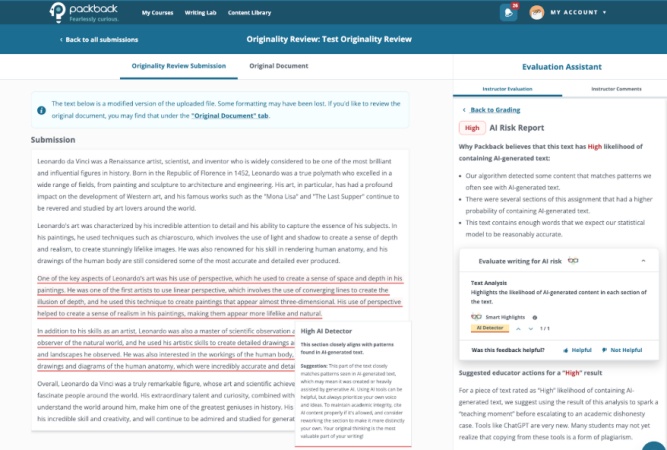
Yes, Packback is equipped with a sophisticated "AI Risk Indicator" designed to flag potentially AI-generated content. According to its official documentation, the platform uses a probability model to analyze whether a post matches linguistic patterns typical of AI tools such as ChatGPT. Importantly, Packback does not automatically remove or ban posts based on this score alone. Instead, it assigns instructors a risk level from Low to High, leaving the final academic integrity decision to them.
In short, Packback can mark text suspected of being AI-generated, but it cannot definitively prove whether a student actually used AI. It only serves as partial evidence to support instructors' judgment.
How Does Packback Detect AI?
In general, Packback includes an AI Risk Indicator in its Originality Fingerprint report to assess how closely your writing matches patterns typical of AI-generated text. The analysis examines factors such as word choice, sentence structure, and linguistic predictability.
The Originality Fingerprint report contains two key indicators:
-
Uniqueness: how unique your text is compared to online sources and other previously submitted work on Packback.
-
AI Risk: how likely your writing is identified as AI-generated by the platform's algorithm.
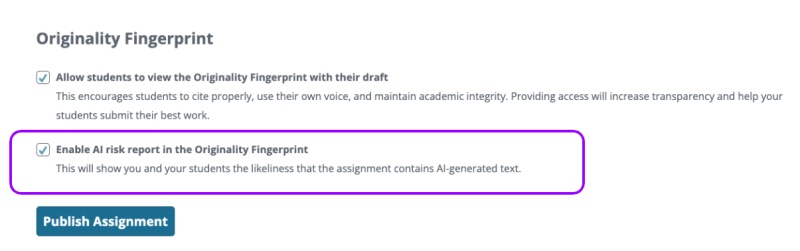
By default, only instructors can view the full Originality Fingerprint report, including the AI Risk score. Whether students can also access this report depends entirely on the instructor's assignment settings.
If the instructor enables visibility for students:
-
For most discussion posts , you can run the report and view results in the Instant Feedback sidebar while drafting.
-
For formal writing assignments (such as Deep Dives or Originality Reviews), students may be able to see the report during drafting, or only after submission and grading, based on instructor preferences.
Once available, the report displays an AI Risk level (Low, Medium, High) and often includes Smart Highlighter markings to identify sections the algorithm considers more likely to be AI-generated.
How to Get Around Packback AI Detection?
To successfully navigate Packback in 2026, you shouldn't just try to "hide" AI. Instead, you need to transform your writing to meet Packback's specific high-quality metrics. Here is the step-by-step strategy to bypass the Packback AI check while securing a top-tier grade.
Use an AI Humanizer for a "Human" Foundation
The most critical step is reducing signals that trigger the AI Risk Indicator -- especially the overly "smooth" and predictable patterns commonly found in AI-generated text.
In theory, you can manually rewrite your content to add variation. But in practice, this is difficult to do consistently. This is where an AI humanizer becomes much more effective. Tools like Tenorshare AI Bypass go beyond basic paraphrasing.
-
Human-Like Rewriting: Reconstructs sentence structures and introduces natural variation.
-
Bypass Mainstream AI Detectors: Reduces predictability and makes the text less likely to trigger high AI Risk scores.
- Adjustable Tone & Style: Adjusts the tone of your writing, making it less uniform and more personalized.
As a result, your writing no longer reads like standard AI output, but closer to authentic human expression. This ensures your AI Risk report stays in the "Low" zone .
Hack the "Curiosity Score"
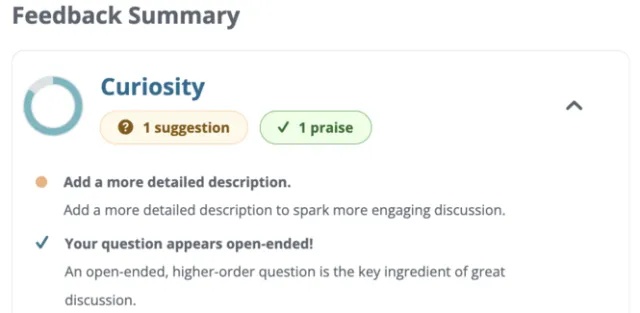
One crucial point to clarify: professors are the ultimate judge when determining whether a student has used AI dishonestly. Besides AI Risk score, instructors also rely heavily on class participation, which is reflected in Packback's Curiosity Score .
In Packback Discussions, you can show independent thinking and active class involvement with high quality posts. If a professor sees a slightly elevated AI risk score but observes strong, class-specific engagement reflected in your Curiosity Score, they will be much less likely to accuse you of academic dishonesty.
Leverage the Feedback Summary
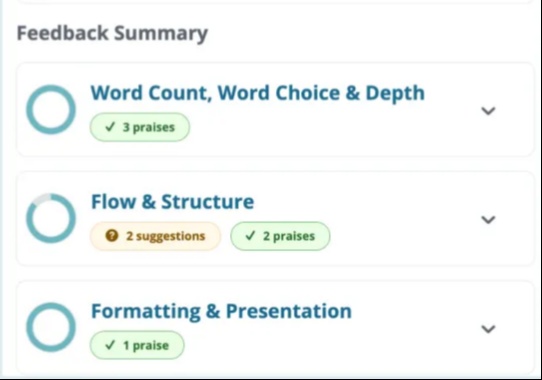
For long-form assignments in Packback Writing, students can access a detailed Feedback Summary before final submission. This dashboard acts as a "pre-grading" scanner that evaluates your writing across three specific pillars:
-
Word Count, Word Choice & Depth: This section checks if your vocabulary is diverse and academic. AI often uses "fluff" words. If you lack "Praises" here, it means your content is too shallow.
-
Flow & Structure: This is where AI patterns are often caught. If you see "Suggestions", your transitions might be too robotic or repetitive.
-
Formatting & Presentation: Ensures your citations and layout meet academic standards.
Before you submit, check these circles and use an AI humanizer like Tenorshare AI Bypass to rephrase those specific sections.
What Professors Actually See in Their Packback Dashboard?
In 2026, the grading process is highly automated; professors don't guess -- they rely on a forensic breakdown called the AI Risk Indicator. When a professor logs in, they see a "Moderation Queue" where every post is analyzed through three specific lenses:
Color-Coded Risk Labels
Each submission is tagged as Low (Green), Medium (Yellow), or High (Red). A "High Risk" flag means the Originality Fingerprint found a near-perfect match with AI linguistic patterns.
The "Smart Highlighter"
This tool provides a sentence-by-sentence breakdown, highlighting AI-suspect phrases in red. It specifically targets "perfect" fluency and robotic transitions that lack natural human variance.
The "Undeploy" Action & Paper Trail
Professors can "Undeploy" flagged posts, forcing students to "Edit and Republish". They also track your Curiosity Score history. A sudden, unexplained jump in writing quality combined with a High-Risk flag is often the "smoking gun" for academic dishonesty.
Can Packback Tell If You Use ChatGPT or Claude?
Packback can identify content generated by mainstream AI tools such as ChatGPT and Claude by recognizing linguistic patterns typical of generative AI. However, it cannot definitively determine which specific AI model or platform was used. According to its official documentation, the system only detects general AI-like patterns in language consistency and predictability, rather than distinguishing between ChatGPT‑4o, Claude 3.5, Gemini, or any other particular tool. As a result, all AIgenerated content faces similar risk of being flagged if it has not been sufficiently humanized.
Conclusion
So, does Packback detect AI ?
The short answer is yes. Packback utilizes the Originality Fingerprint system to scan for AI-generated patterns. However, it is crucial to remember that the algorithm is only one part of the story. Your professor is the final judge. To protect your academic reputation on Packback, engage actively in class and reference unique lecture details that AI cannot replicate, and use Tenorshare AI Bypass while combining personal insights to meet both platform detection and professor expectations .

Tenorshare AI Bypass
- Create 100% undetectable human-like content
- Bypass all AI detector tools like GPTZero, ZeroGPT, Copyleaks, etc.
- Original content, free of plagiarism and grammatical errors
- One-click AI bypass with a clean and easy-to-use interface

FAQs
Does Packback Detect ChatGPT-4o, Claude 3.5, or the Latest AI Models?
Yes, the Packback AI detection system is not static. It is constantly updated to recognize the linguistic fingerprints of the newest Large Language Models (LLMs). Whether you are using ChatGPT-4o, Claude 3.5, or Gemini, the platform analyzes the "predictability" and "uniformity" of the text. Even if these newer models sound more human-like to a person, they still follow mathematical patterns that the Originality Fingerprint can identify.
Can Packback Detect AI If I Manually Edit the ChatGPT Output?
Manual editing can help, but it is often insufficient to fully bypass the Packback AI check. Packback's algorithm looks at "burstiness" (variation in sentence length) and "perplexity" (complexity of word choice). To truly hide the AI origin, you would need to rewrite nearly every sentence from scratch -- which is why using a professional tool like Tenorshare AI Bypass is far more efficient.
How Can I Improve My Curiosity Score While Ensuring My AI Risk Stays Low?
Improving your Curiosity Score and lowering your AI Risk actually go hand-in-hand. Packback's "Digital TA" rewards posts that ask open-ended questions, include specific external citations, and use diverse vocabulary. To achieve this without triggering detection, you should focus on adding "human-only" elements: mention a specific live-class discussion, share a personal anecdote, or link to a niche research paper that isn't part of standard AI training data.
You Might Also Like
- Does Turnitin Detect ChatGPT 5? Full Detection and Avoidance Guide
- Do UCS Check AI? Complete Guide to UC Application AI Detection
- Tenorshare AI Detector Review: How Well Does It Detect AI Text?
- Does Canvas Have AI Detection? What It Tracks and What It Cannot Do
- Can AI Detectors Be Wrong? Causes, False Positives & How to Reduce Risk
- Why Do AI Detectors Flag My Writing | Reasons & Solutions

Tenorshare AI Bypass: 100% Bypass AI Detection
Turn AI text into undetectable, human-like content.AI Humanizer, 100% Undetectable
Humanize AI text instantly.
Tenorshare AI Bypass: 100% Bypass AI Detection