
How Do Teachers Check for AI ? A Guide to Detection Methods and Tools
As AI tools like ChatGPT, Claude, and Gemini grow increasingly prevalent in students' daily study, teachers are placing greater focus on detecting AI-generated content. You may try figuring out: how do teachers check for AI ?
In this article, we will focus on your actual teaching needs and guide you through the specific methods to check for AI use across various types of student work.
Can Teachers Really Detect AI?
Yes, teachers can really detect AI with certain methods.
When you are faced with suspecting whether a student's work is AI-generated, a useful AI detection tool like Tenorshare AI Detector and your own professional judgment can provide great help.
How Teachers Check for AI in Essays?
When evaluating student essays, you can focus on three key aspects: writing style, fluency of argumentation, and personal expression. This is because AI-generated essays often exhibit distinct characteristics, including:
-
A flat, monotonous tone throughout
-
Perfect grammar but overly simplistic sentences
-
A lack of personal insights or authentic examples.
You can also compare submitted student essays with previous drafts or classroom writing samples. If the essay style or vocabulary suddenly improves significantly, contrary to the student's previous levels, it's highly likely that AI was used.
When you identify the above characteristics in a student's essay, you can use AI detectors such as Tenorshare AI Detector to corroborate your findings.
-
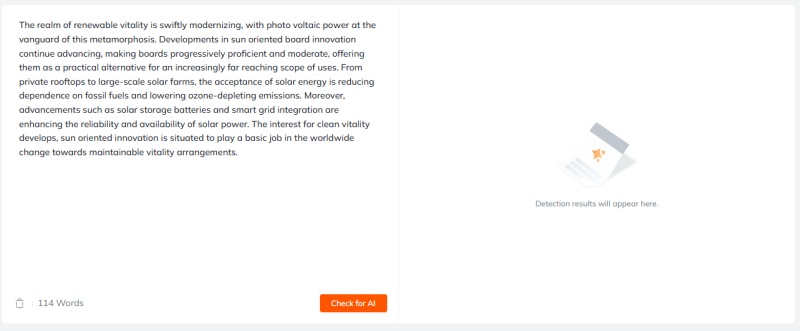
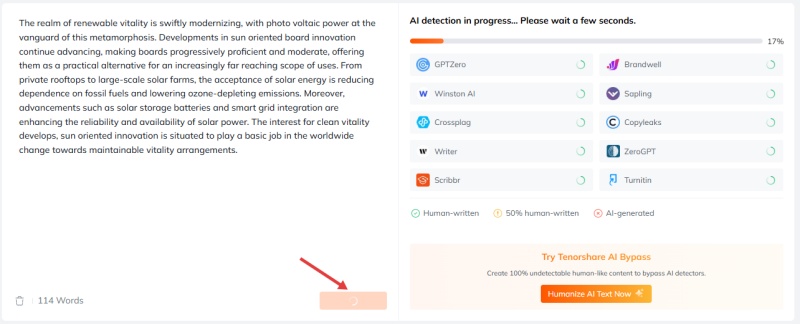
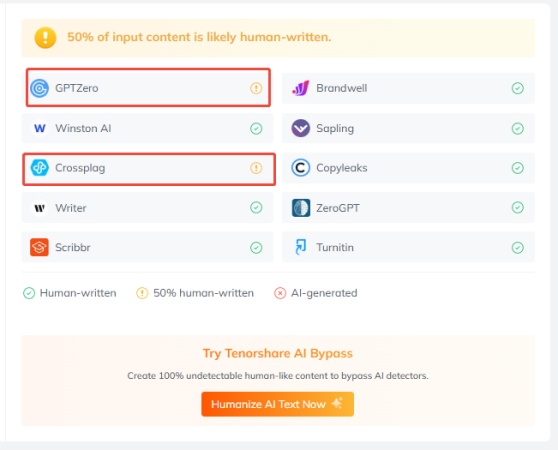
Copy the text you find suspicious and paste it into Tenorshare AI Detector.

-
Click "Check for AI" and wait for the process
-
Observe the test results and draw conclusions.
How Teachers Check for AI Plagiarism?
When checking for AI-assisted plagiarism in students' work, you can mainly rely on two key methods: AI detectors with plagiarism checkers, and your familiarity with professional knowledge.
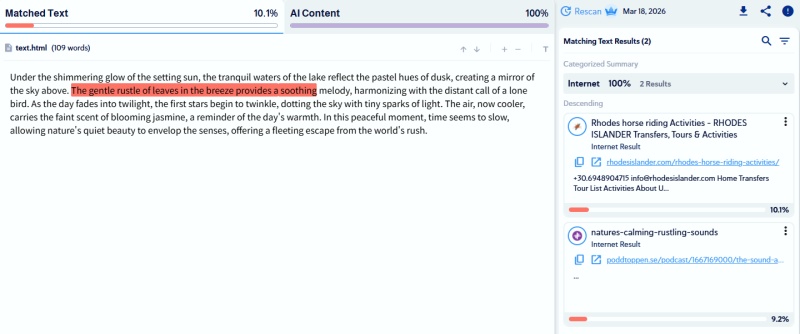
It is recommended to use detectors with plagiarism checkers like Copyleaks, which can not only detect AI-generated content but also cross-reference the same content against online sources to identify direct plagiarism.
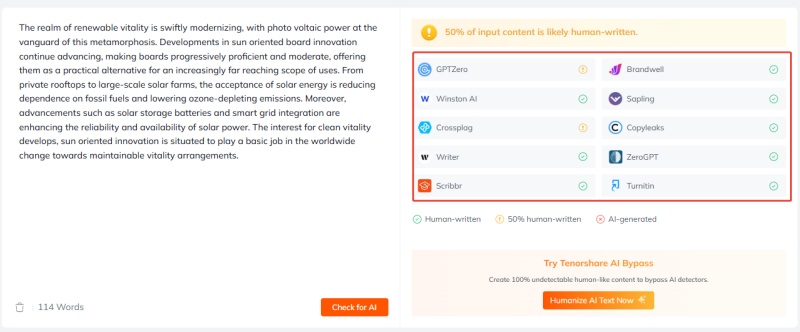
To improve your efficiency, you can also try Tenorshare AI Detector , which allows you to obtain comprehensive AI detection results all on one platform.
Another crucial factor is your own subject expertise. AI writing often mechanically repeats textbook definitions, generic examples, or formal terminology without reflecting real understanding. If a student's work shows perfect accuracy but lacks personal comprehension or unique insights, it will naturally arouse your suspicion.
How Teachers Check for AI in PowerPoint Slides
When reviewing students' PowerPoint slides, you can first look for the following language patterns in the text content:
-
Repetitive phrasing
-
Overly formal, uniform language
-
Lack of personal voice or natural flow
At this point, Tenorshare AI Detector can help you efficiently identify AI-generated content, supporting you in making accurate judgments about student work.
Additionally, you also need to pay attention to the layout and visual effects of the slides. AI-designed layouts and visuals often appear overly polished, generic, or inconsistent with a student's usual design style. Charts, diagrams, or images generated by AI may be precise but difficult to verify for authenticity, which can signal heavy AI involvement.
You can also ask students to explain the content during presentations or follow-up sessions. If a student cannot clearly describe the logic or key points, it strongly suggests the work was AI-generated.
Also read: Can Teachers Detect AI in PowerPoints Slides: The Complete Guide
Conclusion
So, how do teachers check for AI ? The core is to combine the use of AI detection tools with your personal professional judgment.
You can first use your professional knowledge or personal judgment to identify content with obvious AI-generated characteristics, then use an AI detector to check the text to further corroborate your thoughts. You can also communicate with students further.
In this process, Tenorshare AI Detector will be a handy and efficient tool that helps you accurately identify AI traces across essays, slides, and other assignments, making your AI detection work easier and more efficient.

Tenorshare AI Bypass
- Create 100% undetectable human-like content
- Bypass all AI detector tools like GPTZero, ZeroGPT, Copyleaks, etc.
- Original content, free of plagiarism and grammatical errors
- One-click AI bypass with a clean and easy-to-use interface

FAQs
What tools do teachers use to detect AI writing?
Teachers often use AI detection tools such as Copyleaks, GPTZero, and Originality.ai to analyze writing patterns. Additionally, teachers might combine automated results with their own professional knowledge and personal judgment to identify AI-generated content.
How do teachers check for AI on Google Docs?
Teachers can look at how the document was created and developed over time. Besides using AI detection or plagiarism tools, another method is checking the version history. A natural writing process usually shows gradual edits, revisions, and small changes.
How do teachers check for AI on Canvas?
Canvas itself does not have built-in AI detection. Instead, teachers rely on AI detectors to analyze submitted work for patterns such as repetition or predictability.
Teachers may also review submission behavior and writing consistency across assignments, using these combined signals to form a judgment rather than relying on a single result.
How do teachers check for AI in code?
Teachers can look for unusually detailed or uniform comments, as AI-generated code often includes built-in explanations. You may also ask students to explain or modify the code to check whether they truly understand the logic.
You Might Also Like
- How to Check Turnitin Score Before Submitting: Student-Friendly Methods
- Does Canvas Have AI Detection? What It Tracks and What It Cannot Do
- Can Turnitin Detect AI on a PDF? Complete Detection Guide
- What AI Detector Do Colleges Use for Students in 2026?
- How to Use Turnitin AI Detector: 2026 Student Guide
- Can Turnitin Detect Humanize AI: Full Test in 2026

Tenorshare AI Bypass: 100% Bypass AI Detection
Turn AI text into undetectable, human-like content.AI Humanizer, 100% Undetectable
Humanize AI text instantly.
Tenorshare AI Bypass: 100% Bypass AI Detection