
GeoGebra vs Desmos: What's the Difference & Which One to Use?
Need to graph a function, explore a geometry problem, or check your calculus work---but not sure whether to open GeoGebra or Desmos? You're not alone.
GeoGebra vs Desmos is less about finding one universal winner and more about matching the right tool to the task. Desmos stands out for simple, fast graphing and interactive exploration, while GeoGebra offers a broader toolkit for geometry, 3D math, CAS, and advanced mathematics.
In this guide, we'll compare both tools to help students and teachers choose the one that works best for them.
GeoGebra vs Desmos at a Glance
| Feature | GeoGebra | Desmos |
|---|---|---|
| 2D Graphing | Excellent | Excellent |
| Algebra | Excellent | Excellent |
| Geometry | Advanced | Good |
| Calculus | Advanced | Good |
| CAS / Symbolic Math | ✔️ | Limited |
| 3D Math | Advanced | ✔️ |
| Statistics | Advanced | Good |
| Regression | ✔️ | Excellent |
| Interactive Exploration | Excellent | Excellent |
| Classroom Tools | ✔️ | ✔️ |
| Ease of Use | Moderate | Very easy |
| Best For | Broad and advanced math | Quick graphing and exploration |
The biggest difference is breadth versus simplicity . GeoGebra combines graphing, geometry, 3D, CAS, probability, statistics, and other tools in its Calculator Suite. Desmos focuses heavily on an accessible graphing experience while also offering geometry, 3D, scientific, and other calculators.
GeoGebra vs Desmos: What's the Difference?
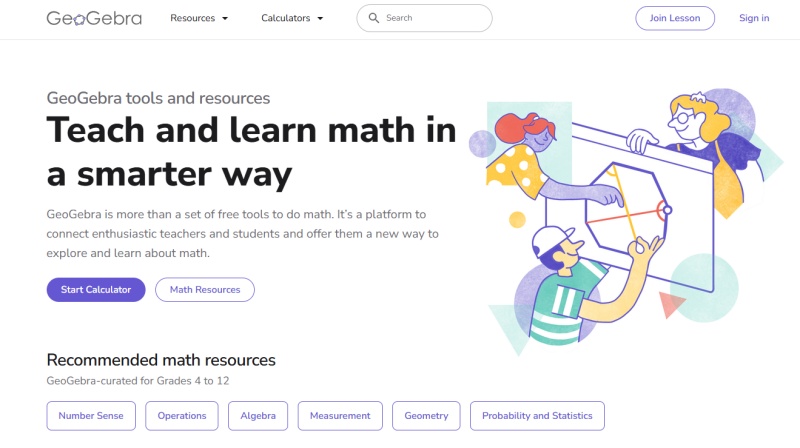
GeoGebra is designed as a broader dynamic mathematics platform. Its Calculator Suite combines graphing, geometry, 3D, CAS, and probability tools, allowing users to move between different mathematical representations within one environment.
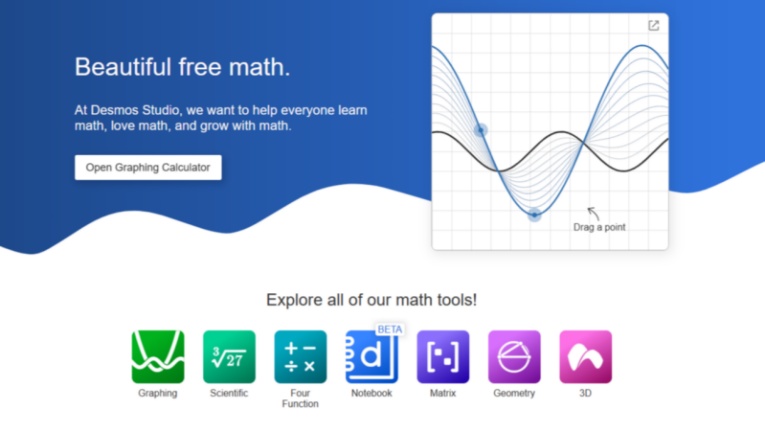
Desmos takes a more streamlined approach. Its graphing calculator is particularly well suited to entering equations, changing parameters, plotting functions, and seeing the results immediately. It has also expanded beyond 2D graphing with tools for geometry and 3D mathematics.
This difference affects the learning experience.
Desmos tends to be easier to start with. Students can enter a function and quickly see its graph without learning many tools first.
GeoGebra offers more depth. Its wider collection of construction, algebraic, symbolic, statistical, and 3D tools can support more advanced tasks, but the larger feature set can also require more time to learn.
In simple terms, Desmos prioritizes a streamlined interactive experience, while GeoGebra provides a more comprehensive mathematical environment.
GeoGebra vs Desmos Feature Comparison
GeoGebra and Desmos overlap in many areas, but they are designed with different priorities. This section compares their main features, focusing on what each platform can do and how their tools differ.
Graphing and Visualization
Both GeoGebra and Desmos provide powerful graphing tools for functions, equations, inequalities, and mathematical visualization.
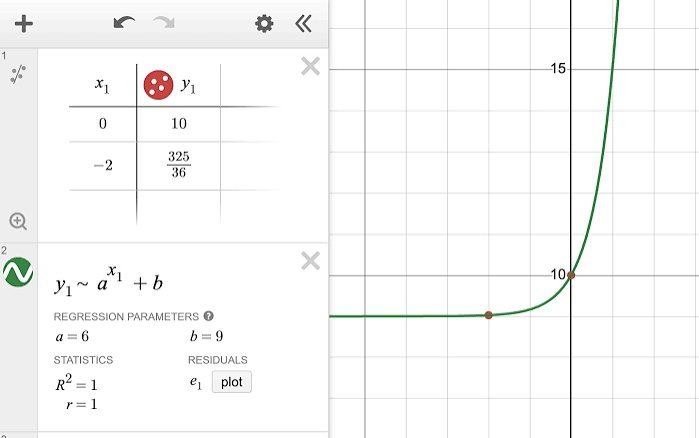
Desmos focuses on making graphing fast and accessible. Its clean interface allows users to enter equations, adjust sliders, and immediately observe how changes affect graphs.
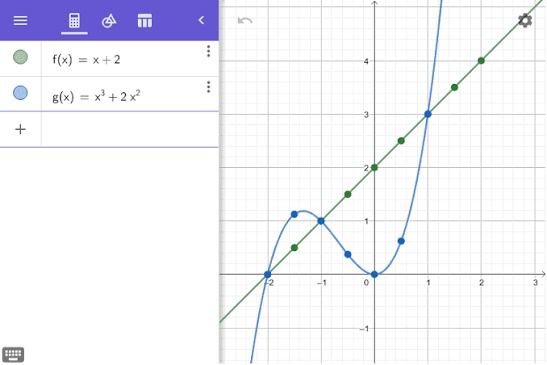
GeoGebra connects graphs with other mathematical representations, including algebraic expressions, geometry objects, tables, and 3D models. This makes it useful for exploring relationships between different areas of mathematics.
Desmos is optimized for quick visual exploration, while GeoGebra offers deeper connections between mathematical objects.
Geometry Tools
Geometry is one of the clearest differences between the two platforms.
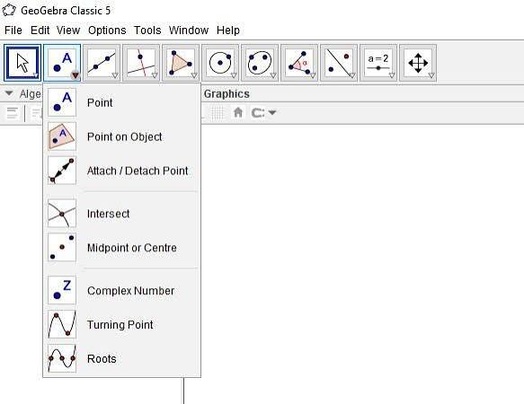
GeoGebra provides a dedicated geometry environment with tools for creating points, lines, circles, polygons, transformations, measurements, and dynamic constructions. Users can manipulate objects and observe how geometric relationships change.
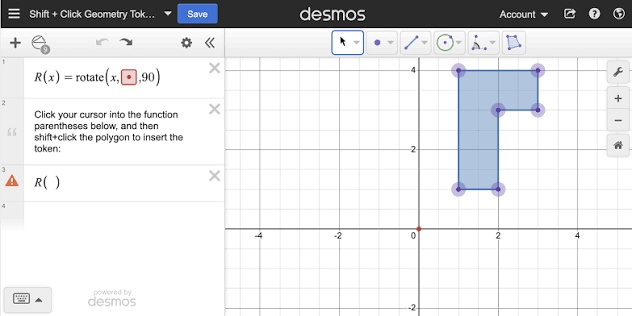
Desmos also supports geometry activities, allowing students to create and explore basic geometric concepts. However, its geometry features are more focused on accessibility and classroom exploration rather than advanced construction.
GeoGebra provides a more complete geometry toolkit, while Desmos offers a simpler geometry experience.
CAS and Symbolic Calculations
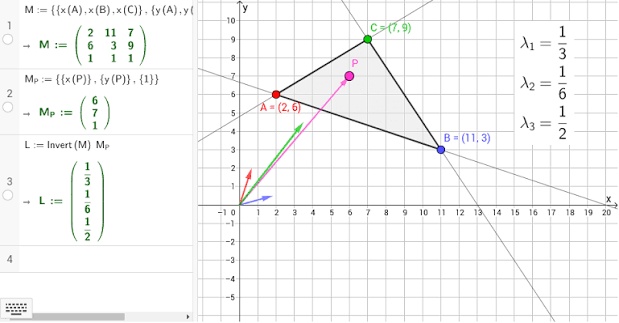
GeoGebra has a dedicated CAS (Computer Algebra System) environment that supports symbolic calculations, equation solving, derivatives, integrals, and algebraic transformations.
Desmos focuses more on numerical calculations, graphing, and visual exploration rather than symbolic computation.
For users who need symbolic manipulation or advanced mathematical calculations, GeoGebra provides more functionality.
3D Mathematics
Both platforms now support 3D mathematics.
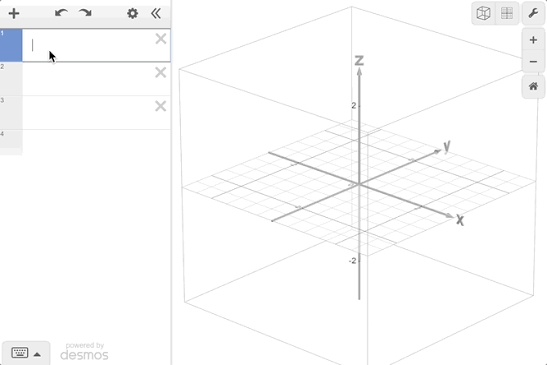
Desmos 3D allows users to explore points, functions, and surfaces in a familiar graphing environment, making it easier for existing Desmos users to transition into 3D visualization.
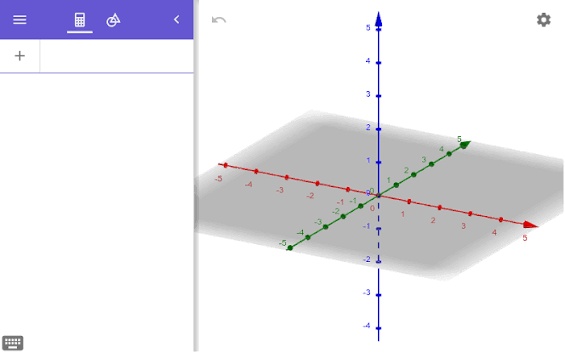
GeoGebra's 3D Calculator provides additional mathematical construction tools, including planes, vectors, solids, measurements, and transformations.
For basic 3D visualization, both tools are capable. For more advanced 3D mathematical modeling, GeoGebra offers a broader feature set.
Statistics and Data Analysis
Both GeoGebra and Desmos support statistics-related learning.
Desmos is particularly convenient for plotting data and creating regression models directly within its graphing interface.
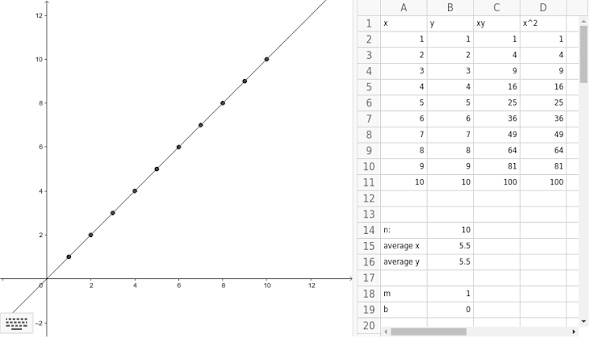
GeoGebra provides a wider collection of statistical tools, including probability, data analysis, and connections between statistics and other mathematical representations.
The better choice depends on whether the priority is quick visualization or a broader mathematical environment.
Classroom and Collaboration Tools
Both platforms provide features designed for educational use.
Desmos is known for its interactive classroom activities, where students can explore concepts through guided tasks and teachers can observe student responses.
GeoGebra provides interactive resources, lessons, and classroom features that connect dynamic mathematics with teaching activities.
The main difference is that Desmos emphasizes simplicity and engagement, while GeoGebra emphasizes mathematical depth and flexibility.
Ease of Use
Desmos generally has a shorter learning curve because its interface focuses on a smaller set of core actions.
GeoGebra offers more tools and customization options, but the larger feature set may require more time for beginners to learn.
In short:
-
Desmos prioritizes simplicity and speed.
-
GeoGebra prioritizes flexibility and mathematical depth.
GeoGebra vs Desmos for Different Math Subjects
The best choice between GeoGebra and Desmos depends on the subject you are studying and the type of mathematical tasks you need to complete. While both tools can support multiple areas of mathematics, each has advantages in different learning situations.
| Math Subject | Better Choice | Why |
|---|---|---|
| Algebra | Desmos | Easier for graphing equations, exploring functions, and visualizing changes |
| Functions | Desmos | Fast parameter adjustments and intuitive graph exploration |
| Geometry | GeoGebra | More advanced construction, measurement, and dynamic geometry tools |
| Trigonometry | Desmos | Simple visualization of functions and transformations |
| Calculus | Both | Desmos is strong for visual exploration, while GeoGebra offers more advanced symbolic tools |
| Statistics | Both | Both support data visualization and regression analysis |
| 3D Math | GeoGebra | More complete tools for 3D objects, measurements, and constructions |
| Advanced Mathematics | GeoGebra | Better support for CAS, symbolic calculations, and complex mathematical models |
For most high school students , Desmos is often the easier starting point for algebra, functions, and graph-based learning. Its simple interface helps students focus on mathematical concepts without spending much time learning the software.
For students studying geometry, advanced calculus, 3D mathematics, or more complex mathematical topics , GeoGebra may be a better choice because it provides a wider range of mathematical tools in one platform.
However, the two tools are not mutually exclusive. Many students and teachers use Desmos for quick visualization and exploration, while using GeoGebra when more advanced mathematical modeling or construction is required.
Need Step-by-Step Math Solutions? Try Tenorshare AI Math
GeoGebra and Desmos are excellent tools for exploring mathematical concepts, visualizing equations, and understanding relationships between different mathematical objects. However, they are mainly designed as math exploration and visualization tools rather than solutions focused on explaining how to solve a specific problem .
For students who need help with homework, want to understand solving processes, or need guidance when they are stuck on a difficult question, an AI math solver can provide a different type of support.
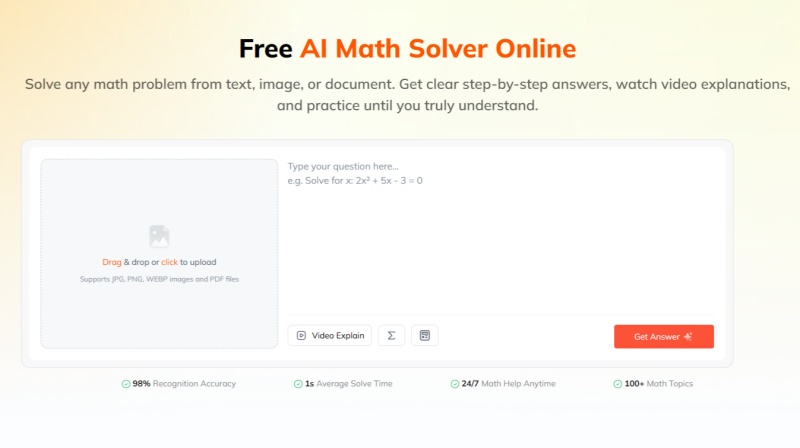
Tenorshare AI Math focuses on solving math problems and explaining the reasoning behind each step. Instead of only showing a final answer, it helps students understand the process and learn how to approach similar problems.
Key Features of Tenorshare AI Math
-
Multiple Input Options: Supports text, images, and PDF files to solve problems from different homework formats.
-
Step-by-Step Solution Explanations: Provides detailed solving steps and explains the reasoning behind each answer.
-
AI-Generated Video Explanations: Creates visual explanations to help students understand complex math concepts.
-
Practice Question Generation: Generates similar exercises to help students review and reinforce their knowledge.
-
Built-In Math Calculator: Includes a calculator for quick calculations and mathematical expressions.
-
Integrated AI Learning Platform: Connects with other AI tools within the Tenorshare AI ecosystem for broader learning support.
Compared with GeoGebra and Desmos, Tenorshare AI Math serves a different purpose:
| Tool | Main Purpose |
|---|---|
| GeoGebra | Visualize and explore advanced mathematical concepts |
| Desmos | Quickly graph equations and investigate functions |
| Tenorshare AI Math | Solve math problems and understand step-by-step solutions |
For students and teachers, these tools can complement each other. You can use Tenorshare AI Math to understand the solution process, then use Desmos or GeoGebra to visualize the mathematical concept behind the problem.
Final Verdict: Which One Should You Choose?
The answer to GeoGebra vs Desmos depends on your learning goals.
Desmos is a better choice for students and teachers who need simple, fast graphing and interactive function exploration. GeoGebra is better suited for users who need advanced geometry, 3D math, CAS, and a wider range of mathematical tools.
For many learners, using both tools can be the most effective approach. Desmos makes everyday graphing easier, while GeoGebra provides more advanced capabilities for exploring complex mathematical concepts.
If your goal is to understand how to solve a specific math problem step by step , rather than only visualize it, an AI math solver like Tenorshare AI Math can provide additional support by explaining solving processes and reasoning.
Ultimately, the best math tool is the one that matches your task: use GeoGebra or Desmos for exploring mathematics, and use Tenorshare AI Math when you need guided problem-solving help.

Tenorshare AI Math
- Solve math from text, images & PDFs at 98% accuracy
- Deliver step-by-step answers with detailed logic breakdown
- Access video explanations for deeper math concept understanding
- Generate matching practice tests to solidify knowledge

FAQs
-
Can I use GeoGebra and Desmos together?
Yes. The two tools can complement each other. For example, you can use Desmos to quickly visualize a function and GeoGebra to explore a related geometric construction or 3D model.
-
Which is better, Desmos or GeoGebra?
It depends on your needs. Desmos is generally better for simple graphing and function exploration, while GeoGebra is stronger for geometry, 3D math, CAS, and advanced mathematical tasks.
-
Is GeoGebra used in schools?
Yes. GeoGebra provides educational resources and classroom tools for teachers and students, including interactive activities and materials for Grades 4--12.
-
Does GeoGebra have a step-by-step math solver?
Yes. GeoGebra offers Math Solver for step-by-step solutions, while Math Practice provides hints and feedback for certain algebraic tasks.
-
Is Desmos still allowed on the SAT?
Yes. The current SAT includes a built-in Desmos calculator in Bluebook. Students can use its scientific and graphing modes during the Math section, subject to College Board calculator policies.
-
Is GeoGebra fully free?
GeoGebra provides free access to its core calculators and many educational resources. However, its licensing terms distinguish between non-commercial and commercial use, so it is more accurate to describe it as free for typical non-commercial educational use rather than universally free for every purpose.
You Might Also Like
- Desmos Alternatives Review: 4 Best Graphing Calculators Compared in 2026
- How to Use Desmos for SAT 2026: Master the Digital SAT Calculator
- 8 Best GauthMath Alternatives Reviewed: Top Apps & Websites in 2026
- Best Wolfram Alpha Alternatives for Students: 6 Math Solvers With Steps
- 10 Best Mathway Alternatives in 2026: Free Math Solvers With Step-by-Step Solutions
- 6 Best Photomath Alternatives in 2026: Math Apps and Online Tools Compared

Tenorshare AI Math: Solve any math problems with AI
Turn math questions into clear solutions, tutorial videos & targeted practice setsTenorshare AI Math: Instant Solutions
Steps, videos & practice for every problem
Tenorshare AI Math: Solve any math problems with AI