
2026 Mathway vs Photomath Full Review: Key Differences & Best Use Cases
Mathway and Photomath are two widely used math-solving tools. Both can help users work through equations, check answers, and view solution steps, but they are designed around somewhat different workflows.
This Mathway vs Photomath comparison looks at their input options, subject coverage, explanations, platform access, and pricing structure.
The best choice depends less on a universal winner and more on the type of math you study and how you prefer to enter problems.
Catalogs:
Quick Answer: Is Mathway or Photomath Better?
Photomath is often a practical choice for students who want to scan a printed or handwritten problem with a phone and follow a visual, step-by-step explanation. Its mobile-first experience can be especially convenient for homework worksheets and textbook exercises.
Mathway may be a better fit for users who want a web-based solver, need to type complex expressions, or work across a broader range of subjects. In addition to core math topics, Mathway includes tools for areas such as statistics, linear algebra, chemistry, and physics.
In short:
-
Choose Photomath if camera scanning, mobile use, and visual explanations are your priorities.
-
Choose Mathway if you need broader subject coverage, specialized calculators, or browser access.
Compare the current free and paid features in your location before subscribing, since availability and plan details can change.
Mathway vs Photomath at a Glance
| Feature | Mathway | Photomath |
|---|---|---|
| Main Input Options | Typing, calculator interface, photo upload | Camera scanning and manual input |
| Best-Known Use Case | Broad subject coverage and calculator tools | Fast mobile scanning and visual explanations |
| Subject Range | Math plus selected science-related topics | Primarily mathematics |
| Platform Access | Web and mobile access | Primarily mobile app access |
| Step-by-Step Help | Available for supported problems; access may vary by plan and region | Available for supported problems; detail may vary by plan and region |
| Useful For | Students using complex notation or multiple subjects | Students checking textbook and worksheet problems |
The photomath vs mathway decision is usually not about whether one can solve a basic equation. Both can handle many standard problems. The more important question is which workflow matches your study habits.
What Is Mathway?
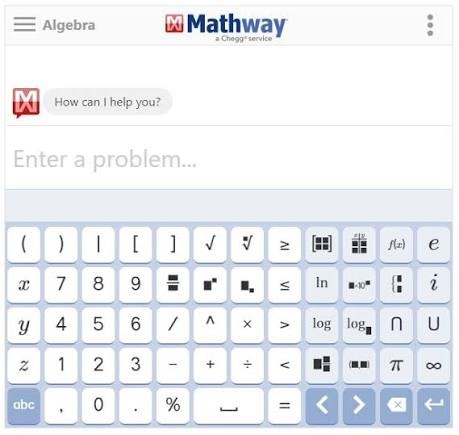
Mathway is a math solver and calculator platform designed to help users solve problems across multiple levels of mathematics. It supports subjects including basic math, algebra, trigonometry, precalculus, calculus, statistics, finite math, and linear algebra. It also offers tools related to chemistry and physics.
Users can enter a problem with a keyboard or virtual calculator, upload an image, or choose a specialized calculator for tasks such as factoring, derivatives, graphing, and statistics.
Mathway can be useful when a problem is easier to type than scan. For example, students working with a long calculus expression, matrix operation, or statistics formula may prefer a dedicated input interface over taking a photo.
Key Features
-
Multiple input methods: Type a math problem directly or upload a photo to get a solution without manually entering complex symbols.
-
Step-by-step solutions: Shows the solving process for supported problems, helping users understand how an answer is reached.
-
Built-in math calculators: Includes dedicated tools for equations, derivatives, integrals, limits, probability, standard deviation, and other calculations.
-
Graphing tools: Lets users graph equations and functions to visualize mathematical relationships.
-
Web and mobile access: Mathway can be used through its website or mobile app for solving problems on different devices.
What Is Photomath?
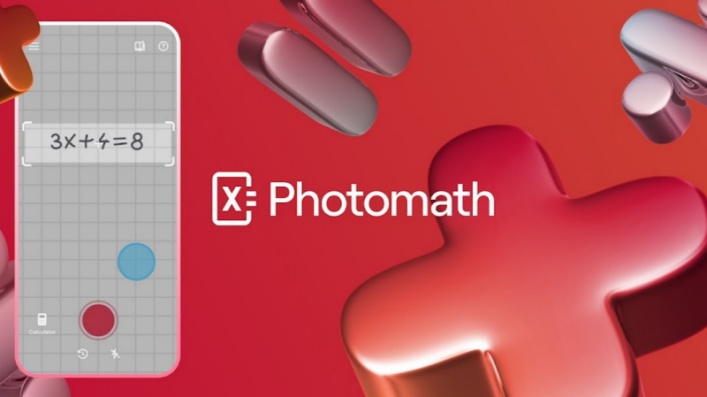
Photomath is a mobile math-learning app best known for its camera-scanning feature. Users point a phone camera at a math problem, review the recognized expression, and receive a solution for supported question types.
The app covers many common school math topics, including arithmetic, algebra, geometry, trigonometry, statistics, and calculus. It also provides manual input for cases where a scan needs correction.
Photomath is designed around a visual workflow. This can make it convenient when a student is working from a printed worksheet, textbook, or neatly written notes and wants to check a specific problem without typing the entire expression.
Key Features
-
Camera Math Scanner: Scan printed or handwritten math problems and automatically recognize equations for solving.
-
Step-by-Step Solutions: Break down each problem into detailed solving steps instead of only providing the final answer.
-
Multiple Solution Methods: Provide different approaches for solving certain problems to help students compare methods.
-
Learning Assistance Features: Offer additional explanations, hints, and animated tutorials through Photomath Plus.
Photomath vs Mathway: The Key Differences That Matter
Input Methods and Handwriting Recognition
Both tools support manual input and photo-based problem solving, but their primary workflows are different.
| Input Option | Mathway | Photomath |
|---|---|---|
| Typed Input | Supports keyboard and calculator-style input | Supports manual entry |
| Photo Input | Supports photo upload or camera input | Camera scanning is a central feature |
| Best Use Case | Complex expressions that are easier to type precisely | Printed worksheets and clearly written problems |
| Handwriting Results | Can vary by notation and image quality | Can vary by handwriting clarity and page layout |
Photomath is built around a scan-first experience : point the camera at a problem, review the recognized expression, and continue to a solution. This may be convenient for students working from a textbook or worksheet.
Mathway is often more practical when a user wants to enter notation directly . Typing can reduce recognition mistakes for long expressions, matrices, nested fractions, or equations with several variables.
For either tool, users should confirm that the recognized equation matches the original problem before relying on the answer. A small input error---such as a missed negative sign, exponent, or denominator---can change the result completely.
Subject Coverage and Supported Problem Types
Mathway and Photomath both cover common school math topics, but Mathway offers a broader selection of specialized subject tools.
| Topic or Use Case | Mathway | Photomath |
|---|---|---|
| Basic Math and Pre-Algebra | ✔️Supported | ✔️Supported |
| Algebra and Geometry | ✔️Supported | ✔️Supported |
| Trigonometry and Calculus | ✔️Supported | ✔️Supported |
| Statistics and Linear Algebra | ✔️Supported | Coverage may vary by problem type |
| Chemistry and Physics Tools | Available for selected tasks | Primarily math-focused |
| Graphing and Specialized Calculators | Available | More limited as a calculator-focused workflow |
Photomath is generally suited to students solving standard math exercises from elementary levels through calculus. Its experience is centered on identifying an equation and presenting a solution path.
Mathway may be a stronger match for students taking several quantitative subjects at once or looking for dedicated tools such as derivative, factoring, matrix, statistics, or graphing calculators.
Neither tool is ideal for every format. Written proofs, diagram-heavy geometry questions, and long word problems may require extra interpretation before a solver can help.
Step-by-Step Explanations and Learning Value
The main value of a math solver is not only whether it returns an answer, but whether the explanation helps the student understand the method.
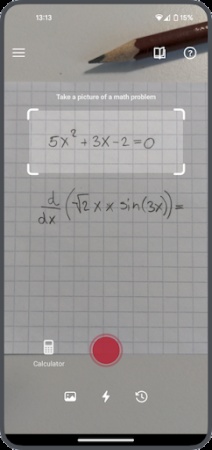
Photomath may suit students who prefer:
-
A visual sequence of equation changes
-
Camera-based problem entry
-
Short, guided explanations for standard textbook problems
-
Reviewing one problem at a time on a phone
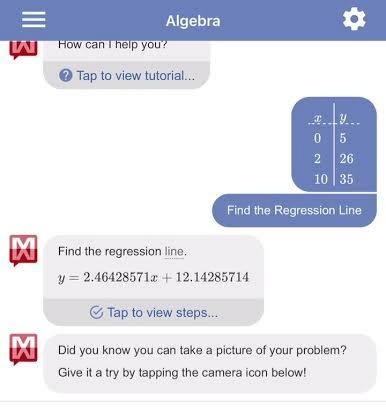
Mathway may suit students who prefer:
-
Typing an exact expression before solving
-
Moving between specialized calculators
-
Reviewing procedures for a broad set of subject areas
-
Working in a browser while studying
The available level of explanation can vary by topic, platform, location, and subscription plan. Students should also keep in mind that a step-by-step solution is not always a complete conceptual lesson.
A productive workflow is simple:
-
Attempt the problem independently.
-
Use the tool to check the answer or identify the first incorrect step.
-
Read the explanation rather than copying it.
-
Solve a similar problem without assistance.
This approach makes either tool more useful for learning and less likely to become an answer shortcut.
Devices, Platforms, and Ease of Use
The best platform depends on where and how you usually study.
| Consideration | Mathway | Photomath |
|---|---|---|
| Mobile Use | Available on mobile devices | Designed primarily for mobile use |
| Web Browser Access | Available | Typically more mobile-centered |
| Chromebook or Laptop Workflow | Useful for browser-based input | May require using a phone alongside the computer |
| Best for Paper Homework | Supports photo input | Particularly convenient for scan-first use |
| Best for Long Typed Expressions | Often more comfortable | Manual input is available, but mobile entry may feel slower |
Photomath can be a natural option when a student has a physical worksheet in front of them and wants a quick scan. Its interface is designed to reduce the steps between seeing a problem and reviewing a solution.
Mathway can be more convenient for students who study at a desktop or laptop, especially when they need to type advanced notation, compare several tools, or move between math and science-related tasks.
Free Features, Paid Plans, and Pricing
Both tools offer free access to core problem-solving features, but their paid plans focus on different benefits.
-
Mathway Free: Enter or upload problems and access available solutions. Step-by-step availability can vary by problem and platform.
-
Mathway Premium: Includes full Step-by-Step Access for $9.99/month or $39.99/year. The annual plan works out to about $3.33/month.
-
Photomath Free: Scan or enter supported math problems, view answers, and access step-by-step explanations.
-
Photomath Plus: Adds custom visual aids and extra "how" and "why" learning support for $9.99/month or $69.99/year. The annual plan works out to about $5.83/month.
Mathway has the lower annual subscription price, so it may suit students who mainly want consistent access to detailed solution steps across a broad range of subjects. Photomath's free version already includes core scanning and explanation features; its paid plan is more relevant for users who want additional visual learning support.
Prices and plan details can vary by region, platform, or promotional offer, so confirm them in the app before subscribing.
Mathway vs Photomath: Is There Another Option?
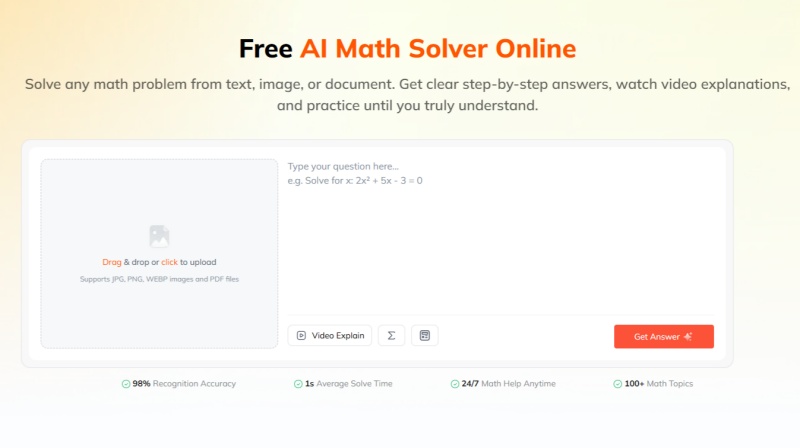
Mathway and Photomath are useful options for solving math problems, but the best choice depends on how you prefer to work through a question. If you want to explore another AI math solver , Tenorshare AI Math offers a free, browser-based way to solve math problems and review step-by-step explanations.
Its other core features include:
-
Image and PDF input: Lets users upload JPG, PNG, WEBP, or PDF problems instead of typing them manually.
-
Step-by-step explanations: Breaks a problem into readable stages and explains the method used.
-
Video explanations: Converts solutions into short visual lessons with concept reminders.
-
Practice problems: Generates similar exercises so students can check whether they actually understand the method.
-
Follow-up questions: Allows students to continue asking about confusing steps or concepts after receiving the initial solution.
You can use it to work through problems online, follow the reasoning behind a solution, and check your understanding as you study. As with any math solver, review the steps and verify the answer before relying on it for homework.
Final Verdict: Should You Choose Mathway or Photomath?
In the Mathway vs Photomath comparison, Photomath is generally the better fit for students who want to scan printed or handwritten problems on a phone and follow visual explanations. Mathway is more suitable for users who prefer browser access, typed input, specialized calculators, and broader coverage across math and selected science subjects.
The right choice depends on your device, course level, and preferred input method---not on a single overall winner. If Mathway or Photomath does not handle a particular problem well, Tenorshare AI Math is also a free, browser-based option for continuing your work online.

Tenorshare AI Math
- Solve math from text, images & PDFs at 98% accuracy
- Deliver step-by-step answers with detailed logic breakdown
- Access video explanations for deeper math concept understanding
- Generate matching practice tests to solidify knowledge

FAQs
-
How Accurate Is Mathway?
Mathway can solve many standard math problems accurately, but results depend on whether the equation was entered or scanned correctly and whether the problem format is supported. Always check signs, exponents, parentheses, fractions, and solution steps before relying on an answer.
-
Why Does Mathway Not Work Anymore?
Mathway may return a general method rather than a completed solution when a scanned expression is misread, a symbol is entered incorrectly, or a complex problem falls outside its supported handling. Re-entering the problem manually can help; if it still does not produce a usable result, an online alternative may be useful.
-
Which Is Better, Mathway or Photomath?
Photomath is often more convenient for camera scanning and visual explanations, while Mathway is better suited to typed input, browser use, and broader subject coverage. The better option depends on whether you are working from a worksheet, a computer, or a complex expression.
-
Is Mathway or Photomath Better for Calculus?
Both tools can handle many calculus topics, including derivatives, integrals, and limits. Mathway may be more convenient for typing advanced notation, while Photomath can be useful for scanning clearly printed textbook problems; in either case, check the notation and mathematical restrictions carefully.
-
Is Using Mathway or Photomath Considered Cheating?
Using Mathway or Photomath is not automatically cheating, but it depends on your teacher's rules and how you use the result. They are generally more appropriate for checking homework, reviewing steps, and practicing than for completing restricted assignments or tests.
You Might Also Like
- Is Gemini or ChatGPT Better at Math? Gemini vs. ChatGPT for Math
- Photomath vs Microsoft Math Solver (2026): Key Differences & Current Availability
- GeoGebra vs Desmos: What's the Difference & Which One to Use?
- 2026 Gauth vs Photomath: Which AI Math Solver Is Best for Math?
- Best AI Models for Math (2026): 4 Leading Tools Compared & Ranked

Tenorshare AI Math: Solve any math problems with AI
Turn math questions into clear solutions, tutorial videos & targeted practice setsTenorshare AI Math: Instant Solutions
Steps, videos & practice for every problem
Tenorshare AI Math: Solve any math problems with AI