
2026 Best AI for Statistics: 6 Tools for Homework and Data Analysis
Search for the best AI for statistics , and you will find everything from homework solvers to tools that analyze entire spreadsheets. But these tools are built for different jobs: one may help explain a probability problem step by step, while another is designed to run regression on thousands of rows of data.
To make the comparison more useful, we looked at six tools across different statistics workflows , including homework, statistical calculations, dataset analysis, spreadsheets, and research. The best choice depends largely on what you need to do with your data---or whether you have a dataset at all.
Catalogs:
6 Best AI Tools for Statistics in 2026
- Comparison Table
- ChatGPT --- Best Overall AI for Statistics
- Julius AI --- Best for AI-Powered Statistical Data Analysis
- Claude --- Best for Explaining Complex Statistical Analysis
- Gemini --- Best for Statistics in Google Sheets
- Wolfram Alpha --- Best for Statistical Computation
- Tenorshare AI Math --- Best for Statistics Homework
What Is the Best AI for Statistics?

The best AI for statistics depends on who you are and what you need to do.
If you are a student solving statistics homework, a general-purpose AI such as ChatGPT can explain concepts, answer follow-up questions, and work through calculations. However, you may need to give more specific instructions to get the exact method or level of detail you want. A dedicated AI math solver can be a more direct option when your main goal is to solve an individual statistics problem and follow the steps.
If you are a researcher, analyst, or professional , prioritize tools that can handle structured datasets, statistical tests, code, and larger analysis workflows. General AI tools such as ChatGPT or Claude offer flexibility and explanation, while more specialized options such as Julius AI or Wolfram Alpha focus more heavily on data analysis or statistical computation.
In short, choose based on your task:
-
Statistics homework and step-by-step problem solving: Tenorshare AI Math or ChatGPT
-
General statistical analysis and datasets: ChatGPT
-
Dedicated AI data analysis: Julius AI
-
Detailed explanation and interpretation: Claude
-
Statistical calculations: Wolfram Alpha
-
Statistics in Google Sheets: Gemini
Want to see how they differ in features, strengths, and limitations? Keep reading for the full comparison.
6 Best AI Tools for Statistics in 2026
Comparison Table
| Tool | Best For | Statistical Analysis | File/Data Support | Main Strength |
|---|---|---|---|---|
| ChatGPT | Overall statistics use | Yes | CSV, Excel, PDF and more | Flexible analysis and explanations |
| Julius AI | Statistical data analysis | Yes | CSV, Excel, Google Sheets, PDF and more | Conversational dataset analysis |
| Claude | Explaining complex statistical analysis | Yes | CSV, Excel and connected data sources | Reasoning and interpretation |
| Gemini | Statistics in Google Sheets | Yes | Google Sheets | Spreadsheet-integrated analysis |
| Wolfram Alpha | Statistical computation | Yes | Direct data, files and structured inputs | Computational statistics |
| Tenorshare AI Math | Statistics homework | Problem-focused | Text, image and PDF | Step-by-step learning |
ChatGPT --- Best Overall AI for Statistics

ChatGPT combines statistical explanations, file analysis, coding, and visualization in one conversational interface.
Users can upload CSV and Excel files and ask questions about the data in natural language. Its data-analysis environment can run Python-based calculations and statistical analysis, create tables and charts, and explain assumptions and results.
OpenAI lists statistical techniques such as t-tests, ANOVA, MANOVA, correlation, regression, ARIMA, and seasonal decomposition among the analyses ChatGPT can perform. Users can also inspect the Python code behind supported analyses rather than relying only on the generated explanation.
- Works with both statistics questions and datasets
- Runs Python-backed statistical analysis
- Supports common hypothesis tests, regression, and time series
- Creates tables and data visualizations
- Allows follow-up questions about results and methodology
- Statistical assumptions and test selection should still be verified
- Available file and analysis capabilities can depend on plan and workspace
- A general-purpose interface may be broader than necessary for simple homework questions
- Prompts may require refinement, which can make setup time-consuming
Best for: Users who want one flexible tool for statistical questions, dataset analysis, coding, and explanations.
Julius AI --- Best for AI-Powered Statistical Data Analysis
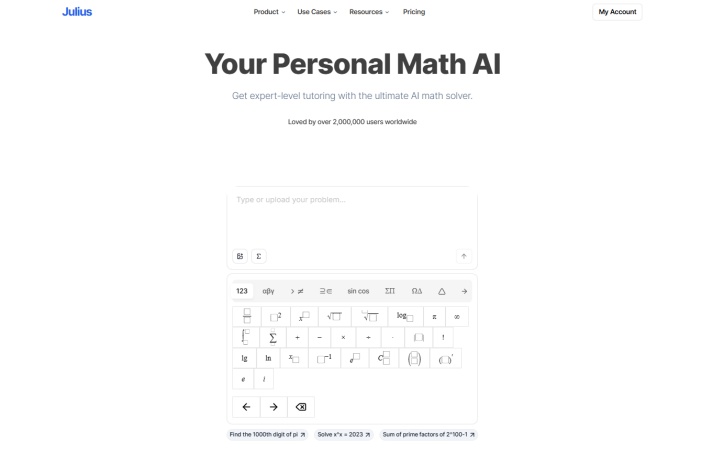
Julius AI is built more specifically around analyzing data through natural-language requests.
Its statistical tools cover operations such as ANOVA, chi-square tests, p-values, standard deviation, and statistical modeling. Julius can also generate and execute R code, allowing users to perform analyses without manually writing the code themselves.
The workflow centers on asking questions about uploaded data, cleaning datasets, producing visualizations, and exporting results. Current product materials position the platform toward academic and scientific data analysis as well as broader dataset exploration.
- Designed specifically around data analysis
- Supports statistical tests and modeling
- Can generate and execute R code
- Includes data cleaning and visualization
- Uses a conversational interface instead of requiring manual programming
- Free usage is limited
- Provides more functionality than most basic homework problems require
- Users should still check whether the selected statistical method is appropriate
Best for: Students, researchers, and analysts who want to explore and analyze datasets through natural-language prompts.
Claude --- Best for Explaining Complex Statistical Analysis

Claude is a general-purpose AI assistant, but its current data tools make it relevant for statistical analysis that requires explanation and interpretation.
Anthropic's Data plugin can analyze uploaded CSV and Excel files, write SQL, profile data, generate Python visualizations, and connect to databases such as Snowflake, Databricks, and BigQuery. It also includes statistical-analysis and validation workflows.
Claude can also use code execution for more complex analysis. Anthropic provides examples of uploading raw research data, recalculating reported statistics, checking p-values and sample sizes, and documenting the results in a spreadsheet.
This makes Claude useful when the task involves not only generating a numerical result but also discussing methodology, interpreting findings, or reviewing an analysis.
- Detailed natural-language explanations
- Supports CSV and Excel analysis
- Can use code for calculations and visualizations
- Useful for reviewing methodology and interpreting results
- Can work with larger connected data environments through its Data plugin
- It is a general AI assistant rather than dedicated statistical software
- Some data workflows depend on specific Claude features or plugins
- Statistical conclusions still need independent verification
- Prompts may require refinement, which can make setup time-consuming
Best for: Users who want detailed reasoning and interpretation alongside statistical or data analysis.
Gemini --- Best for Statistics in Google Sheets

Gemini is a natural fit for users whose data already lives in Google Sheets.
Google allows users to ask Gemini questions about spreadsheet data directly from the Sheets side panel. Example workflows include identifying trends and asking how to perform regression or prediction on spreadsheet data. Users can also inspect the analysis steps behind a response.
Gemini can therefore reduce the need to export spreadsheet data simply to perform exploratory analysis or understand patterns.
Its main role here is spreadsheet assistance rather than replacing dedicated statistical software for every advanced method.
- Works directly with Google Sheets
- Supports natural-language questions about spreadsheet data
- Can help identify trends
- Supports regression and prediction-related analysis workflows
- Keeps analysis within an existing Google Workspace workflow
- Best suited to data already stored in Google Sheets
- Availability can depend on account and Workspace configuration
- Not designed as a dedicated statistics package
Best for: Students and professionals who primarily work with statistics data in Google Sheets.
Wolfram Alpha --- Best for Statistical Computation
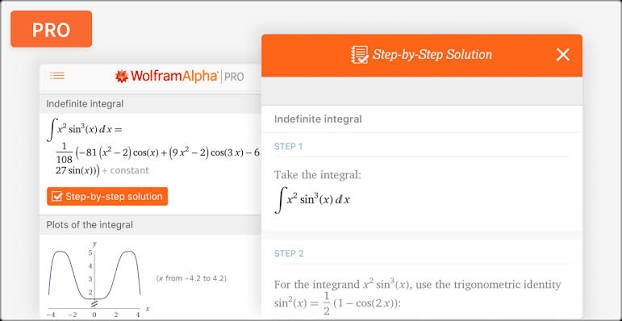
Wolfram Alpha approaches statistics from a computational rather than chatbot-first perspective.
Its statistics tools cover descriptive statistics, regression analysis, statistical inference, hypothesis tests, confidence intervals, random variables, and probability distributions. Users can enter a dataset or statistical expression and receive structured mathematical results.
For example, Wolfram Alpha supports calculations involving mean, kurtosis, linear and polynomial regression, confidence intervals, z-tests, and probabilities under common distributions. It also links to dedicated step-by-step statistics solutions and practice problems.
This makes it useful when the main task is computation and the user already has a reasonable idea of what quantity or test needs to be calculated.
- Broad descriptive and inferential statistics coverage
- Strong probability and distribution support
- Handles regression and statistical inference
- Useful for checking numerical calculations
- Offers structured mathematical output
- Less conversational than general-purpose AI assistants
- Users may need to know which statistical operation to request
- Some advanced or step-by-step features may require additional access
Best for: Students and professionals who primarily need statistical calculations, formulas, and computational checks.
Tenorshare AI Math --- Best for Statistics Homework
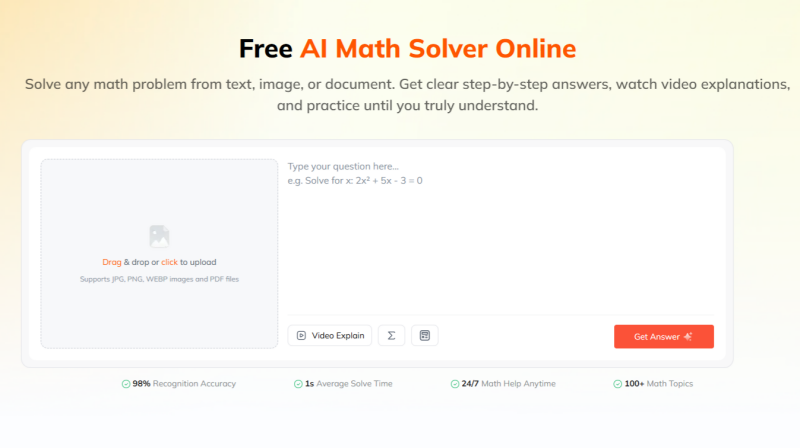
Tenorshare AI Math serves a different part of the statistics workflow. Rather than focusing on large datasets, it is designed around solving and understanding individual math problems .
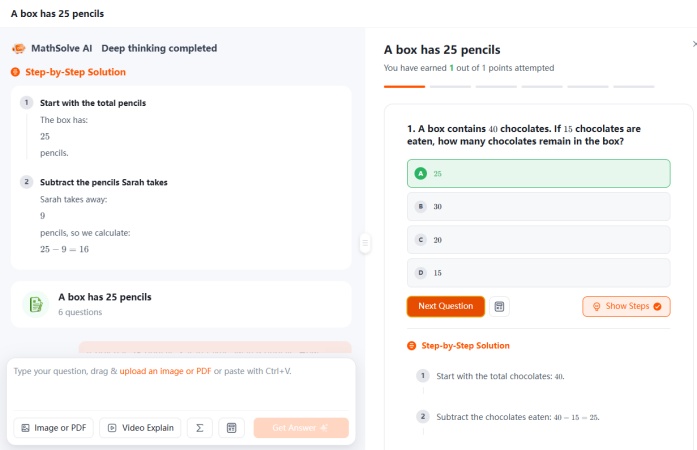
Users can enter problems as text or upload images and PDF documents. The tool then provides step-by-step solutions, with additional video explanations, follow-up questions, and practice problems available as part of its learning workflow.
That makes it more relevant to statistics homework than to professional statistical data analysis. A student working on probability, descriptive statistics, distributions, or other statistics questions can begin with the problem itself rather than preparing a CSV or spreadsheet first.
Tenorshare AI Math should therefore not be viewed as a replacement for Julius AI, GPT for Work, or specialist statistical software. Those tools are more appropriate when the task involves analyzing complete datasets, running research workflows, or applying advanced statistical models.
- Accepts text, images, and PDF-based problems
- Provides step-by-step solution logic
- Includes follow-up questions
- Offers video explanations and related practice
- Designed around learning individual problems rather than managing datasets
- Not designed for large CSV or spreadsheet analysis
- Less suitable for advanced statistical modeling and research workflows
- Important statistical methods and assumptions should still be checked independently
Best for: Students who want to solve and understand individual statistics homework problems step by step.
Which Is the Best AI Model for Statistics?
It is difficult to name one AI model as universally best for statistics because most major benchmarks do not measure statistics alone.
Artificial Analysis currently evaluates frontier models across agentic tasks, coding, scientific reasoning, and general capabilities. Its August 2026 Intelligence Index gives the largest combined weight to agentic, coding, and scientific-reasoning tasks rather than a dedicated statistics category.
A newer benchmark, AA-AnalystAgent , is more directly relevant to quantitative work because it evaluates models on real-world spreadsheets and documents. Even there, the best-performing model solved only 54% of tasks correctly across all five attempts, showing that strong general models can still be inconsistent on quantitative-analysis workflows.
This is an important distinction: a high overall benchmark score does not prove that a model will always select the correct statistical test, use the right assumptions, or interpret every result correctly.
ChatGPT vs. Claude vs. Gemini for Statistics
ChatGPT is particularly useful when users want to combine conversation with code-backed statistical analysis. It can work with uploaded datasets, run Python, create charts, and perform techniques including ANOVA, regression, correlation, and time-series analysis.
Claude is well suited to workflows that emphasize explanation, methodology, and interpretation. Its current Data tools support CSV and Excel analysis, SQL, visualization, and statistical validation.
Gemini is especially convenient when statistics work already takes place in Google Sheets, where it can answer questions about spreadsheet data and support workflows involving trends, regression, and prediction.
For practical use, choosing based on workflow is more useful than declaring one model universally best:
-
ChatGPT: flexible statistical analysis and Python-backed calculations
-
Claude: analysis with detailed reasoning and interpretation
-
Gemini: statistics and data exploration within Google Sheets
Conclusion
The best AI for statistics depends on whether you need professional data analysis or quick problem solving.
For researchers and analysts, tools such as ChatGPT, Claude, Julius AI, Gemini, and Wolfram Alpha offer dataset analysis, statistical calculations, coding, and interpretation. However, important results should still be checked for accuracy, assumptions, and method selection.
For students solving statistics homework, a dedicated AI math solver may be more convenient. Tenorshare AI Math supports direct problem input and step-by-step solutions, making it a simple choice for understanding individual statistics problems without building a complex data-analysis workflow.

Tenorshare AI Math
- Solve math from text, images & PDFs at 98% accuracy
- Deliver step-by-step answers with detailed logic breakdown
- Access video explanations for deeper math concept understanding
- Generate matching practice tests to solidify knowledge

FAQs
-
What Is the Best AI for Statistics Homework?
For statistics homework, choose a tool that explains the solution rather than only returning a value. Tenorshare AI Math supports text, image, and PDF problems with step-by-step explanations and follow-up learning features. Wolfram Alpha is useful when the main goal is statistical computation, while ChatGPT provides conversational explanations.
-
What Is the Best AI for Statistical Analysis?
ChatGPT and Julius AI are both practical choices for AI-assisted statistical analysis. ChatGPT supports Python-backed calculations and methods including ANOVA, regression, correlation, and time-series analysis, while Julius AI focuses on conversational statistical modeling and dataset analysis. The better choice depends on the data format, statistical method, and level of control you need.
-
What Is the Best Free AI Tool for Statistical Analysis?
There is no single free AI tool that is best for every statistical workflow. ChatGPT offers data-analysis capabilities with availability depending on the user's plan and account features, while Julius AI also provides limited access to its analysis tools. For important work, compare current usage limits before choosing a free option.
-
Is ChatGPT Good at Statistics?
ChatGPT can handle many common statistics tasks, including descriptive analysis, t-tests, ANOVA, regression, correlation, and time-series analysis. It can also use Python to perform calculations and explain the results. However, users should still verify the test selection, assumptions, code, and interpretation.
-
Can ChatGPT Do Data Analysis?
Yes. ChatGPT can analyze uploaded CSV and Excel files, summarize data, create tables and charts, transform datasets, and run Python-based statistical analysis. Available features can vary by model, plan, workspace, and account configuration.
-
Which Is the Best AI for Solving Statistics Problems?
For individual homework-style statistics problems, Tenorshare AI Math focuses on step-by-step learning, while Wolfram Alpha is particularly useful for direct statistical computation. ChatGPT provides a broader conversational option that can handle both questions and datasets.
You Might Also Like
- AI Math Solver That Can Read Graphs: 5 Best Tools Reviewed
- Desmos Alternatives Review: 4 Best Graphing Calculators Compared in 2026
- Best App for Math Problem Solving: 5 AI Math Solver Apps Tested and Compared
- AllMath Review 2026: We Tested Its AI Math Solver Accuracy
- Goth AI Review 2026: Is This AI Math Solver Worth Using?
- DeltaMath Solver Review 2026: Is This AI Math Solver Good?

Tenorshare AI Math: Solve any math problems with AI
Turn math questions into clear solutions, tutorial videos & targeted practice setsTenorshare AI Math: Instant Solutions
Steps, videos & practice for every problem
Tenorshare AI Math: Solve any math problems with AI