
2026 Photomath vs Symbolab Full Review: Features, Pros, Cons & Best Use Cases
Students often turn to math solver apps to work through tricky homework problems, and Photomath and Symbolab are two of the most popular options. Both tools can walk users through math questions, yet they shine in different areas.
So, Photomath vs Symbolab -- which one fits your study needs?
This guide compares their strengths for quick homework scans, advanced calculus, graphing and cross-platform use. We also cover a free step-by-step AI math solver alternative and answer common questions students ask about these tools.
Catalogs:
Quick Answer: Is Symbolab or Photomath Better?
Neither Symbolab nor Photomath is automatically better for every student. Symbolab is generally more focused on structured math tools, detailed solution paths, graphing, and practice-oriented features. Photomath is commonly used for quickly entering a problem and receiving an answer across a broad range of subjects.
If your priority is working through complex algebra, trigonometry, or calculus problems in detail, Symbolab may be a better fit. If you mainly want a fast answer check and use multiple types of math or science problems, Photomath may suit your workflow.
For the main Photomath vs Symbolab decision, Photomath is usually the more convenient option for scanning a worksheet on a phone, while Symbolab is often better suited to typed expressions, advanced topics, and browser-based study.
Photomath vs Symbolab: Full Comparison
| Feature | Photomath | Symbolab |
|---|---|---|
| Primary experience | Mobile-focused scanning and solving | Web and app-based solver with broader tool selection |
| Input methods | Camera scan and calculator-style input | Typed input, photos, natural-language prompts, and topic-specific tools |
| Step-by-step support | Available for supported problems | Available for supported problems and calculators |
| Math coverage | School math through calculus | Pre-algebra through calculus, with graphing and specialized calculators |
| Practice features | Learning-oriented explanations and visual aids | Practice, quizzes, worksheets, and progress-related tools |
| Best fit | Quick homework scans and routine school math | Complex expressions, graphing, practice, and desktop use |
Photomath's main advantage is convenience . A student can scan a printed or handwritten problem and review a solution without spending much time formatting the expression. This can be useful when checking homework from a textbook or worksheet.
Symbolab's broader interface may be more useful when a problem needs precise typed input, a graph, a dedicated calculator, or repeated practice. Its range of topic-specific tools can also make it practical for students moving from algebra into calculus or linear algebra.
Neither app should be treated as an infallible source. Camera recognition can misread handwriting, and any automated solver can present an answer in a form that differs from a teacher's required method. Reviewing the input and checking the reasoning remain important.
Photomath vs Symbolab: Which Is Better for Your Needs?
| If Your Main Need Is... | The More Suitable Option May Be | Why |
|---|---|---|
| Scanning a worksheet quickly | Photomath | Its camera-first workflow is designed for fast problem capture. |
| Editing long or complex expressions | Symbolab | Its typed input and specialized calculators offer more control. |
| Reviewing graphs or practicing a topic repeatedly | Symbolab | It includes graphing, practice-oriented features, and topic-specific tools. |
| Working mainly from a phone | Photomath | Its mobile experience is centered on scanning physical problems. |
| Working mainly from a laptop or desktop | Symbolab | Its browser-based tools can be more convenient for longer study sessions. |
Best for Scanning Homework and Quick Answer Checks
Choose Photomath when:
-
Your problem is printed or handwritten on paper.
-
You want to avoid typing fractions, exponents, or equations manually.
-
You are checking work after trying the problem yourself.
Photomath is often the simpler choice when the problem is already on paper. Its scan-first workflow reduces the need to type fractions, exponents, or equations manually. This makes it useful for quick answer checks after attempting a problem independently.
Consider Symbolab when:
-
You need to correct or refine the recognized expression.
-
You want to choose a specific calculator after entering the problem.
-
You want to continue beyond the initial answer.
Symbolab can also work with image-based input, but its interface is generally more useful when you want to edit a complex expression, choose a calculator, or explore a problem beyond the initial answer.
Best for Complex Algebra, Trigonometry, and Calculus
| Problem Type | What May Matter Most |
|---|---|
| Long algebraic expressions or rational equations | Precise typed input |
| Logarithms and trigonometric identities | Clear step-by-step transformations |
| Derivatives, integrals, matrices, and graphs | Access to specialized calculators and graphing tools |
For longer algebraic expressions, rational equations, logarithms, trigonometric identities, derivatives, integrals, matrices, and graphing tasks, Symbolab's typed input and specialized calculators can be helpful. It is designed to support a wide range of structured math problems.
Photomath covers many school-level and introductory calculus topics, but students handling highly detailed expressions may prefer a tool that gives them more control over how the problem is entered. In the Symbolab vs Photomath comparison, this is one of the clearest differences: camera convenience versus a deeper set of math-entry and calculator tools.
Best for Learning, Practice Problems, and Graphing
To use either tool as a learning aid rather than an answer source, try this workflow:
-
Attempt the problem without assistance.
-
Compare your work with the displayed steps.
-
Identify the first step where your method changed.
-
Solve a similar problem independently.
Both tools present solution steps for many supported problems. The value of those steps depends on how they are used. Reading each transformation, identifying the rule behind it, and then solving a similar problem independently is more useful than copying the final result.
Symbolab includes practice-oriented features, graphing, and topic-specific calculators, which may appeal to students who want to review a concept repeatedly. Photomath focuses more on explaining the problem directly in front of the learner, including visual aids and additional explanations for supported questions.
Best for Mobile vs Desktop Use
| Study Setup | Consideration |
|---|---|
| Physical textbook, worksheet, or notebook | Photomath may be more convenient because of its camera-first workflow. |
| Laptop-based homework or long equations | Symbolab may be easier to use because of its browser-based interface. |
| Quick study session between classes | A mobile scanning workflow may reduce setup time. |
| Longer practice or graphing session | A larger screen may make typed input, graphs, and multiple tools easier to manage. |
Photomath is primarily designed around the phone camera, so it is especially convenient for students working from physical worksheets. Its streamlined mobile workflow is a practical option for short homework sessions.
Symbolab has a strong browser-based experience alongside its mobile apps. This can be useful on a laptop or desktop, particularly when typing longer expressions, using graphs, switching between calculators, or completing practice activities. Students who regularly study at a desk may find this layout easier to work with.
A Free Alternative for Step-by-Step Solutions: Tenorshare AI Math
or many students, getting the final answer is only part of the problem. The more useful part is seeing how the answer was reached -- especially when reviewing an unfamiliar method before a quiz or trying to find the exact step where their own work went wrong.
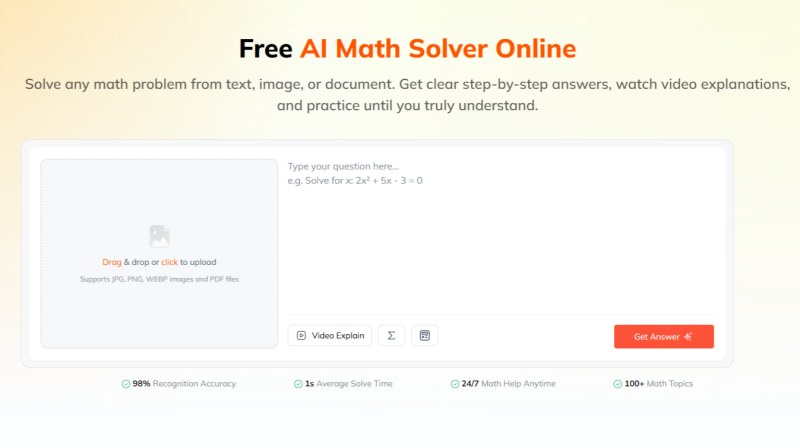
Photomath and Symbolab both offer step-by-step explanations for supported problems, but access to more detailed explanations and learning features may be limited by their free-plan or subscription terms . Students who want to compare a different approach before paying for a plan may consider Tenorshare AI Math as an alternative.
Key Features:
-
Detailed step-by-step explanations: Users can review the solution process rather than only receiving a final answer.
-
Multiple input formats: It accepts math problems entered as text, uploaded as images, or provided in PDF files.
-
AI-generated video explanations: Some problems can be accompanied by video-based walkthroughs for learners who prefer a visual explanation.
-
Similar practice questions and quizzes: Users can generate follow-up questions to test whether they understand the method.
-
A built-in calculator: The tool includes calculation support for expressions and simpler arithmetic tasks.
Tenorshare AI Math may be useful if you work with problems from several sources, such as typed notes, worksheets, screenshots, or PDFs, and want to compare different explanation formats. Its practice and quiz features may also help students move from reviewing one answer to applying the same method independently.
As with any AI math solver , check the problem input carefully and verify important answers against your course materials or instructor guidance. Free-trial availability, feature limits, and subscription terms may change, so review the current product information before relying on the service.
Final Verdict: Should You Choose Photomath or Symbolab?
In the Photomath vs Symbolab comparison, the better choice depends mainly on how you enter problems and the level of math you study.
Photomath is generally the more practical option for students who want to scan homework on a phone, check routine school math problems, and view a straightforward solution path with minimal setup.
Symbolab may be a better fit for students who frequently work with advanced algebra, trigonometry, calculus, graphs, or long typed expressions.
The best approach is to test both tools with several real problems from your course. If you also want to explore another format, Tenorshare AI Math is an alternative that offers step-by-step explanations during its free trial.
Tenorshare AI Math
- Solve math from text, images & PDFs at 98% accuracy
- Deliver step-by-step answers with detailed logic breakdown
- Access video explanations for deeper math concept understanding
- Generate matching practice tests to solidify knowledge

FAQs
-
Is Symbolab Trustworthy?
Symbolab is an established math-solving platform, but "trustworthy" can mean several things. Its answers and steps can be useful for checking work and understanding a method, but they should still be verified, especially for complex problems or graded assignments. Students should also review current subscription, renewal, privacy, and support terms before paying for a plan.
-
Is Photomath Considered Cheating?
Photomath is not automatically considered cheating. Whether its use is permitted depends on the rules of your class, school, assignment, or exam. Using it to check your work, identify an error, or understand a step may support learning. Using it to submit work you do not understand may violate academic-integrity rules. When unsure, ask the instructor before using any solver.
-
Can Photomath and Symbolab Solve Word Problems?
Both tools can support some word problems, although results may vary depending on the wording, mathematical complexity, and clarity of the input. For word problems, it is especially important to check whether the app interpreted the quantities, conditions, and question correctly before relying on its solution.
-
Do Photomath and Symbolab Offer Free Trials?
Free access and trial availability may vary by product, platform, country, and subscription plan. Both services may offer free functionality, but the number of available steps, premium features, trial periods, and billing terms can change. Check the current app-store listing or official subscription page before starting a trial.
-
Can You Use Photomath and Symbolab Without Creating an Account?
Some core features may be available without creating an account, but certain personalized, premium, saved-history, or progress-tracking features may require sign-in. Requirements can differ between the mobile app and web version, so review the current prompts and account terms for the platform you use.
You Might Also Like
- Photomath vs Microsoft Math Solver (2026): Key Differences & Current Availability
- GeoGebra vs Desmos: What's the Difference & Which One to Use?
- 2026 Photomath vs. Wolfram Alpha: Which Tool Fits Your Math Needs?
- 2026 Mathway vs Photomath Full Review: Key Differences & Best Use Cases
- 2026 Gauth vs Photomath: Which AI Math Solver Is Best for Math?
- 8 Best Math AI Solvers Compared (2026): Step-by-Step Problem Solving

Tenorshare AI Math: Solve any math problems with AI
Turn math questions into clear solutions, tutorial videos & targeted practice setsTenorshare AI Math: Instant Solutions
Steps, videos & practice for every problem
Tenorshare AI Math: Solve any math problems with AI