
2026 Photomath vs. Wolfram Alpha: Which Tool Fits Your Math Needs?
Photomath and Wolfram Alpha are popular tools for students who need help solving and checking math problems. Both can provide answers and support step-by-step problem solving, but they approach the task differently. Understanding these differences can help you choose the AI math solver that better fits your study habits and the problems you need to solve.
In this Photomath vs. Wolfram Alpha comparison, we look at their input methods, core capabilities, study use cases, and limitations. The goal is not to name one universal winner, but to help you choose the tool that best matches the way you study and solve math problems.
Quick Verdict: Is Photomath or Wolfram Alpha Better?
Photomath and Wolfram Alpha serve different needs.
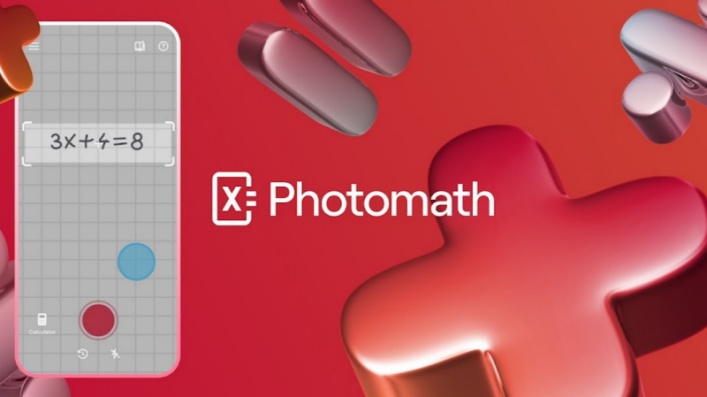
Photomath is generally more convenient when you have a problem on paper and want to use your phone camera to scan it. Its step-by-step format can be helpful for reviewing common homework questions and following how a solution develops.
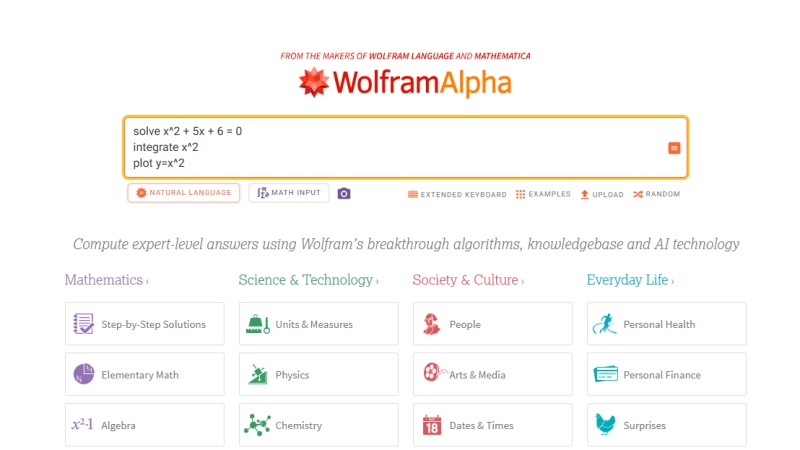
Wolfram Alpha is generally more useful when you need to calculate, verify, graph, or explore a mathematical expression. It supports broader computational and STEM-related queries, making it relevant for students working with advanced math, science, engineering, units, and data.
For a quick decision:
-
Choose Photomath for camera-based homework help and accessible solution steps.
-
Choose Wolfram Alpha for symbolic math, advanced calculations, answer checking, and broader STEM queries.
-
Consider using both when you want to scan a problem first and then verify or expand on the result.
Photomath vs. Wolfram Alpha at a Glance
| Category | Photomath | Wolfram Alpha |
|---|---|---|
| Primary purpose | Photo-based math help and explanations | Computational queries and result verification |
| Main input method | Camera scanning and calculator-style input | Typed math, natural-language queries, and supported photo input |
| Best for | Homework problems and visual step-by-step learning | Complex math, symbolic computation, graphs, and STEM questions |
| Subject coverage | Primarily math | Math, science, engineering, units, finance, and more |
| Platforms | Mobile app | Web and mobile apps |
| Free option | Basic plan available | Basic account available |
| Paid features | Additional explanations and learning support | Step-by-step solutions, extra computation time, and Pro tools |
Both tools have free access options, but their premium features differ. Before subscribing, check the current plan details in your country, as prices and available features may change.
Photomath: Best for Camera-Based Homework Help
Key Features
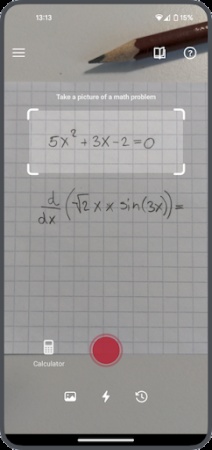
Photomath is built around a photo-first workflow . Students can scan many printed or handwritten math problems with a phone camera, then review the solution and its steps. It also provides a calculator-style input option for problems that are not being scanned.
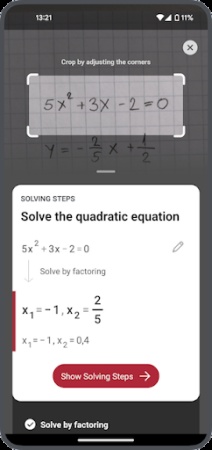
The app focuses on presenting a solution in an approachable format. Depending on the problem, it may provide step-by-step explanations, visual aids, and more than one solving method. This can be useful for students who want to see how an answer is reached rather than only viewing the final result.
Photomath covers a range of school-level topics, including arithmetic, algebra, geometry, trigonometry, statistics, and calculus.
Best Use Cases and Limitations
Photomath is often a practical choice for everyday homework, especially when a problem is already printed in a workbook, textbook, or worksheet. It can save time compared with manually typing fractions, exponents, roots, or other notation into a search field.
It may be particularly useful for:
-
Reviewing algebraic steps after attempting a problem independently
-
Checking a geometry or trigonometry exercise
-
Scanning a textbook question while studying away from a computer
-
Seeing an alternative method for a supported math problem
However, it is important to review the scanned text before accepting a result. Handwriting quality, image clarity, and problem format can affect recognition. It is also better to use the app as a learning aid than as a shortcut around practice. Some detailed explanations and learning features may require a paid subscription.
Wolfram Alpha: Best for Accurate Computation and Verification
Key Features
Wolfram Alpha is a computational knowledge engine that interprets queries and generates structured results. Students can enter equations, expressions, functions, units, and natural-language questions to calculate or explore a topic.
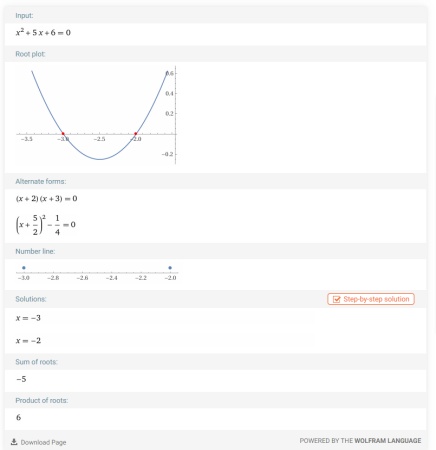
Its math capabilities include solving equations, simplifying expressions, graphing functions, working with derivatives and integrals, and handling symbolic math. Beyond math, Wolfram Alpha can also support questions involving physics, chemistry, engineering, finance, nutrition, dates, and unit conversions.
-
Wide Range of Math Support: Supports various math topics, including algebra, calculus, statistics, and linear algebra.
-
Advanced Computational Ability: Handles complex calculations such as equations, derivatives, integrals, matrices, and symbolic operations.
-
Math Visualization Tools: Generates graphs and visual outputs to help users understand functions, data, and mathematical relationships.
-
Natural Language Understanding: Allows users to enter math questions in a more natural way instead of relying only on strict formulas.
-
Cross-Discipline Knowledge Base: Extends beyond mathematics to support science, engineering, finance, and other technical fields.
Best Use Cases and Limitations
Wolfram Alpha can be useful when the goal is to verify a calculation, test an expression, generate a graph, or work with a more technical STEM question. It is also a helpful option when a problem needs to be typed precisely rather than captured through a camera.
It may be particularly useful for:
-
Checking derivatives, integrals, limits, and equation solutions
-
Exploring graphs and function behavior
-
Converting units or calculating scientific quantities
-
Verifying a homework answer after solving it manually
-
Handling math problems that extend beyond a standard worksheet format

That said, its interface may require more familiarity with mathematical notation and query phrasing than a camera-first app. Free access is available, but detailed step-by-step solutions for supported problems are generally associated with paid Pro plans .
Which Tool Is Better for Different Math Tasks?
The better choice depends on the type of question, the way you want to enter it, and whether your goal is to understand a solution or verify a result.
| Math Task | Better Starting Point | Why |
|---|---|---|
| Printed or handwritten homework | Photomath | Its camera-based input makes it convenient to capture a problem directly from a worksheet or textbook. |
| Basic algebra and geometry | Photomath | Step-by-step explanations can help students review the process behind a solution. |
| Calculus and symbolic equations | Wolfram Alpha | It is designed for computational queries, including derivatives, integrals, equations, and symbolic expressions. |
| Graphing functions | Wolfram Alpha | It can generate graphs and help users explore the behavior of functions. |
| Science, engineering, and unit conversions | Wolfram Alpha | Its coverage extends beyond math to a broader range of technical and computational queries. |
| Word problems | Depends on the problem | Photomath may be useful for clearly scanned questions, while Wolfram Alpha can help when the relevant values and equations are entered precisely. |
| Checking an answer | Wolfram Alpha | It can be useful for verifying calculations and testing related expressions. |
For a typical paper-based homework question , Photomath may be the easier place to start because students can scan the problem and review its solution steps on a phone. This workflow can be especially helpful when typing mathematical notation would take extra time.
For advanced algebra, calculus, symbolic equations, graphing, or science calculations , Wolfram Alpha may be more suitable. Its computational approach makes it useful for processing expressions, checking results, and exploring related mathematical relationships.
Students do not always need to choose only one tool. For example, you could use Photomath to capture a homework question and understand the initial solution path, then use Wolfram Alpha to verify the answer, graph the function, or test a similar expression.
For Free Step-by-Step Solutions, Try Tenorshare AI Math
Photomath and Wolfram Alpha can both provide step-by-step help for supported math problems, but the level of detail and feature availability may depend on the problem type or subscription plan. If your main goal is to access detailed solution steps without adding another paid tool to your study routine, Tenorshare AI Math is an alternative to consider.
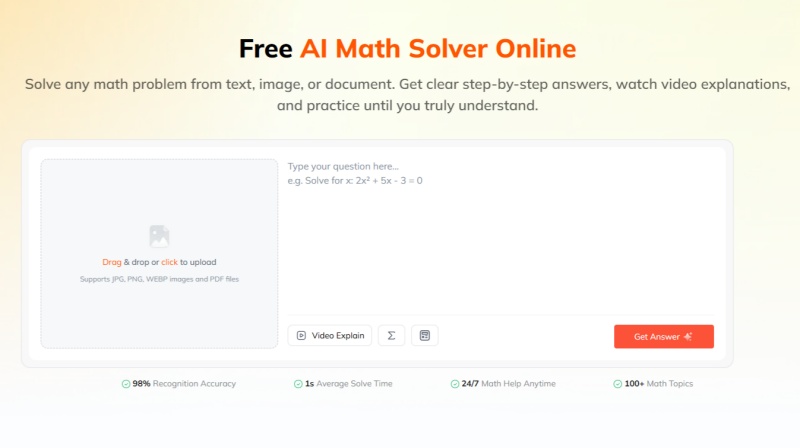
Tenorshare AI Math is designed to help students move beyond a final answer by breaking a problem into understandable steps . This can be useful when reviewing algebra, geometry, calculus, or other homework questions that require more than a quick result. In addition to step-by-step math support, Tenorshare AI Math includes AI-powered learning features that can help students explore a problem in more depth.
-
Multiple Input Modes: Accepts text prompts, photos and PDF documents, letting students tackle problems from various homework file formats.
-
Step-by-Step Solution Breakdown: Splits up problem-solving workflows and clarifies the logic behind every step rather than just giving final answers.
-
AI Video Explanations: Produces visual walkthroughs to help learners grasp complex math concepts more easily.
-
Practice Problem Generator: Creates matching practice exercises after solving a question so students can solidify their knowledge.
-
Built-in Math Calculator: Includes a native calculator panel to quickly compute basic calculations and mathematical expressions.
When evaluating it alongside Photomath and Wolfram Alpha, consider how well its explanation style, input options, supported topics, and extra AI tools fit your own learning workflow.
Final Verdict: Is Photomath Better Than Wolfram Alpha?
There is no single winner in the Photomath vs. Wolfram Alpha comparison. The better choice depends on the problem type, your preferred input method, and whether you need an explanation, a verified calculation, or both.
Photomath is well suited to students who want to scan homework problems and review clear, visual solution steps. Wolfram Alpha is better suited to students who need computational support, symbolic math, answer verification, graphing, and broader STEM queries.
If your main question is "How do I solve the problem in front of me?", Photomath may be the more convenient choice. If your question is "Can I calculate, verify, or explore this expression more deeply?", Wolfram Alpha may be more appropriate.
For students looking for a broader AI-supported math workflow, Tenorshare AI Math is another option to evaluate alongside both tools.
Tenorshare AI Math
- Solve math from text, images & PDFs at 98% accuracy
- Deliver step-by-step answers with detailed logic breakdown
- Access video explanations for deeper math concept understanding
- Generate matching practice tests to solidify knowledge

FAQs
-
Can Photomath Solve Word Problems?
Photomath can solve many supported word problems when they are scanned clearly. Results depend on the problem's wording, layout, and the quality of the image. Always review the recognized question before relying on the solution.
-
Does Wolfram Alpha Scan Math Problems?
Wolfram Alpha supports photo input in certain workflows, including through its mobile apps. Feature availability may vary by device and subscription plan, so check the current product information if photo input is a priority.
-
Does Photomath Use AI?
Photomath uses automated technology to recognize math problems and generate solutions and explanations. Because "AI" can refer to many different technologies, it is more useful to evaluate how well the app recognizes your problem and explains the solution.
-
How Does Wolfram Alpha Work?
Wolfram Alpha interprets a user query and applies algorithms, curated data, and computational methods to generate results. Depending on the query, it can return calculations, graphs, symbolic outputs, unit conversions, data, and other structured information.
-
Is Wolfram Alpha Free to Use?
Wolfram Alpha offers a free Basic option. Some features, including step-by-step solutions for supported queries, are available through paid Pro plans. Check the official pricing page for current plan details.
-
Can You Use Photomath and Wolfram Alpha Together?
Yes. You can use Photomath to scan a problem and follow the solution steps, then use Wolfram Alpha to verify the result, graph an expression, or explore a more advanced version of the problem.
You Might Also Like
- Photomath vs Microsoft Math Solver (2026): Key Differences & Current Availability
- GeoGebra vs Desmos: What's the Difference & Which One to Use?
- Is Gemini or ChatGPT Better at Math? Gemini vs. ChatGPT for Math
- 2026 Mathway vs Photomath Full Review: Key Differences & Best Use Cases
- 2026 Gauth vs Photomath: Which AI Math Solver Is Best for Math?
- 6 Best Photomath Alternatives in 2026: Math Apps and Online Tools Compared

Tenorshare AI Math: Solve any math problems with AI
Turn math questions into clear solutions, tutorial videos & targeted practice setsTenorshare AI Math: Instant Solutions
Steps, videos & practice for every problem
Tenorshare AI Math: Solve any math problems with AI