
Can DeltaMath Detect Cheating? What Teachers Can Actually See 2026
You finish a DeltaMath assignment much faster than usual, check an answer with outside help, or leave the page open while you work--then start wondering: can your teacher see it? Can DeltaMath detect cheating , track browser activity, or show how long you spent on each question?
The answer is not a simple yes or no.
This guide explains what DeltaMath officially says teachers can access, what its public materials do not clearly confirm, and how to get help without crossing your course's academic-integrity rules. Because features and school policies can vary, always follow the instructions for your specific assignment.
Catalogs:
Does DeltaMath Detect Cheating? The Short Answer
Does DeltaMath detect cheating? It collects and displays assignment data that can help teachers review a student's work, including problem attempts, submitted answers, timestamps, time spent, completion information, and IP addresses.
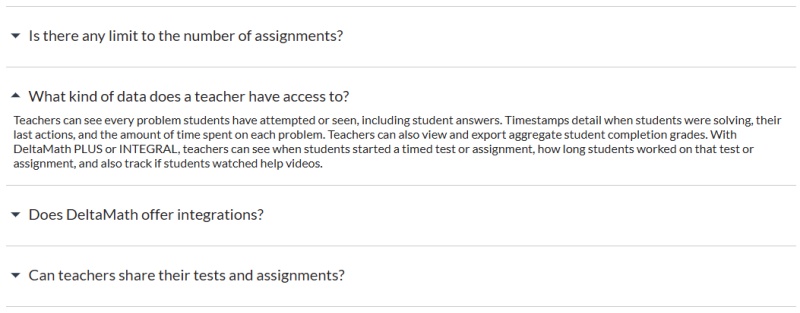
That is not the same as an automatic "cheating detected" result. DeltaMath's public FAQ focuses on teacher-visible progress and activity data, while its teacher pages describe features such as assessment controls and optional student-work uploads. A teacher may use that information alongside classroom performance and course rules when deciding whether to ask questions about an assignment.
In other words, if you are asking, "Can DeltaMath see if you cheat?" the better question is: what information can a teacher review , and what does the assignment policy allow ?
What Teachers Can See on DeltaMath?
According to DeltaMath's FAQ and Privacy Policy , teachers can access several categories of assignment-related data.
Problem Attempts, Submitted Answers, and Completion Status
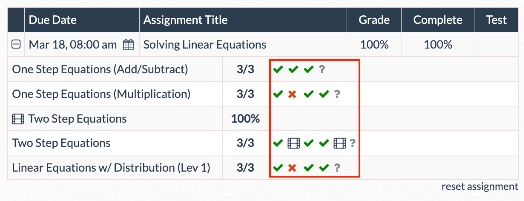
Teachers can see problems a student has attempted or viewed, along with submitted answers. DeltaMath's privacy policy says it collects data on attempted problems, submitted answers, whether answers were correct, completion percentages, and whether assignments were completed on time.
This matters because a final score is not the only information available. A teacher can review the work history connected to an assignment, rather than seeing only the last answer entered.
Time Spent, Timestamps, and Assignment Activity
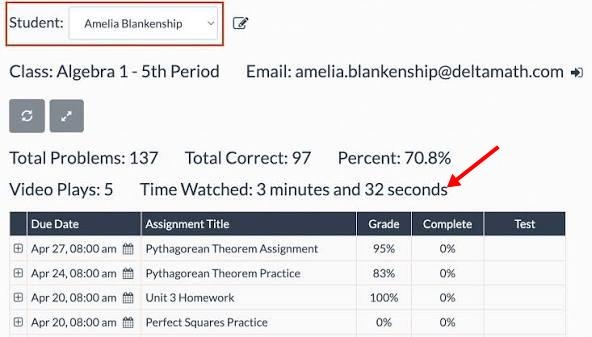
Does DeltaMath track time? Yes. Official documentation says teachers can see timestamps showing when students were solving, their last actions, and the amount of time spent on each problem.
For PLUS or INTEGRAL accounts, teachers can also see when a timed test or assignment was started and how long a student worked on it. That addresses related questions such as "Can DeltaMath see how long you took?" and "Can DeltaMath see how long you spend on each question?"
The data provides context, but time alone does not explain why a student worked quickly or slowly. Difficulty level, prior knowledge, interruptions, accessibility needs, and teacher settings can all affect completion time.
IP Address and Account-Use Information
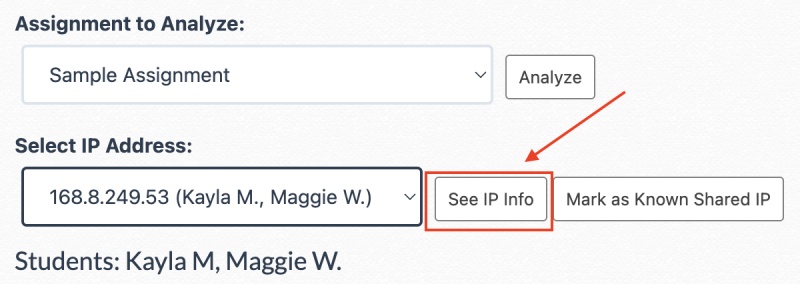
DeltaMath's privacy policy states that teachers can see IP addresses for problems solved by their students. The policy explains that this can help teachers check whether multiple accounts may be signing in from the same computer.
The same policy also describes technical usage data that DeltaMath may collect, such as browser type, device-related information, referring or exit pages, click history, pages viewed, and time spent on pages. However, public collection disclosures should not automatically be treated as a statement that every item is displayed in a teacher dashboard.
Can DeltaMath See How Fast You're Going?
Yes. DeltaMath says teachers can view time-related assignment data, including timestamps and the amount of time spent on each problem.
| What a teacher may see | What it can show | What it cannot prove by itself |
|---|---|---|
| Per-problem time | How long a problem remained active | Whether a student understood every step |
| Timestamps | When work or submissions occurred | Why work happened at that time |
| Assignment duration | The total recorded working time | Whether interruptions affected the session |
A fast or slow completion time can stand out, but one number is not a verdict. For example, a student may:
-
Know the skill well and finish quickly.
-
Use a calculator when the assignment allows it.
-
Return to an assignment that was already partly completed.
-
Leave the page open during an interruption.
-
Need additional time to learn an unfamiliar concept.
If the recorded time does not reflect your actual effort, explain the situation to your teacher. A brief, honest conversation is more useful than trying to interpret a time record on your own.
Does DeltaMath Track Tabs or Detect Tab Switching?

DeltaMath's public FAQ and privacy policy reviewed for this guide do not explicitly say that teachers can view a log of browser-tab switches or receive a teacher-facing alert when a student changes tabs.
That is different from saying no related activity can ever be recorded in any setting. Schools may use separate testing tools, browser-management software, learning-management systems, or local device policies. During DeltaMath tests, teachers can also restrict activity on the DeltaMath student page and use passcodes to control access, according to the Teachers/Schools page .
The safest interpretation is simple: do not assume that a lack of a public tab-switching statement makes outside help permitted. Follow the instructions for the particular assignment or test.
Can DeltaMath Detect Copy and Paste?
The official DeltaMath pages reviewed here do not explicitly confirm a teacher-facing copy-and-paste detector or an automatic plagiarism decision for math-answer entry.
Some online answers make broad claims about copy-and-paste detection, but many are unsupported or confuse DeltaMath with text-plagiarism tools. For that reason, they should not be treated as authoritative sources.
More importantly, copying an answer into a math platform can still violate class rules even if a platform does not publicly advertise a paste detector. The appropriate standard is the teacher's policy, not whether a particular action may be technically logged.
Can DeltaMath Detect Screenshots?
The official public materials reviewed for this guide do not state that DeltaMath provides teachers with a screenshot-detection feature.
A screenshot can also be captured or handled by software outside DeltaMath, depending on the school device or assessment environment. Students should not interpret the absence of a public product claim as permission to share assessment content or seek prohibited help.
How to Get Legitimate Help When You're Stuck?
Searching for "Delta Math cheats," "delta math cheat," or "how to cheat on Delta Math" often signals a deadline problem or a gap in understanding. Shortcuts do not solve the underlying skill gap, and they can create academic-integrity consequences under school rules. These alternatives are more useful and safer.
Use DeltaMath Hints, Videos, and Teacher Support
Start with resources already connected to the assignment:
-
Read the problem directions carefully.
-
Use available DeltaMath hints or instructional videos.
-
Identify the first step you do not understand.
-
Avoid repeated guessing; pause and review the method instead.
-
Write down what you tried before asking for help.
If the problem still does not make sense, write down what you tried and ask your teacher a focused question. For example: explain where you got stuck, identify the rule or operation you do not understand, and ask for one comparable example. Asking before a deadline is usually more effective than waiting until the work is due.
Use an AI Math Solver to Understand the Method
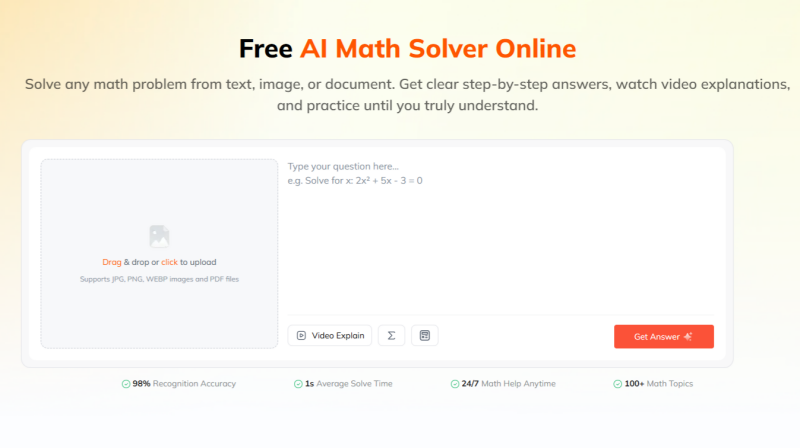
DeltaMath hints and instructional videos can be helpful, but they may not answer every question. Teachers may also be unavailable when you are studying outside class or close to a deadline. When outside help is allowed for the assignment, an AI Math Solver such as Tenorshare AI Math can provide on-demand, detailed support for understanding a problem.
Its core features can help students learn the method, not just look for an answer:
-
Step-by-step solutions: Breaks down the solution process so students can follow the reasoning, identify where they went wrong, and understand why each step is needed.
-
AI follow-up questions: Lets students ask about a confusing step, rule, or calculation in a conversational format--similar to asking a tutor for clarification.
-
AI-generated video explanations: Provides visual walkthroughs for concepts that may be harder to understand through written steps alone.
-
Similar practice questions: Generates related problems so students can practice the same skill independently after reviewing an explanation.
A useful approach is to try the DeltaMath problem first, then use the solver to understand the specific step that is causing difficulty. After you finish the work, it can also help you check your answer and practice similar questions before a quiz or test.
Always follow your teacher's rules for outside tools. For assignments where external assistance is not allowed, use the solver later for study and practice rather than for completing the submission.
Conclusion: Can DeltaMath Tell If You Cheat?
So, can DeltaMath detect cheating ?
DeltaMath can give teachers access to meaningful assignment records, including problem attempts, submitted answers, timestamps, time spent, completion data, and IP information. Those records can help a teacher review work in context, but DeltaMath's public documentation does not describe one automatic feature that definitively proves a student cheated.
The best approach is to follow your teacher's rules and seek legitimate help when you are stuck. For permitted study support, tools such as Tenorshare AI Math can explain a difficult method step by step, answer follow-up questions, and generate similar practice problems--helping you build understanding before your next DeltaMath assignment, quiz, or test.
Tenorshare AI Math
- Solve math from text, images & PDFs at 98% accuracy
- Deliver step-by-step answers with detailed logic breakdown
- Access video explanations for deeper math concept understanding
- Generate matching practice tests to solidify knowledge

FAQs
-
What Is DeltaMath?
DeltaMath is an online math learning platform that teachers use to assign practice, homework, tests, and other math activities. It includes auto-grading, assignment tools, and teacher-facing progress data. DeltaMath supports multiple grade levels and a wide range of math topics.
-
Is DeltaMath Free?
DeltaMath offers a free teacher account with core assignment and practice features. It also has paid PLUS and INTEGRAL options for schools or districts that add features such as tests, videos, integrations, and expanded reporting. Availability for students depends on how their teacher or school uses the platform.
-
Does DeltaMath Show Cheating?
DeltaMath shows teachers assignment-related records; it does not publicly describe a single automatic "cheating" label in the materials reviewed here. Teachers may use available data and school policy to review work or discuss concerns with a student.
-
Can You Cheat on DeltaMath?
The more useful question is whether outside help is allowed for a specific assignment. Using unauthorized assistance can violate school or course rules regardless of the platform's technical capabilities. Use approved resources, ask your teacher when rules are unclear, and focus on learning the method needed for quizzes and tests.
-
Can Teachers See How Long You Took on DeltaMath?
Yes. DeltaMath states that teachers can see timestamps and the amount of time students spend on each problem. With PLUS or INTEGRAL, teachers can also see when a timed test or assignment started and how long a student worked on it.
You Might Also Like
- Can ChatGPT Do Math? Here's What It Gets Right and Wrong
- Why Is Statistics So Hard to Understand? 5 Real Reasons
- How to Get Better at Math Fast: 8 Strategies to Improve Your Skills
- How to Solve Linear Equations in 5 Easy Steps [2026 Guide]
- Geometry Proofs: How to Think Through and Solve Any Proof
- Geometric Terms List: 30+ Geometry Terms You Should Know

Tenorshare AI Math: Solve any math problems with AI
Turn math questions into clear solutions, tutorial videos & targeted practice setsTenorshare AI Math: Instant Solutions
Steps, videos & practice for every problem
Tenorshare AI Math: Solve any math problems with AI