
Does Claude Leave Watermarks? Full Explanation and Bypass Tips 2026
Many Claude users worry about one question before using AI-generated content: does Claude leave watermarks in text ?
The answer is not as straightforward as it seems. Watermarks, AI detection, hidden signals, and writing patterns are often confused with one another, making it difficult to know what is actually happening behind the scenes.
In this guide, you'll learn whether Claude leaves watermarks, how AI detectors analyze Claude-generated text, and what you can do to make AI-assisted writing sound more natural.
Also Read: How to Remove Grok Watermark: 4 Steps for Undetectable Text (2026)
Catalogs:
Does Claude AI Leave Watermarks in Text?

At the time of writing, Claude AI is not publicly known to leave an official watermark in generated text . Anthropic's public materials discuss Claude's safety and responsible AI practices, but they do not clearly state that Claude adds a hidden watermark to every text response.
This is different from AI detection. Claude-generated text may still be flagged by AI detectors, but that does not prove there is a Claude watermark. Detectors usually analyze writing patterns, sentence structure, and word choice rather than reading an official hidden mark.
For comparison, Google has publicly explained that SynthID can watermark and identify AI-generated content, including text from Gemini experiences. Claude does not currently have the same kind of public text-watermarking statement.
So, does Claude AI leave watermarks in text? Based on publicly available information, there is no confirmed official Claude text watermark . However, unedited Claude output may still look AI-generated to detection tools.
Can AI Detectors Detect Claude-Generated Text?
Yes, Claude-generated text can sometimes be detected by AI detectors, but this does not necessarily mean Claude leaves a hidden watermark. Most detectors do not look for an official Claude watermark. Instead, they analyze whether the writing appears similar to AI-generated content.
In simple terms, there are two different ideas here:
-
A Claude text watermark would be a hidden signal placed in the text.
-
AI detection is a probability-based judgment based on writing patterns.
This means Claude text may be flagged because it sounds AI-generated, not because a detector has found proof of a real Claude watermark.
What Is a Claude Text Watermark?
A Claude text watermark would be a hidden signal designed to show that a piece of text was generated by Claude. Unlike a visible watermark on an image or video, a text watermark would usually be invisible to readers and require a specialized tool to detect.
However, there is currently no official public statement from Anthropic confirming that Claude adds a watermark to its normal text outputs. Therefore, when people talk about a "Claude text watermark," they are usually worried about whether Claude-generated text has detectable features that AI detectors can identify.
These features may include:
-
Overly polished wording
-
Repetitive sentence patterns
-
Predictable paragraph structure
-
Generic transitions
-
Limited personal details or real examples
So in most cases, "Claude text watermark" is not about a confirmed hidden mark. It is more often a general way of asking whether Claude text can be recognized as AI-written.
How Do AI Detectors Identify Claude Text?
AI detectors usually compare a piece of writing against patterns commonly found in AI-generated text. They may look at sentence rhythm, word choice, structure, repetition, and how natural or varied the writing feels.
Claude often produces clear, structured, and well-organized responses. This is useful for drafting, but if the output is used without editing, it may feel too smooth, too balanced, or too generic.
Common signals that may raise an AI detection score include:
-
Repeated transitions such as "Moreover," "Furthermore," or "In conclusion"
-
Sentences with similar length and rhythm
-
Paragraphs that follow the same structure
-
Broad claims without personal experience or specific examples
-
A polished tone that lacks natural human variation
That said, AI detection is not always accurate. A human-written text can be wrongly flagged as AI, while an AI-generated text may pass after careful rewriting. Detection results should be treated as probability-based judgments, not absolute proof.
For this reason, the goal should not be to "remove a Claude watermark" that may not exist. A better approach is to make the writing more original, personal, natural, and context-specific.
How to Bypass Claude AI Detection & Humanize Claude Text
If you are worried that Claude-generated text may be flagged by AI detectors, the most effective approach is to humanize the content. This means improving the text so it sounds less generic, less formulaic, and more like your own natural writing.
Here are several practical ways to bypass Claude AI detection risks responsibly and make Claude text more human-like.
1. Rewrite the Opening and Conclusion
Claude often generates polished introductions and tidy conclusions. While this improves readability, it can also make the writing feel formulaic.
Instead of using the draft as-is, rewrite the opening to address the reader's question more directly and add a specific angle. Likewise, replace generic conclusions with a practical takeaway, recommendation, or next step. Small changes like these can make the content feel more purposeful and less AI-generated.
2. Add Personal Examples and Real Context
One of the easiest ways to humanize Claude text is to add information that AI cannot easily invent:
-
Personal experiences or opinions
-
Real-world examples and case studies
-
Industry-specific insights
-
User pain points or observations
-
Original analysis and conclusions
These details make the content more distinctive and less likely to read like a generic AI draft.
3. Break Repetitive Sentence Patterns
Claude tends to produce balanced sentence structures and predictable transitions. To make the writing feel more natural:
-
Mix short and long sentences
-
Vary paragraph length
-
Remove repetitive connectors such as "Furthermore" and "In addition"
-
Use conversational phrasing where appropriate
Human writing is rarely perfectly consistent. A little variation helps create a more authentic voice.
4. Remove Generic AI Phrases
Many AI-generated drafts rely on common phrases that sound professional but add little value.
Examples include:
-
"It is important to note that..."
-
"In today's digital landscape..."
-
"There are several factors to consider..."
-
"Ultimately, the best approach depends on..."
Instead of using broad statements, be specific. Clear and direct wording usually sounds more natural and engaging.
5. Clean Hidden Formatting and Extra Characters
Before publishing or submitting Claude-generated content, do a quick formatting check:
-
Remove unusual spaces and invisible characters
-
Fix inconsistent line breaks
-
Standardize quotation marks and punctuation
-
Delete unnecessary symbols or formatting artifacts
This step will not remove a Claude watermark, but it can improve readability and prevent formatting issues caused by copying content between different tools.
6. Use Tenorshare AI Bypass to Humanize Claude Text
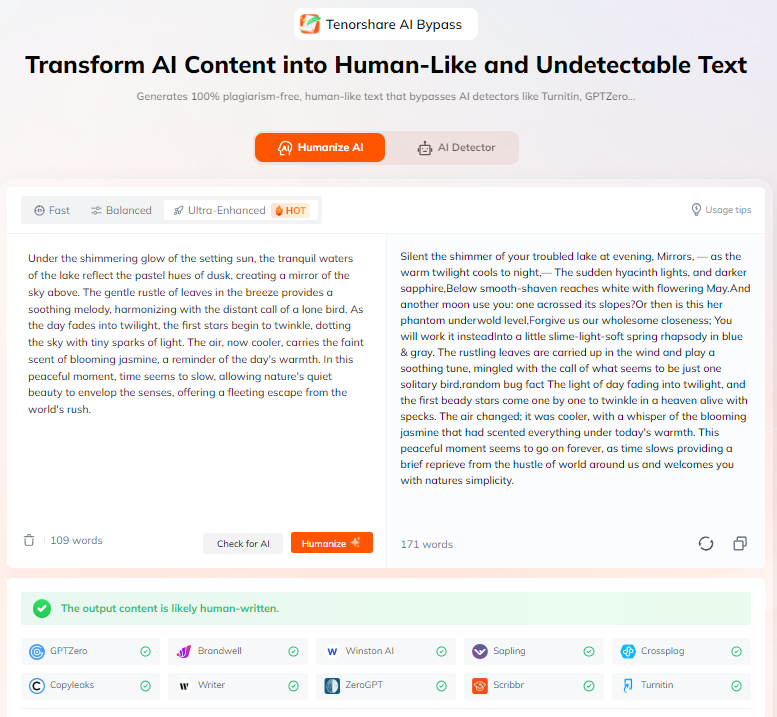
If you want a one-click way to humanize Claude-generated content, consider using a reliable AI humanizer such as Tenorshare AI Bypass. Tools like this are designed to reduce the AI-generated patterns that often trigger detection systems---the characteristics some users refer to as an AI text watermark. Instead of manually rewriting every paragraph, you can quickly transform Claude output into more natural, human-like writing while preserving the original meaning.
Key features of Tenorshare AI Bypass include:
-
AI Humanization: Rewrites Claude-generated text to sound more natural, engaging, and human-written.
-
Built-in AI Detector: Check AI detection scores before and after rewriting to evaluate the effectiveness of the humanization process.
-
Multi-Language Support: Humanize content in multiple languages, making it suitable for global users and multilingual projects.
-
Multiple Rewrite Styles: Choose from different rewriting styles based on your goals, whether you need academic, professional, creative, or SEO-focused content.
This makes Tenorshare AI Bypass a practical solution for students, bloggers, marketers, SEO writers, and professionals who use Claude for drafting but want the final content to feel more authentic, readable, and personalized.
Conclusion
So, does Claude leave watermarks ? Based on publicly available information, Claude does not appear to add a confirmed official watermark to normal text outputs. However, Claude-generated text can still be detected by AI detectors.
If you are using Claude for writing, the safest approach is to treat its output as a draft. Add your own examples, rewrite generic sections, vary sentence structure, remove repetitive AI phrases, clean formatting, and use a tool like Tenorshare AI Bypass when you need a more natural final version.
Claude may not leave a confirmed text watermark, but unedited Claude text can still feel AI-generated. Humanizing the content is the best way to make it more useful, readable, and authentic.

Tenorshare AI Bypass
- Create 100% undetectable human-like content
- Bypass all AI detector tools like GPTZero, ZeroGPT, Copyleaks, etc.
- Original content, free of plagiarism and grammatical errors
- One-click AI bypass with a clean and easy-to-use interface

FAQs
-
What Does Remove Watermark Mean for AI Text?
For AI text, "remove watermark" usually refers to rewriting AI-generated content, cleaning formatting, reducing repetitive phrasing, or minimizing AI detection signals that make the content appear machine-written. Since Claude has no confirmed official text watermark, the term is often used more broadly to describe the process of humanizing AI-generated text by improving sentence variety, adding natural language, incorporating personal insights, and making the writing feel more authentic and context-specific.
-
Does ChatGPT Leave Watermarks?
There is no publicly confirmed watermark in standard ChatGPT text outputs. However, this does not mean ChatGPT-generated content cannot be identified. AI detectors may still flag ChatGPT text based on common AI writing characteristics, such as predictable sentence structures, overly polished wording, or a lack of human variation. Detection results are based on pattern analysis rather than proof of an official watermark.
-
Does Gemini Watermark Text?
Google has introduced SynthID, a technology designed to watermark certain AI-generated content, including text from Gemini experiences. Unlike traditional visible watermarks, SynthID uses embedded signals that are intended to be difficult for users to notice while still allowing content to be identified as AI-generated under specific circumstances.
Also Read: How to Remove Gemini Watermark: Proven Strategies for Clean Text
-
Can GPTZero Detect Claude?
GPTZero may identify Claude-generated text by analyzing writing patterns, language predictability, sentence structure, and other AI-related signals. Because Claude often produces clear and well-organized content, some outputs may receive higher AI scores if they are used without editing. However, GPTZero's results are probabilistic rather than definitive, meaning a detection result should be viewed as an estimate rather than conclusive evidence that the text was generated by Claude or contains a watermark.
-
Does Claude AI Leave Watermarks in Code?
There is no public evidence that Claude adds official watermarks to generated code. However, AI-generated code may still contain recognizable coding patterns, naming conventions, commenting styles, or structural similarities that suggest AI assistance. While these characteristics can sometimes make code appear AI-generated, they are not the same as a confirmed watermark embedded by Claude.
You Might Also Like
- Why Does GPTZero Say I Used AI When I Didn't? Reasons and Fixes
- Does Packback Detect AI? What You Need to Know in 2026
- Can Claude Humanize Text? Best Prompts & Easy Methods
- CarterPCs AI Humanizer Review: Best Alternative to Beat AI Detection
- Why Do AI Detectors Flag My Writing | Reasons & Solutions
- How to Humanize AI Content on Grammarly?

Tenorshare AI Bypass: 100% Bypass AI Detection
Turn AI text into undetectable, human-like content.AI Humanizer, 100% Undetectable
Humanize AI text instantly.
Tenorshare AI Bypass: 100% Bypass AI Detection